For Halloween we’ll make the router play the opening of Bach’s Toccata and Fugue. It’s a joke, but also the most fun way to learn a piece of RouterOS scripting: a note is just a frequency, a melody is a loop, and an alarm you can hear is one line away. At the end you’ll find the script ready to paste.
First of all: does your router have a speaker?
Not every MikroTik device has the buzzer, the little built-in speaker. The documentation gives no list of which families have it: it only says “supported only on devices with a beeper, check the device page”. The only sure way is to try it. Paste this into the terminal — two notes:
:beep frequency=1000 length=200ms; :delay 300ms; :beep frequency=1500 length=200msIf you hear ding-dong, you’re in. If you hear nothing, your model has no buzzer (it happens on many CRS switches, and of course on virtual CHRs): the command is accepted anyway, but stays silent. In our lab, for instance, a CCR1009 sounds, a CRS418 doesn’t.
(Note: the option /system routerboard settings silent-boot mutes the boot beeps, but not the beep command: they’re different things.)
A note is a frequency: :beep
The command is simple: a frequency in hertz and a duration.
:beep frequency=440 length=500ms440 Hz is the A above middle C, the note instruments tune to. Everything starts from there. If the : and the brackets [ ] are new to you, the scripting basics are in the card RouterOS scripting on MikroTik: what it is and the basic commands.
From the note to the frequency
Western music splits the octave into twelve semitones, and each semitone multiplies the frequency by the same factor: the twelfth root of two, about 1.0595. Starting from A at 440 Hz, each semitone up multiplies by that number, each octave up doubles. You don’t have to compute it by hand: here’s the table of the notes we’ll use.
C4=262  D4=294  E4=330  F4=349  G4=392  A4=440  B4=494
C5=523  D5=587  E5=659  F5=698  G5=784  A5=880  B5=988  C6=1047
(The number is the octave: C5 is one octave above C4, and indeed 523 is about twice 262.) With these frequencies you can write any simple melody.
Durations and rests
The duration is the length parameter. For the silence between notes — and for real rests — you use :delay, which does nothing for the given time:
:beep frequency=392 length=300ms   # G
:delay 350ms                       # short gap
:beep frequency=523 length=300ms   # C, higher
A musical rest is simply a :delay with no :beep before it. Keep it in mind: later, in the player, we’ll write a rest as a row with frequency 0 — but underneath it’s always this same :delay with no sound.
A melody player
Writing dozens of :beep by hand is tedious. Better to put the melody in a list of frequency · duration pairs and run it with a loop — the same :foreach and the same use of arrays you see in the KB card. A frequency of zero means “rest”.
# player: each item is {frequency_Hz ; duration}; freq 0 = rest
:local song {
  {392;250ms};{523;250ms};{659;500ms};{0;150ms};{659;250ms};{587;600ms}
}
:foreach n in=$song do={
  :local f ($n->0); :local d ($n->1)
  :if ($f > 0) do={ :beep frequency=$f length=$d }
  :delay ($d + 40ms)
}
In the player, a rest is a row with frequency 0. The idea would be “a note at zero frequency”, i.e. silence — a :delay. Careful though: RouterOS doesn’t accept :beep frequency=0, it errors. So the 0 here is just a marker, and the check :if ($f > 0) does two things at once: it skips the sound and avoids the error, leaving only the :delay. We keep it as a {freq;duration} row inside the array instead of leaving the loop to drop a separate :delay for each rest: this way every element has the same shape and the melody stays a single list. The loop reads each pair, plays the note (skipping the 0 rows), waits the duration plus a small gap so the notes don’t run together, and moves on. Change the pairs and you have a new song.
Level 2: readable melodies with a resolver
Writing 880 instead of “A” works, but the melody becomes unreadable. You can do better with a dictionary: an array with keys, mapping a note’s name to its frequency. In RouterOS you write {"a4"=440; "c5"=523; …} and read it with $HZ->"a4". That’s the “resolver”: you give it a name, it gives you the hertz. It’s the same kind of associative array as in the scripting basics.
:local HZ {"c4"=262;"cs4"=277;"d4"=294;"e4"=330;"f4"=349;"g4"=392;"a4"=440;"b4"=494;
           "c5"=523;"cs5"=554;"d5"=587;"e5"=659;"f5"=698;"g5"=784;"a5"=880;"b5"=988;"c6"=1047;"p"=0}
I use the international names (a = A, 440 Hz; cs = C sharp, a semitone up). Now the melody is written with notes and the player resolves them on the fly; "p" stays the rest (it’s 0):
:local song {
  {"g4";250ms};{"c5";250ms};{"e5";500ms};{"p";150ms};{"e5";250ms};{"d5";600ms}
}
:foreach n in=$song do={
  :local f ($HZ->($n->0)); :local d ($n->1)
  :if ($f > 0) do={ :beep frequency=$f length=$d }
  :delay ($d + 40ms)
}
The only difference from before is one line: $HZ->($n->0) turns the name into a frequency. Now the melody reads.
Alarms you can hear: Netwatch set to music
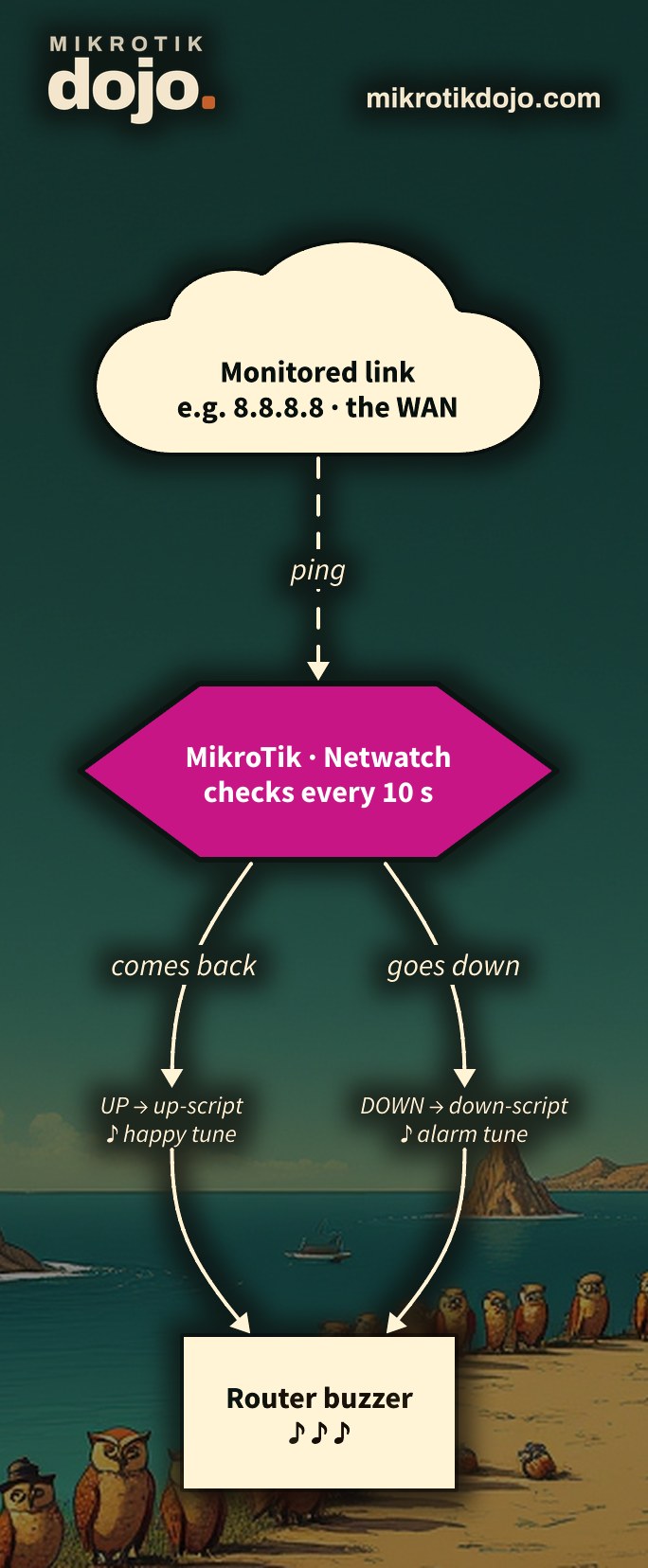
Here it gets useful. Netwatch watches an address and runs a script when it goes down (down-script) and when it comes back (up-script). You can give it two different melodies: so, without looking at the screen, you hear what happened. In an office, for example: the primary line drops and the backup kicks in → a warning tune plays; the primary comes back → a cheerier one.
/tool netwatch add host=8.8.8.8 interval=10s \
  down-script=":beep frequency=392 length=400ms; :delay 500ms; :beep frequency=262 length=700ms" \
  up-script=":beep frequency=523 length=250ms; :delay 150ms; :beep frequency=659 length=250ms; :delay 150ms; :beep frequency=784 length=400ms"
The “down” goes lower (G → low C, two dark notes), the “up” rises (C → E → G, cheerful). You can also put a longer, recognizable tune in the down-script (public domain, always): the “engine room” effect is guaranteed. That said, for serious alarms you need logs, email or Telegram: the little tune is the fun extra, not the monitoring system.
Happy Halloween: the Toccata and Fugue
And here it is, the seasonal gift: the opening of Bach’s Toccata and Fugue in D minor BWV 565 (public domain) — call it, in the spirit of those “transcription for winds and violin” labels, an arrangement for routers and system integrators. It follows the shape of the score, reduced to a single voice: the buzzer is monophonic, it can’t play the big chords. Paste it into the terminal of a router with a buzzer and turn the room up.
# Toccata and Fugue in D minor BWV 565 — arrangement for routers and system integrators
# One voice for the monophonic buzzer: not a music lesson, just to recall Bach. Needs a buzzer (e.g. CCR1009).
:local HZ {"cs4"=277;"d4"=294;"e4"=330;"f4"=349;"g4"=392;"a4"=440;"cs5"=554;"d5"=587;"e5"=659;"f5"=698;"g5"=784;"a5"=880;"p"=0}
:local song {
  {"a5";140ms};{"g5";140ms};{"a5";400ms};{"p";150ms};
  {"g5";130ms};{"f5";130ms};{"e5";130ms};{"d5";130ms};{"cs5";400ms};{"d5";750ms};{"p";450ms};
  {"a4";140ms};{"g4";140ms};{"a4";400ms};{"p";300ms};
  {"e4";400ms};{"f4";300ms};{"cs4";600ms};{"d4";1200ms}
}
:foreach n in=$song do={
  :local f ($HZ->($n->0)); :local d ($n->1)
  :if ($f > 0) do={ :beep frequency=$f length=$d }
  :delay ($d + 40ms)
}
It isn’t meant to be a music lesson — there are better places for that — just to make the buzzer recall Bach’s piece: a trained ear will have objections, we’re happy just to recognize it. And for the Christmas version, with the same player you change the pairs and it becomes Jingle Bells: but that’s another joke, two months from now.
Tested in the lab on a CCR1009’s buzzer with RouterOS 7.24.5 (stable): the :beep command, the array player with :foreach, the Toccata and the Jingle Bells melodies. The command exists only on devices with a beeper (the docs point to the product page); the pieces mentioned are public domain.
Frequently asked questions
I pasted the script but nothing plays.
Almost certainly your model has no buzzer (many CRS, all CHRs). Try the “two notes” command at the top: if it stays silent, that’s it. The command doesn’t error anyway.
How do I stop a long melody while it’s playing?
Scripts are stopped from the running jobs: /system script job print and then remove the job. For testing, keep the melodies short.
Can I use it as a real alarm?
As an extra touch yes (Netwatch down/up), but not as the only system: for a reliable alarm use logs, email or Telegram. You won’t hear the buzzer from another room.
Do the frequencies have to be exact?
To recognize a melody the table values are enough. The buzzer is a tiny speaker: don’t expect a piano, but the notes come out clearly.