
CMR: The Dude and CAPsMAN merge into a fleet controller inside RouterOS
RouterOS 7.26 brings a native fleet manager: inventory, mass scripting, orchestrated upgrades and alerts, with one router acting as server and the others as clients. We switched it on against a real fleet — CHRs plus a real WiFi device — and watched, packet by packet, what it actually does, how far it reaches, and what you sign up for in exchange.
What it is, in one line
CMR (Centralized Management and Repository) is RouterOS’s first native fleet controller. If you know MikroTik’s two historical tools, it’s easy to place: it takes the monitoring side of The Dude (discovery, inventory, alerts) and the centralized provisioning side of CAPsMAN (but extended beyond WiFi: VLANs, scripts, upgrades), and adds the piece both lacked: running commands and upgrades across the whole fleet in one shot. All inside RouterOS, no apps or external servers.
Mind one thing, because it’s one of the classic criticisms of MikroTik: CAPsMAN was never a real controller, it was a provisioner (it pushed config and walked away). CMR makes the leap on management — live inventory, scripts, upgrades, alerts — but, as we’ll see, on the radio side it’s still a provisioner, not an RRM controller (Radio Resource Management: auto-channel, auto-power, steering — WiFi that tunes itself) that optimizes channels and power on its own. Keep that in mind.
The architecture: one server, many clients
One device acts as server: you install the extra cmr package on it. Every other RouterOS from 7.26 up acts as a client without any extra package — the client side is already in the base system. Clients connect to the server on TCP 54321, always outbound (handy behind NAT).
Which devices can do what
| Role | What it needs | Architectures |
|---|---|---|
| Server (the controller) | cmr package installed |
arm, arm64, x86 |
| Client (the managed one) | nothing, it’s in base since 7.26 | arm, arm64, x86, mmips |
The smaller/older platforms stay out (smips, PowerPC): neither server nor client. The client also reaches mmips; the server does not, it wants arm/arm64/x86.
What server to pick, to do it well
The server holds the whole fleet’s inventory, encrypts a TLS session per client, collects script output and — when you upgrade — also acts as a package cache (see below). The more clients and features you use, the more CPU/RAM/disk it wants. In practice:
- CPU: single-thread counts. For serious fleets pick an x86 device (a CHR on a mini-PC/VM, or an x86 router) or a high-end arm64, not an entry-level arm.
- RAM: inventory and sessions grow with clients — leave headroom (≥1–2 GB on the server for big fleets).
- Disk: the upgrade package cache takes space (one
.npkset per architecture) → you want storage, not just a few MB of NAND.
A CHR on a VM with a few cores and a couple of GB is the ideal “lab/small-production” server: x86, elastic resources, no radio to waste.
How server and client find each other (three ways, proven on the wire)
Here’s a welcome surprise and a couple of myths to bust. A client reaches the controller in these ways:
And you can read it on the wire. Here’s the controller’s announcement captured on the segment (MNDP, UDP 5678 broadcast), decoded field by field:
IP 10.0.0.1.5678 > 255.255.255.255.5678   UDP len 153    # broadcast, cleartext

TLV  1  MAC ............. AA:BB:CC:00:11:01
TLV  5  identity ........ cmr-srv
TLV  7  version ......... 7.26beta1 2026-10-01 13:29:47
TLV  8  platform ........ MikroTik
TLV 11  software-id ..... glwRS+Ru+AG
TLV 12  board ........... (device)
TLV 16  interface ....... ether1
TLV 17  IPv4 ............ 10.0.0.1
TLV 15  IPv6 ............ fe80::...
TLV 18  (NEW in 7.26) ... 0x02   <── CMR marker
TLV 19  (NEW in 7.26) ... 0x79   <── CMR marker
Fields 1 to 17 are ordinary MNDP (identity, version, board, addresses). The two new 7.26 fields — types 18 and 19 (the raw bytes 0x02 and 0x79) — don’t exist in classic MNDP: they’re the sign that says “a CMR controller is here”, what lets the client recognize the server on the segment and self-adopt. In fact they’re the only thing in the packet that seems to automatically signal “I’m a controller” to the client. And everything — the controller’s identity and address included — travels in cleartext: anyone sniffing the LAN sees it (the control channel on 54321 is TLS, however).
/cmr/client set controller-addresses=cmr.yourdomain.tld
/cmr/client set controller-addresses=10.0.0.1,10.0.0.2   # list
And RoMON? It’s tempting — it’s MikroTik’s management overlay that crosses the L2 segments where MNDP stops. But no: CMR control is IP/TLS and wants IP reachability (routing/VPN), RoMON doesn’t transport it. Detail at the bottom, in the FAQ.
Confident note: the lack of DHCP discovery (the “option 43/138” à la UniFi/Omada) is a growing pain — the request is already in the client’s packets. We trust MikroTik will enable it: it would be the missing piece for remote branches.
Pairing: the device shows up, you approve it
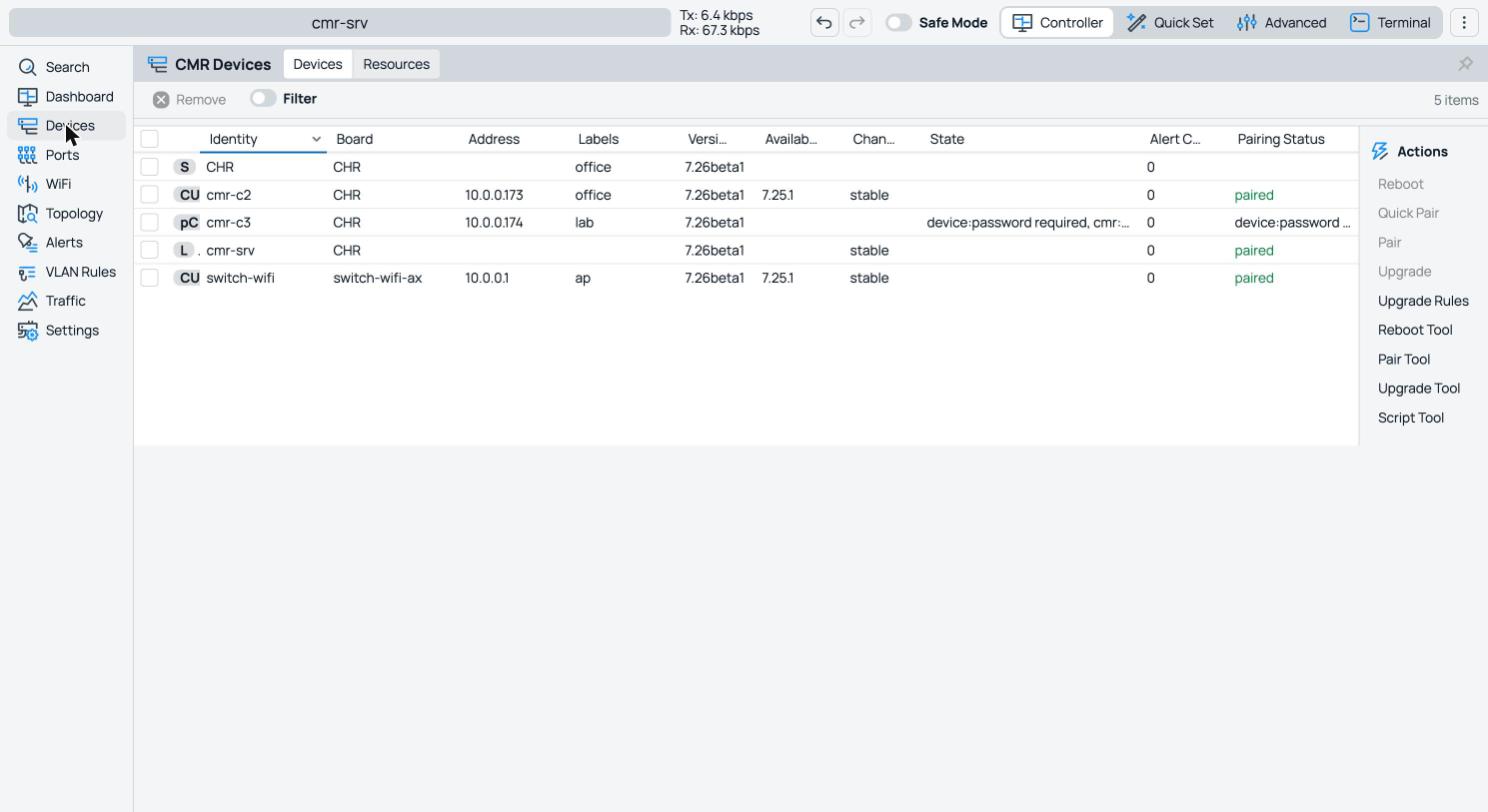
A client that shows up is not managed automatically: the server sees it “waiting for pairing” — exactly the “pending → approve” model of commercial controllers. Three modes:
- none — automatic approval. Convenient on a trusted LAN, but it means “whoever connects gets adopted”: avoid it on exposed networks.
- password — shared secret: the device proves it’s itself.
- confirm — an action is required on the device: two-hands approval (the safest).
The bond is cryptographic and per-identity: each node has its own local-id, and the client remembers the identity of the controller it paired with. Useful consequence: a rogue controller with a different identity cannot hijack an already-adopted client.
Controller or provisioner? The question everyone asks about WiFi
This is the check that matters to anyone coming from UniFi/Omada/Cambium. We joined a real dual-radio device to the fleet and looked at what CMR’s WiFi provisioning actually exposes. The provisioning rule, in full:
/cmr/wifi/print
labels=ap   ssid=DojoWiFi   security.passphrase=***   security.authentication-types=wpa2-psk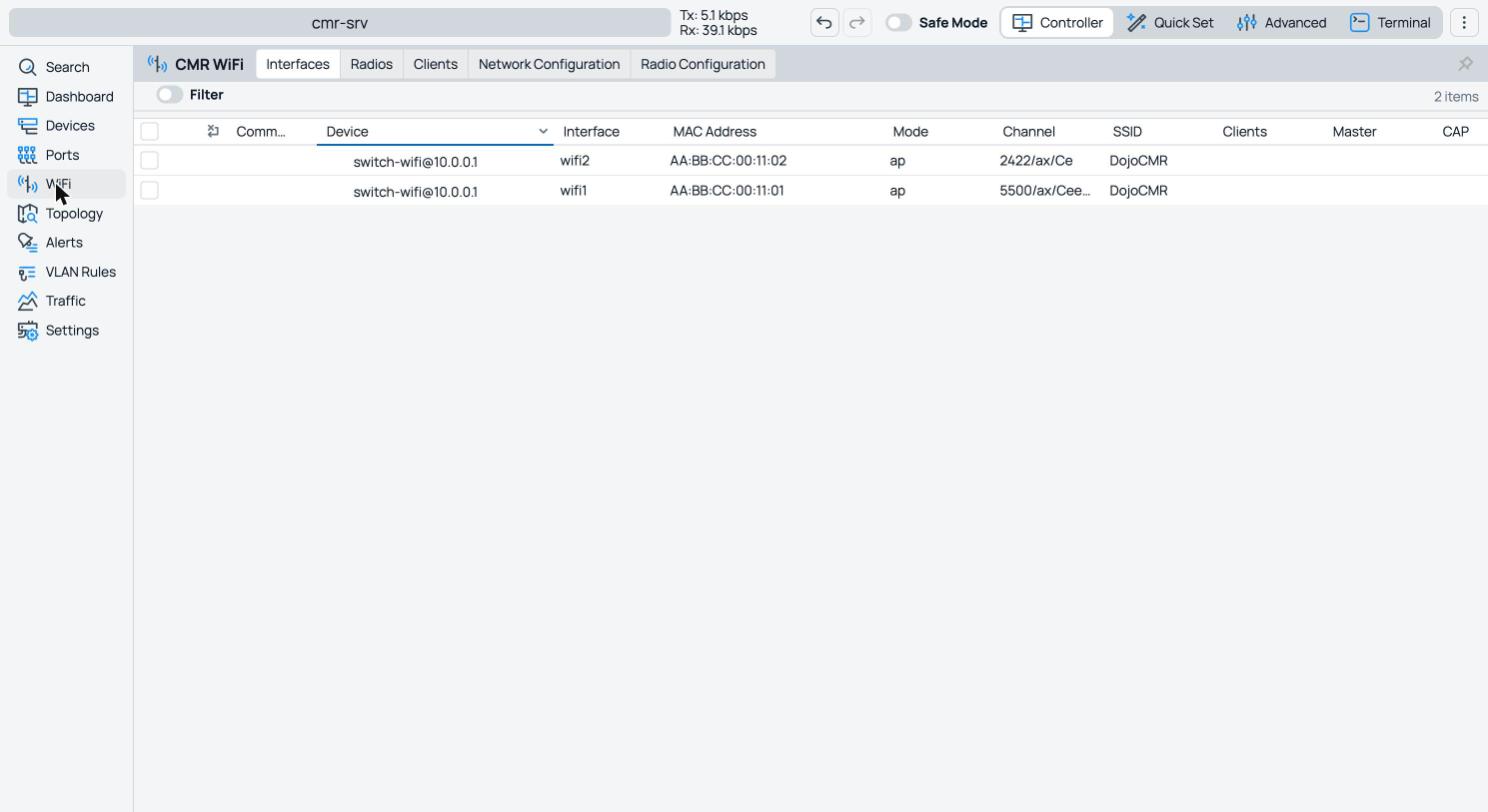
The base rule carries SSID + security + label. You can also provision a fixed channel (there’s a Radio Configuration tab), and the Dashboard even shows per-frequency occupancy — how many APs on each channel, at 2/5/6 GHz. So the radio data is there, and even visualized.
What’s missing is the action. CMR shows the spectrum and lets you pin a channel, but there’s no live controller that listens to interference and moves the channel, lowers the power, does coordinated band-steering across APs by itself. In a word: provisioning and monitoring yes, RRM no. Auto-channel exists at the RouterOS level, but it’s a one-shot pick at startup, not a continuous fleet-wide optimization. The hardware would be capable (the radios advertise spectral scan and on-the-fly channel switch): what’s missing is the orchestration to drive them.
Confident note: it’s beta. The management leap is there; radio RRM isn’t. We trust MikroTik will add real optimization. And meanwhile — since the data (scan, monitor) and the command channel (run-script) are already there — that piece can be built on top of CMR: more on that in the sequel.
What you actually do with it
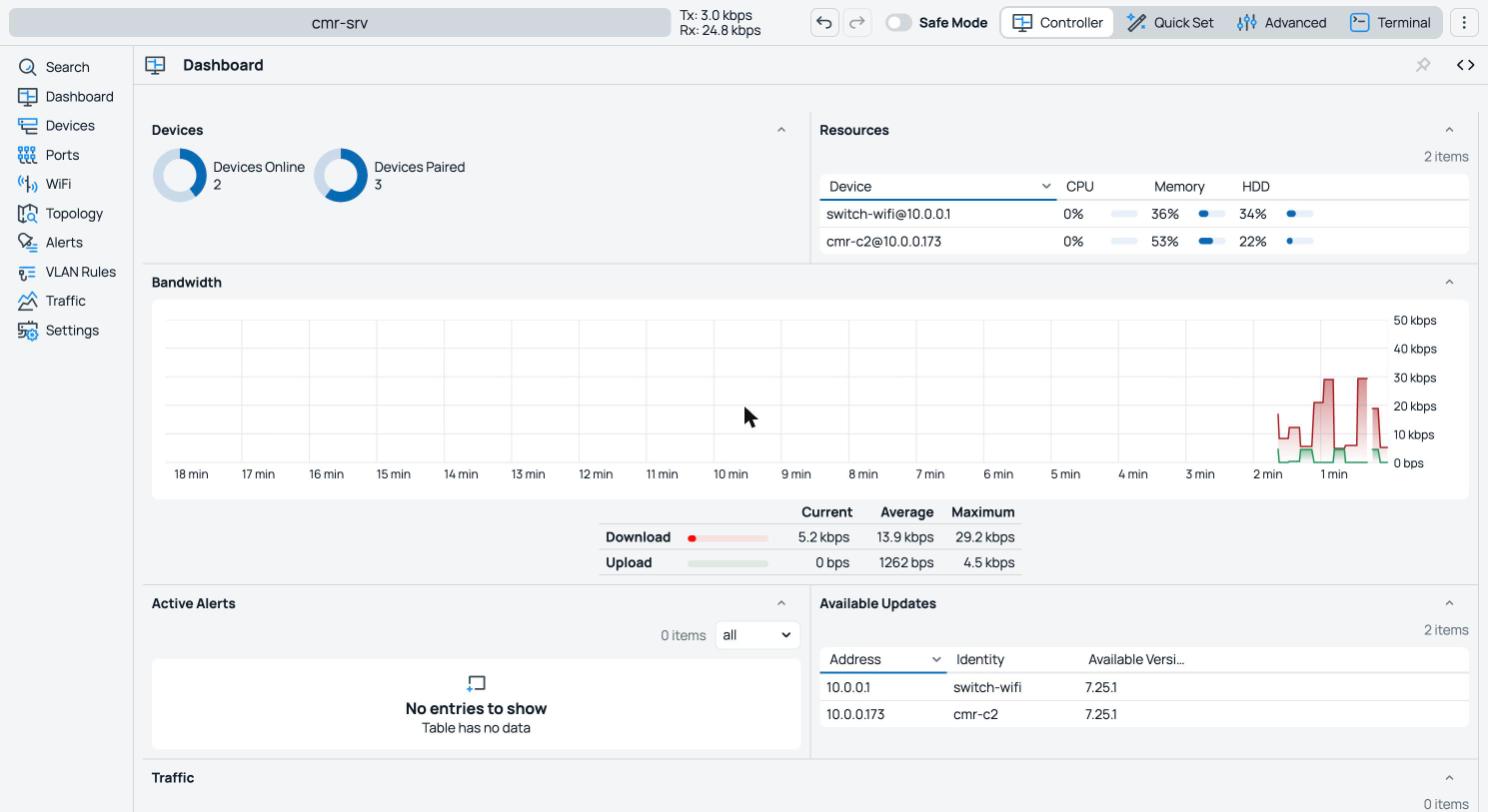
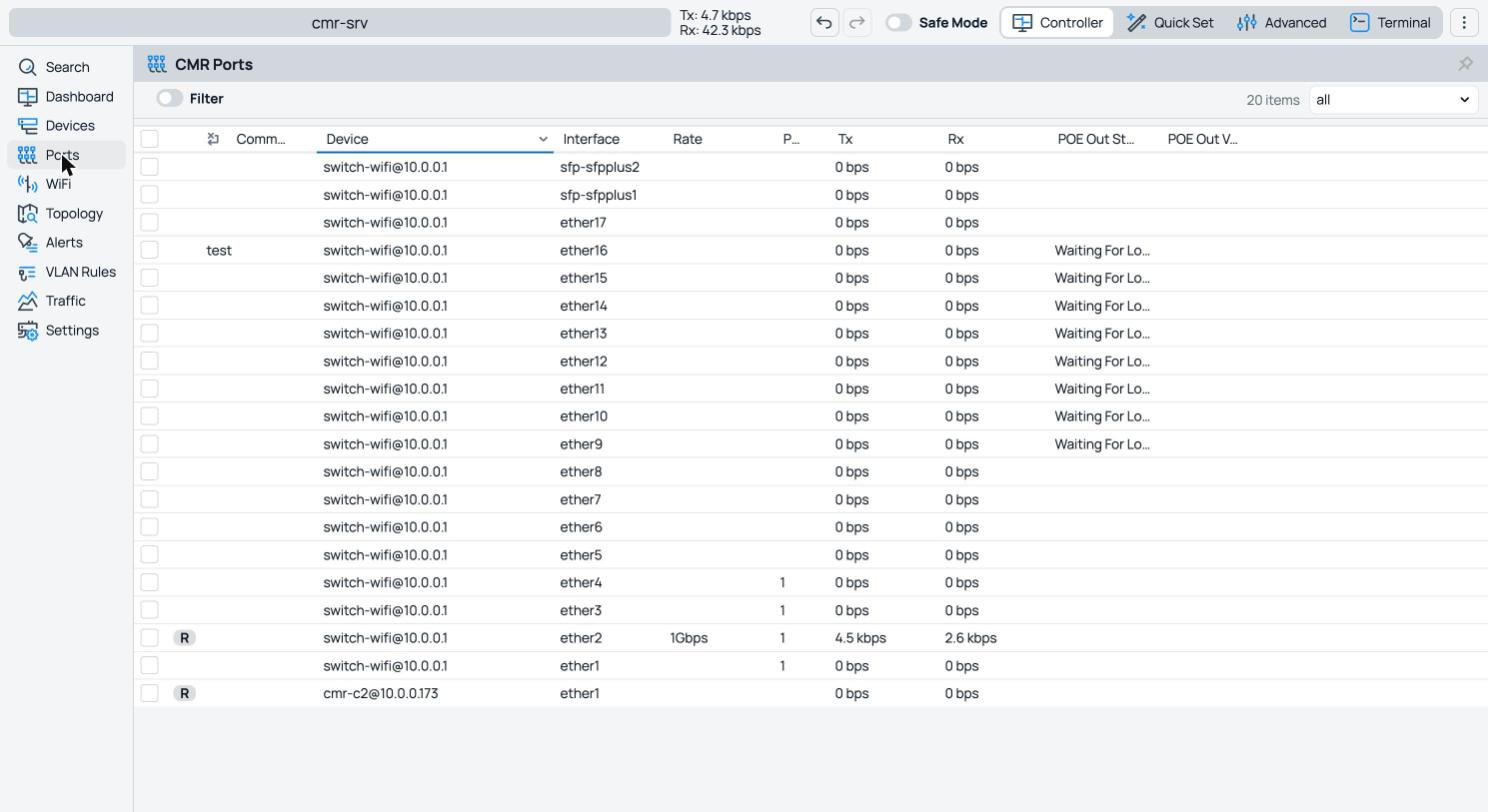
It’s not CLI-only: in WinBox/Webfig there’s a dedicated CMR menu with Dashboard (devices online/paired, resources, WiFi spectrum), Devices (the inventory with the Pair/Script/Upgrade/Reboot tools), Alerts, Ports (per-port Tx/Rx and PoE across the whole fleet), Topology, Traffic, VLAN Rules and WiFi. Underneath, though, everything is also API/REST — and that’s where you see what it really does.
You group by labels
Every operation selects devices by label, with a small algebra: OR (office,lab), AND (office,+ap), exclusion (office,-ap), wildcard (all, all,-core).
You run a script across the whole group, and you get the output back
This is the flagship function. One command, N devices, output collected per device:
/cmr/device/run-script labels=office \
  script=":put ([/system/identity/get name].\" up \".[/system/resource/get uptime])"

device=cmr-c2@...  status=success  output=cmr-c2 up 02h09m
device=cmr-c3@... status=success output=cmr-c3 up 02h09mrun-script has read, write, test, reboot — and nothing else. Creating a user — or changing its password — from remote fails, and even starting the sniffer is blocked. The real run-script output:
run-script … script="/user/set [find name=admin] password=…"
  device=cmr-c2@…   status=failed
  output=not enough permissions (9) (/user/set; line 1)

run-script … script="/tool/sniffer/start"
  device=cmr-c2@…   status=failed
  output=not enough permissions (9) (/tool/sniffer/start; line 1)
A CMR server, even in the wrong hands, does not create users or touch anything gated by policy. But it can read and write config and reboot — and that’s enough to do damage (see “blast radius”).
Alerts — with logging and a native HTTP webhook
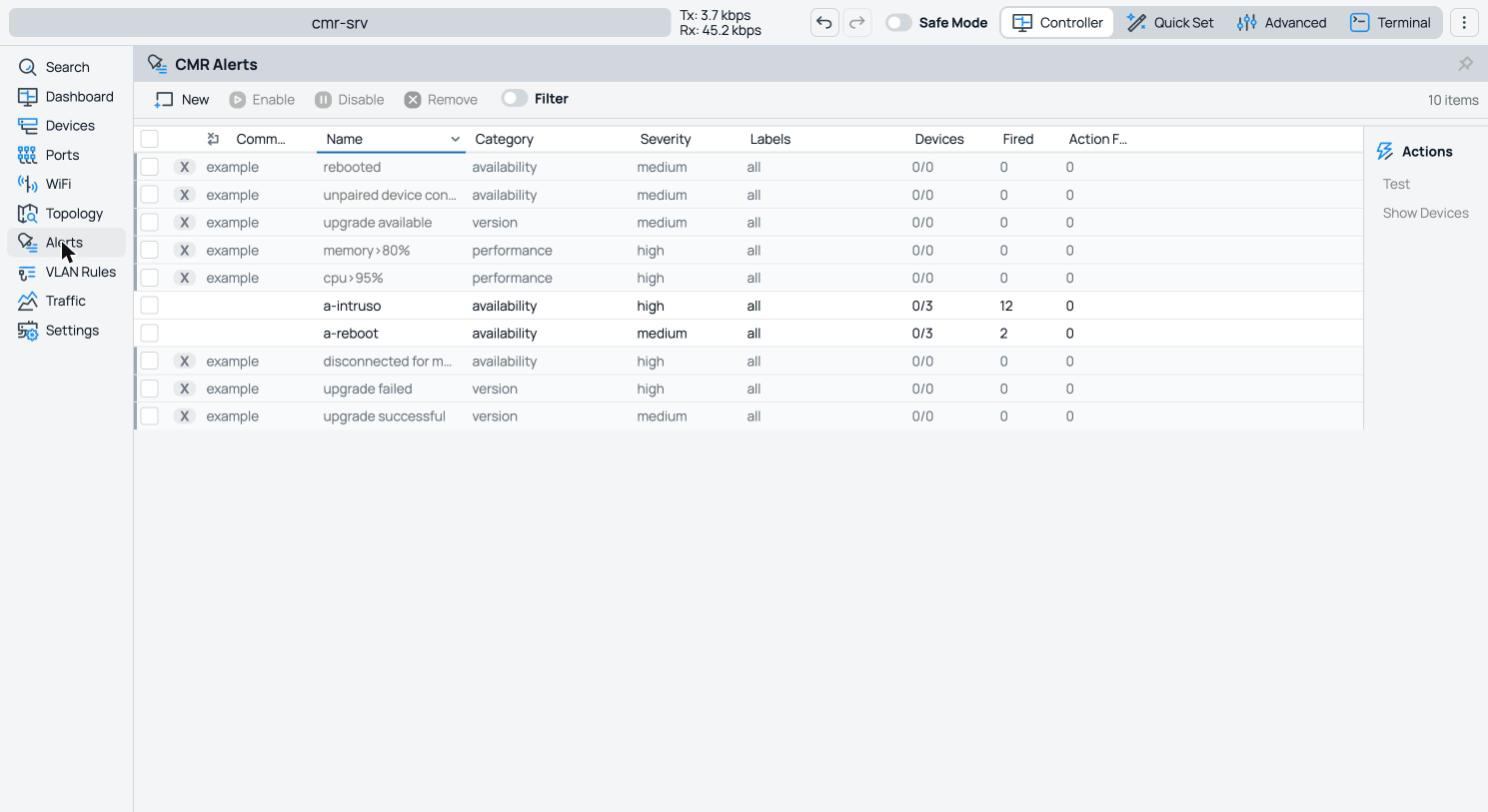
CMR ships with default alerts (CPU>95%, memory>80%, device disconnected, upgrade available, unpaired device connecting, device rebooted) and you add your own. The actions we proved on the hardware:
- Log on the controller:
action.log="…"+action.log-topics=…(with placeholders[device],[cpu-usage]…). - HTTP webhook — native:
action.http-url=…+action.http-method=(get/post/put/…) +action.http-body=…. When the alert fires, CMR calls the URL.
There are no direct “email” or “telegram” actions — but you don’t need them: the webhook covers them all. A POST to Telegram/Slack/Discord’s webhook, or to your own n8n/Node-RED, and the alert lands wherever you want. We made it fire: an unpaired device connecting → a log line unpaired device connected; it’s effectively a “someone attached an unmanaged device to my fleet” detector.
Orchestrated upgrades, and the “R” in Repository
Per-group upgrade rules, with a time window and a channel (stable, long-term, testing, development): there’s already a default rule on stable. And here you see the R in CMR: the server acts as a package repository — it downloads the .npk from the chosen channel, caches them (a cmrpkgs folder, with a configurable cap) and distributes them to the clients. Download once, serve many: perfect for a fleet behind a single uplink. Note: it caches all the packages a device has (routeros + extras like container, wireless…), per architecture — that’s why the upgrade is “whole-device”. You can’t pin a precise version, you follow the channel.
The “R” is only the package cache: it’s not a log or backup repository (see FAQ).
Build your own interface: API, REST, scripting, webhook
The nice thing about CMR is that it doesn’t lock you in: all its data is accessible and composable. Proven on the hardware — the REST API serves the inventory as JSON:
GET /rest/cmr/device   →  [ {".id":"*3","identity":"cmr-c2","board":"CHR",
                              "version":"7.26beta1","connected":"true", … }, … ]
GET /rest/cmr/alert    →  [ … your alerts as JSON … ]
Three surfaces to read/write — the binary API, REST (JSON over HTTP/S), on-box scripting — plus the webhook to push events out. With these bricks you build the dashboard you want, connect CMR to the monitoring you already have (Grafana/Zabbix read the REST), or automate reactions. The native controller gives you the data; the interface is your call.
Security (proven on the wire)
run-script: TLS 1.2 records (17 03 03, Application Data), high-entropy payload. No cleartext piece of the script or its output on the wire.Also: a fixed 54321 port (not changeable), trust tied to the controller’s identity (the pairing), no configurable cert-pinning (trust is the pairing key, TOFU-style at adoption). Exposures to keep in mind: (1) a beta TLS service = pre-auth surface not yet battle-tested; (2) rogue adoption if you use pairing=none on an exposed server; (3) the cleartext discovery (metadata, not control). Rule: do not expose 54321 naked on the Internet — better behind a VPN (clients point to the private IP), or exposed only with pairing=confirm + an allow-list of source IPs. No VPN built into CMR: its channel is a TLS management tunnel, not a data VPN.
Discovery can be forged — but the default saves you
MNDP is not authenticated, so those two marker bytes can be forged. We proved it: with a small custom MNDP announcer (CMR markers + an IP of your choice) a fresh client tried to connect to the announced address — even to a public IP (a Cloudflare address): on 54321 the SYN went out toward that IP, with controller-addresses still empty. Meaning: anyone on the same L2 segment can push an enabled-but-not-yet-paired client toward a controller of their choosing (potential rogue adoption, if that controller accepts the pairing).
# forged MNDP announcement (CMR markers + an IP of choice) → the fresh client tries 54321:
IP <client> > 10.11.12.13.54321: Flags [S]   # any private IP you like
IP <client> > 1.1.1.1.54321:      Flags [S]   # …or even a PUBLIC IP
# client's controller-addresses: EMPTY  (the address comes only from the forged announcement)
Two things, though, cut the risk down — and they’re also how you protect yourself:
- The CMR client is off by factory default. On a freshly installed RouterOS 7.26,
/cmr/clientisenabled=no: a device that never touched CMR does not react to the announcement. The risk only exists if the client was turned on. - An already-paired device is bound to its controller’s identity (
local-id): an announcement with a different identity does not hijack it.
Hardening (proven): if you don’t use CMR, keep the client off — /cmr/client set enabled=no (with the client disabled, zero attempts even under spoofing). If you do use it, restrict neighbor-discovery to trusted interfaces only and adopt devices with pairing=confirm, never none.
Confident note: unauthenticated discovery is a growing pain — we trust MikroTik will sign/authenticate the announcement, so spoofing no longer bites. It’s beta: plenty of time to fix it.
The flip side: the blast radius
All that convenience has a clear price: from a single node you hit the whole fleet. labels=all is a trigger:
/cmr/device/run-script labels=all  script=...   # runs on EVERY device
/cmr/device/upgrade    labels=all  ...           # upgrades EVERY device
/cmr/device/reboot     labels=all                # reboots EVERY device
A typo or a compromised server propagates instantly. The permission cage avoids the “users/policy” disaster, but writing config + rebooting + scheduling an upgrade across everything is enough to take a network down from one point. Protect 54321; don’t use pairing=none where anyone can show up.
“But what if the router is already configured?”
Fair question, proven answer. On a client with a real config (a mybr bridge, a VLAN, an address) we paired it, managed it, and even pointed a CMR rule at it. Result:
bridge mybr    → untouched (comment="user-config", dynamic=false)
vlan   v100    → untouched
address        → untouched
objects CMR added to the device: 0
Bridge, VLAN and address intact, zero objects added behind your back. CMR does not adopt and does not rewrite your config — it works with its own objects. An already-configured router is perfect to manage, monitor and upgrade. The caveat is only about provisioning (WiFi/VLAN): there CMR creates its own objects and does not merge yours, so on an already-full device you risk duplicates. For clean provisioning, start from a config close to default. In no case does it overwrite what’s there.
Confident note: that provisioning doesn’t yet adopt the existing config is a growing pain — we trust it will mature quickly.
What if the controller goes down?
Proven: with the server off, devices keep working — traffic, IPs and their own config untouched; already-provisioned config stays. You only lose the central control (inventory/scripts/alerts/upgrades) until it’s back. And when it returns, clients reconnect by themselves and stay paired. CMR is a management plane, it’s not in the data path: the controller drops, the network doesn’t notice.
Redundancy and hierarchy
Master/slave HA with synchronization? No, not in this beta (redundancy doesn’t exist; each server has its own identity and pairing DB). The only redundancy brick: the client accepts multiple controller-addresses → you can do a “cold” standby (pre-pair devices to a second server too and list both addresses). It’s not automatic failover with shared state.
Controller hierarchy? Yes, as stacking. A node can be server and client at once: a branch gateway acts as server for its local APs (MNDP self-adoption) and as client toward a master CMR. But the master sees that branch as a single device, not its APs: it’s a pyramid of controllers, not a single fleet view. For remote branches, moreover, there’s no relay/proxy mode: each AP must reach the CMR over IP (the gateway’s routing/VPN), with the address set.
Confident note: the primitives (server+client node, multiple controller-addresses) are there. Real HA and a branch relay would be the natural evolution.
Quick FAQ (all verified)
cmr package works; a CHR on a VM is the convenient choice though (x86, elastic resources).controller-addresses accepts a hostname → DDNS/IP Cloud work. Note: IP Cloud has no new CMR-related setting, it’s the usual DDNS you set by hand.mangle action=sniff-tzsp rule (a firewall write) that mirrors packets to a collector/container. CMR has no capture viewer./user/set password= via run-script fails (not enough permissions (9)). And the shortcut doesn’t hold either: if you deploy a script asking for high policy, RouterOS trims it down to the cage’s permissions (reboot;read;write;test) → the script runs but the password change still fails. There’s no “CMR” policy in the user-groups to grant. It’s good for security (a compromised CMR doesn’t touch credentials), but today fleet password rotation with CMR can’t be done: do it by other means (SSH keys + API/Ansible automation). Confident note: it’s exactly the kind of function that’s missing — we trust MikroTik will add safe credential rotation.The natural sequel: a “companion” on top of CMR
CMR gives you the hands and eyes (data via API/REST, commands via write-only run-script, events via webhook). You put the brain in a container: a companion that reads the fleet state and reacts. Ideas the CMR bricks already allow:
- Home-grown RRM: collect radio scan/monitor → channel/power scoring (Cambium-style, local) or AI analysis → re-apply channel/power (they’re writes) with a run-script. The missing radio controller, built on top of CMR.
- Fleet NetFlow/IPFIX: push
/ip/traffic-flowto all → an ntopng container collects. - Centralized syslog: a syslog container + the remote-logging deployed via CMR.
- “Oxidized-style” config backup: run-script returns its output → have it run
/exportand archive every device’s config.
Pros and cons
For
- Native fleet controller: no external servers for the base tasks
- MNDP zero-config self-adoption on the LAN
- Mass scripting with per-device output
- Orchestrated upgrades + package repository
- Alerts with logging and a native HTTP webhook
- API/REST/scripting: build your own dashboard
- TLS channel, consent-based per-identity pairing, permission cage
- NAT-friendly (outbound clients), DDNS/IP Cloud OK
Against / risks
- Blast radius: one node commands the whole fleet
- On WiFi it’s a provisioner, not RRM
- No real HA, no branch relay, no DHCP-discovery, no RoMON
- It’s not syslog/backup; doesn’t manage IP/DHCP/routing/firewall/users
- Discovery in cleartext (metadata); 54321 to protect
- Doesn’t adopt the existing config (duplicates in provisioning)
- Beta: unstable (see below)
Honesty about the beta
During the tests, after several fleet reboots, the server generated a supout.rif for a “service malfunction” and for a while the alerts didn’t fire; then it recovered. And a client, hammered with repeated resets and release/renew, lost its IP until we redid DHCP. It’s exactly what you expect from a brand-new feature. We write it down because the house rule is to show the facts, not just the shiny parts — and it’s the best proof that “beta” here is to be taken literally. But it’s beta: it can only get better.
Validated in the lab on a RouterOS 7.26 beta fleet (one server + several CHR clients) and a real WiFi device, driven via API, with packet capture on MNDP and on the 54321 channel, and a sniffed DHCP test. Addresses in the examples are generic.