
Everyone knows OSPF. Almost nobody knows that RouterOS, since 7.12, also has IS-IS — the other great interior routing protocol, the one that runs service-provider backbones. In this howto we put them head to head on three CHR 7.25 routers, at the packet level: we’ll see they speak in two completely different ways, route the same networks, and find out where IS-IS on MikroTik is already mature and where it’s still young. No theory told from memory: everything captured in the lab.
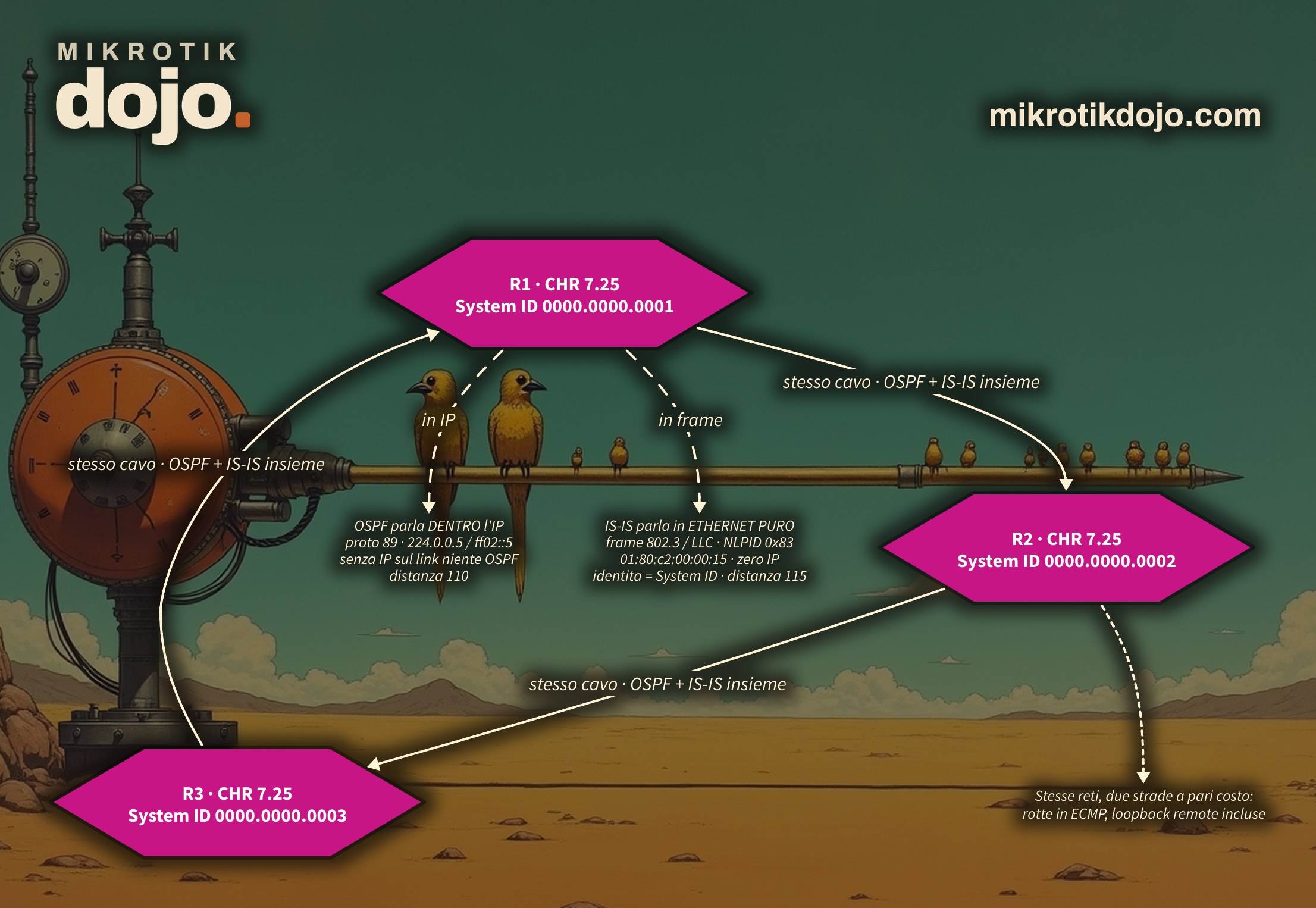
Step 1: two protocols, two ways of talking
OSPF and IS-IS do the same job — distribute IP routes inside a network — but over different “media”, and this is the difference that confuses everyone:
- OSPF puts its messages inside IP packets (IP protocol 89). It needs IP to exist: no IP on the link, no OSPF.
- IS-IS doesn’t use IP for itself: its messages travel directly in the Ethernet frame, using the OSI protocol (CLNS). They’re identified by System ID, not by IP address. That’s why IS-IS forms an adjacency even with no IP configured on the link.
Beware a classic mix-up: when IS-IS talks about Level 1 and Level 2, these are not OSI layers 2 and 3. They are the routing hierarchy levels: Level 1 = inside the area (like an OSPF non-backbone area), Level 2 = the backbone between areas (like area 0). In one line: IS-IS is a Layer 3 protocol (it routes IP) whose messages travel at Layer 2. OSPF, instead, does Layer 3 inside IP.
Step 2: the proof on the wire — the difference is visible at a glance
We turned OSPF and IS-IS on together on the same cable between two routers and put a sniffer on it. In the same moment, three control packets, three different worlds:
OSPFv2  → inside IPv4, multicast 224.0.0.5
  ...01:00:5e:00:00:05, ethertype IPv4 (0x0800), proto OSPF (89): 10.0.12.1 > 224.0.0.5: OSPFv2, Hello

OSPFv3  → inside IPv6, multicast ff02::5
  ...33:33:00:00:00:05, ethertype IPv6 (0x86dd), next-header OSPF (89): fe80::...101 > ff02::5: OSPFv3, Hello

IS-IS   → NO IP at all: 802.3 frame + LLC, NLPID IS-IS 0x83, multicast 01:80:c2:00:00:15
  ...01:80:c2:00:00:15, 802.3, length 1500: LLC, dsap OSI (0xfe), ssap OSI (0xfe), ctrl 0x03:
      OSI NLPID IS-IS (0x83): L2 Lan IIH, src-id 0000.0000.0001
The OSPF packet is a normal IP packet (there’s the ethertype IPv4/IPv6, a source and a destination address). The IS-IS packet has no IP header at all: it’s an 802.3 frame with an LLC header (DSAP/SSAP 0xfe, the OSI network-layer identifier) and the code 0x83. Inside, everything is in TLVs:
L2 Lan IIH, hlen: 27, sys-id-len: 6
  source-id: 0000.0000.0001, holding time, Flags: [Level 2 only]
    Area address(es) TLV #1:        49.0001
    Protocols supported TLV #129:   NLPID(s): IPv4 (0xcc)
    IS Neighbor(s) TLV #6:          SNPA 5254.0021.0101
Area, System ID, carried protocols, neighbours: all in OSI fields, zero IP. This is the line to remember: OSPF chats in IP, IS-IS chats in raw Ethernet.
Step 3: configuring them (bare minimum)
OSPF on RouterOS 7 is an instance, an area and an interface template:
/routing/ospf/instance add name=v2 version=2 router-id=10.255.0.1
/routing/ospf/area add name=backbone instance=v2 area-id=0.0.0.0
/routing/ospf/interface-template add area=backbone interfaces=ether1,ether2
IS-IS has one extra piece, the router’s OSI identity — the NET, i.e. area + System ID (+ a fixed 00 suffix). Here the area is 49.0001 and the System ID 0000.0000.0001:
/routing/isis/instance add name=i1 afi=ip areas=49.0001 \
    system-id=0000.0000.0001 l2.redistribute=connected
/routing/isis/interface-template add instance=i1 interfaces=ether1,ether2 levels=l2
Two notes that save hours. First: the System ID is unique per router (it’s its “identity”, nothing to do with IP). Second: in IS-IS, connected networks and loopbacks are not advertised with a “passive” interface like in OSPF, but with redistribution — l2.redistribute=connected. Forgetting it is the number-one reason “the loopbacks don’t show up”.
Once that’s done, the adjacency comes up (both neighbours state=up):
/routing/isis/neighbor print
 0 instance=i1 interface=ether1 level-type=l2 snpa=52:54:00:21:02:01 srcid="0000.0000.0002" state=up
 1 instance=i1 interface=ether2 level-type=l2 snpa=52:54:00:21:03:02 srcid="0000.0000.0003" state=up
Step 4: the routes — IS-IS routes IPv4 (well)
Three routers in a triangle: each one reaches the “opposite” network via two equal-cost paths. IS-IS installs them in ECMP (flag i = IS-IS, administrative distance 115), including the remote routers’ loopbacks thanks to redistribution:
/ip route print where distance=115
DAi+ 10.0.23.0/30   10.0.12.2%ether1   distance=115    ← ECMP: two equal-cost paths
DAi+ 10.0.23.0/30   10.0.13.2%ether2   distance=115
DAi  10.255.0.2/32  10.0.12.2%ether1   distance=115    ← a remote router's loopback
DAi  10.255.0.3/32  10.0.13.2%ether2   distance=115
For comparison: OSPF uses distance 110. If you turn both protocols on for the same networks, the OSPF routes win and the IS-IS ones stay inactive candidates — a useful detail to know when running them side by side during a migration.
Step 5: IPv6 — it works, but one family at a time
IS-IS was born protocol-agnostic, so IPv6 is natural. On RouterOS you pick the family with afi. Moving the instance to afi=ipv6, the Hellos change the advertised protocol — on the wire you now read NLPID IPv6 (0x8e) instead of IPv4 (0xcc) — and the IPv6 routes install, again in ECMP complete with loopbacks:
/ipv6 route print where distance=115
DAi+ 2001:db8:23::/64  fe80::...201%ether1  distance=115   ← ECMP
DAi+ 2001:db8:23::/64  fe80::...302%ether2  distance=115
DAi  fd00::2/128       fe80::...201%ether1  distance=115   ← remote IPv6 loopback
DAi  fd00::3/128       fe80::...302%ether2  distance=115
Here, though, comes the honest limitation worth knowing. The afi property accepts a single value: ip or ipv6. One instance = one family. And if you try two instances (one IPv4, one IPv6) on the same interfaces, the second one never becomes operational: on the wire you only see the first instance’s Hellos, never the second’s.
# two instances (i1=IPv4, i6=IPv6) on the same ethers → sniffer on the cable:
system-id in the IS-IS Hellos:  0000.0000.0001, 0000.0000.0002   (i1 only)
NLPID:                          IPv4 (0xcc)                       (IPv4 only)
# the second instance's (IPv6) Hellos are not even transmitted
In practice, “classic” IS-IS on Cisco/Juniper carries IPv4 and IPv6 together in a single process; on RouterOS 7.25, instead, you do one family at a time on the same links. Both work perfectly — just not simultaneously. It’s still a young implementation: we trust MikroTik will soon add single-instance dual-stack, because the rest of the IS-IS engine is already solid.
Step 6: areas, scale and why operators love it
First clarification: IS-IS does have areas (anyone saying otherwise is confusing the Level 1/Level 2 above). The difference from OSPF is in the design: in OSPF areas are defined per interface (a router can straddle multiple areas — that’s the ABR); in IS-IS the whole router belongs to one area, and Level 1/Level 2 routers act as the border. Simpler to reason about as the network grows.
IS-IS is known to scale: it’s the protocol of large flat backbones. Two concrete reasons: information travels in extensible TLVs (that’s how IPv6, traffic engineering and segment routing were added without rewriting the protocol), and LSPs are fragmented, so there’s no tight ceiling on the number of advertisable networks. If one day you needed to carry very many routes, IS-IS was built for that.
Step 7: which one to choose?
There’s no absolute winner — and that’s the honest answer.
- OSPF: a sound default for companies and SMBs. Mature, extremely well documented, plenty of people can configure it, and on MikroTik it’s complete (IPv4 with OSPFv2, IPv6 with OSPFv3, two separate processes). Redistribution is done with
redistribute=connected,static,bgp…on the instance. - IS-IS: the “operator” choice — large flat backbones, clean dual-stack in a single topology, TLV extensibility. Redistribution works like OSPF, only per-level (
l1.redistribute/l2.redistribute, with the same sources and default-route origination). On MikroTik it routes IPv4 and IPv6 very well, but today one family at a time on the same links.
Practical advice: if you’re in an enterprise and OSPF is enough, stay on OSPF. If you’re aiming for provider scale, or simply want to know the tool you already have in your router, IS-IS on RouterOS is ready to study and deploy where IPv6-single-stack-per-link isn’t a problem — while keeping an eye on how dual-stack evolves.
Frequently asked questions
Is IS-IS harder to configure than OSPF?
In practice no: instance + System ID + interface template, as you’ve seen. The only “new” thing is the router’s OSI identity (the NET = area + System ID). No more than an OSPF area.
Should I drop OSPF for IS-IS?
No. They’re equivalent on small/medium networks. OSPF stays the enterprise default; IS-IS makes sense when you aim for operator scale or want a single dual-stack topology (on vendors where it’s complete).
With IS-IS can I route IPv4 and IPv6 together on the same MikroTik?
Today on RouterOS 7.25, not on the same links simultaneously: an instance carries a single family (afi=ip or ipv6) and only one instance is active per interface. Both work, but one at a time. We trust MikroTik will add single-instance dual-stack.
Are “Level 1” and “Level 2” the OSI layers 2 and 3?
No, it’s the most common trap. They are the routing hierarchy levels: L1 inside the area, L2 on the backbone — the equivalent of OSPF areas. The “travels at L2” of IS-IS is a different thing (its packets are OSI frames, not IP).
Does IS-IS scale better than OSPF?
Historically yes, on large flat networks: extensible TLVs and fragmentable LSPs. That’s why many operators use it in backbones. At small/medium scale the difference isn’t felt.
Tested in the lab with three CHR RouterOS 7.25 (stable) in a triangle, each with two interfaces on point-to-point links and a loopback, driven from the serial console and sniffed with tcpdump on the segment. OSPF configured with a v2 (IPv4) and a v3 (IPv6) instance, area 0.0.0.0; IS-IS with an instance (areas=49.0001, system-id=0000.0000.000x), interface template levels=l2 and l2.redistribute=connected to advertise connected routes and loopbacks. Capture with OSPF and IS-IS running together: OSPFv2 in IPv4 to 224.0.0.5 (proto 89), OSPFv3 in IPv6 to ff02::5, IS-IS as an 802.3/LLC frame (DSAP/SSAP 0xfe, NLPID 0x83) to 01:80:c2:00:00:15, with no IP header; inside the IS-IS Hellos the TLVs for area (49.0001), protocols (NLPID IPv4 0xcc / IPv6 0x8e) and neighbours (SNPA). IS-IS IPv4 routes installed in ECMP (flag i, distance 115), including remote /32 loopbacks; switching to afi=ipv6, IPv6 routes in ECMP with /128 loopbacks. Simultaneous dual-stack tested and not achieved from a clean state (reboot): two instances (IPv4+IPv6) on the same interfaces → the second forms no adjacency and only the first’s Hellos appear on the wire (a single System ID, IPv4 NLPID only). Generic device; addresses and MACs are lab ones.