
Why isn’t two gateways enough?
Back in 2015 you would write gateway=172.23.0.1,10.0.0.1 and the router would alternate packets between the two lines. Today almost everything is HTTPS, with sessions tied to the IP address: if a session changes its public address halfway through, banks, webmail and cloud services drop it.
In RouterOS 7, ECMP, that is several default routes with the same distance, is already better than the old round robin: out of the box it picks the line with a calculation on the source and destination address, so the same PC going to the same site always leaves through the same line. But you don’t know which one, you can’t give more weight to the faster line, and connections coming in from the internet aren’t guaranteed to go back out the right line. To get control you need PCC.
How does PCC work?
The firewall’s per-connection-classifier matcher computes a hash on the addresses and ports of every new connection and drops it into a “bucket”. With two lines there are two buckets (2/0 and 2/1): every connection ends up in one of the two and stays there until it’s done. The work happens in three moves:
- mark new connections with PCC;
- turn the connection mark into a routing mark;
- send each routing mark out its own line, with a dedicated routing table.
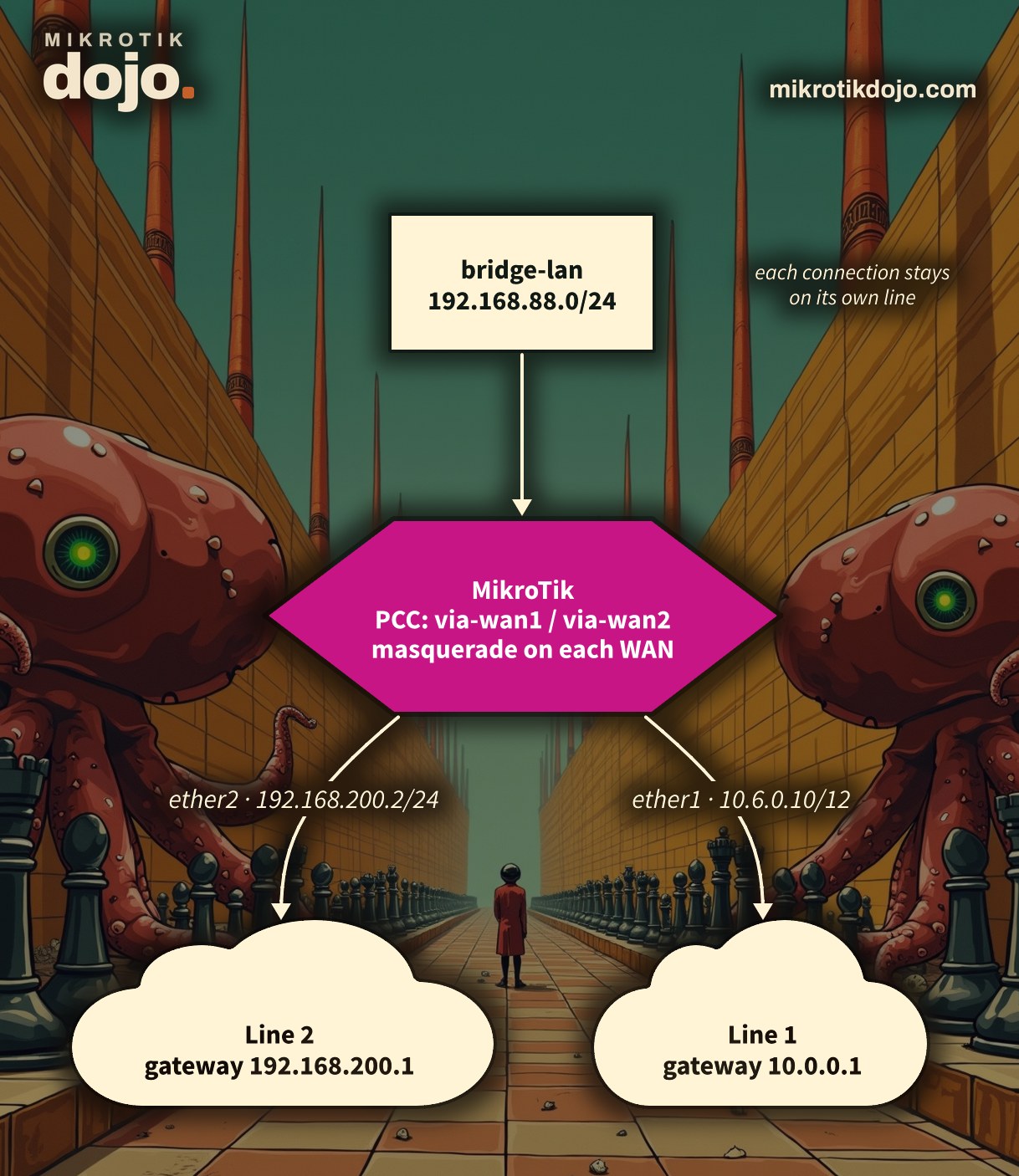
Here’s the diagram for the example:
- WAN1:
ether1, address10.6.0.10/12, gateway10.0.0.1(my lab network); - WAN2:
ether2, address192.168.200.2/24, gateway192.168.200.1(the second line); - LAN:
bridge-lan, network192.168.88.0/24.
⚠️ Heads up: the addresses of the two WANs are the ones from my lab. Replace them with the ones from your lines: the router’s address on each and its gateway (the ISP’s modem or router).
Step 1: how do I configure the two WANs?
One address per line, plus DNS. We’ll add the default routes in step 5, because the PCC tables need them too.
/ip address add address=10.6.0.10/12 interface=ether1 comment="WAN1"
/ip address add address=192.168.200.2/24 interface=ether2 comment="WAN2"
/ip dns set servers=10.0.0.1
To check the addresses of the two lines there’s the Dojo IP calculator, for WAN1 and for WAN2: make sure each gateway is in the same network as the router’s address.
Before you go on, check that both gateways respond:
/ping 10.0.0.1 count=3
/ping 192.168.200.1 count=3
Step 2: how do I create the routing tables?
In RouterOS 7 every routing mark maps to a table, which has to be created before you use it. One per line:
/routing table add name=via-wan1 fib
/routing table add name=via-wan2 fib
Step 3: how do I mark connections with PCC?
This is the heart of it. The mangle rules, with what they mean right below:
/ip firewall mangle
add chain=prerouting in-interface=ether1 connection-mark=no-mark action=mark-connection new-connection-mark=wan1-conn passthrough=yes comment="Inbound from WAN1"
add chain=prerouting in-interface=ether2 connection-mark=no-mark action=mark-connection new-connection-mark=wan2-conn passthrough=yes comment="Inbound from WAN2"
add chain=prerouting in-interface=bridge-lan dst-address-type=!local connection-mark=no-mark \
    per-connection-classifier=both-addresses-and-ports:2/0 action=mark-connection new-connection-mark=wan1-conn passthrough=yes comment="PCC bucket 0"
add chain=prerouting in-interface=bridge-lan dst-address-type=!local connection-mark=no-mark \
    per-connection-classifier=both-addresses-and-ports:2/1 action=mark-connection new-connection-mark=wan2-conn passthrough=yes comment="PCC bucket 1"
add chain=prerouting in-interface=bridge-lan connection-mark=wan1-conn action=mark-routing new-routing-mark=via-wan1 passthrough=no
add chain=prerouting in-interface=bridge-lan connection-mark=wan2-conn action=mark-routing new-routing-mark=via-wan2 passthrough=no
add chain=output connection-mark=wan1-conn action=mark-routing new-routing-mark=via-wan1 passthrough=no
add chain=output connection-mark=wan2-conn action=mark-routing new-routing-mark=via-wan2 passthrough=no- the first two rules make connections coming in from the internet go back out the same line (for example a remote login to the router);
- the third and fourth split the connections born on the LAN between the two buckets;
dst-address-type=!localleaves out traffic headed to the router itself; - the last four turn the connection mark into a routing mark, for LAN traffic and for traffic generated by the router.
All the variants of the classifier (addresses only, ports only, more buckets) are in the MikroTik manual: Per connection classifier.
Step 4: how do I leave the WAN networks out of PCC?
There’s a trap the old tutorials don’t mention. From the LAN you open the web page of line 2’s modem, 192.168.200.1: PCC rolls the dice for that connection too, and half the time it sends it toward line 1’s gateway, where modem 2 isn’t. In the lab, out of ten tries, the page came up five times.
The fix: a rule that makes traffic headed to the WAN networks skip PCC, placed before the two buckets.
/ip firewall address-list add list=reti-wan address=10.0.0.0/12 comment="WAN1 network"
/ip firewall address-list add list=reti-wan address=192.168.200.0/24 comment="WAN2 network"
/ip firewall mangle add chain=prerouting in-interface=bridge-lan dst-address-list=reti-wan \
    action=accept comment="WAN networks: no PCC" place-before=[find comment="PCC bucket 0"]
With this rule, ten tries out of ten.
Step 5: how do I set the routes?
One default route for each table, plus the ones in the main table as a backup:
/ip route
add dst-address=0.0.0.0/0 gateway=10.0.0.1 routing-table=via-wan1 check-gateway=ping comment="PCC WAN1"
add dst-address=0.0.0.0/0 gateway=192.168.200.1 routing-table=via-wan2 check-gateway=ping comment="PCC WAN2"
add dst-address=0.0.0.0/0 gateway=10.0.0.1 distance=1 check-gateway=ping comment="Primary WAN1"
add dst-address=0.0.0.0/0 gateway=192.168.200.1 distance=2 check-gateway=ping comment="Backup WAN2"
Step 6: how do I configure NAT?
LAN users have to go out with the address of the line they’re using: one masquerade per WAN.
/ip firewall nat
add chain=srcnat out-interface=ether1 action=masquerade comment="NAT WAN1"
add chain=srcnat out-interface=ether2 action=masquerade comment="NAT WAN2"
Step 7: how do I check that the connections split up?
From the LAN open a few sites, then on the router look at the counters on the PCC rules and the marked connections:
/ip firewall mangle print stats where comment~"PCC"
/ip firewall connection print count-only where connection-mark=wan1-conn
/ip firewall connection print count-only where connection-mark=wan2-conn
In the lab, with twenty connections from one LAN PC, the buckets split 11 and 9: PCC doesn’t make the shares equal down to the millimeter, but over many connections it gets very close. An even more direct test: from two different PCs open a site that shows your public address; they’ll often go out on different lines.
Step 8: what happens if a line goes down?
check-gateway=ping makes the router check the gateway every 10 seconds: if it doesn’t respond, the route is disabled. The connections marked for that line no longer find a route in their table and fall back on the main table, so onto the other line.
I tested it by shutting down line 2: after about twenty seconds the WAN2 routes went inactive and all the new connections, even the ones in line 2’s bucket, went out on line 1. Twelve requests out of twelve, no errors.
The catch is that check-gateway only checks the first hop: if the modem responds but the ISP is out of service, the router doesn’t notice. For a real check you need to verify an address on the internet, with recursive routes or with Netwatch: that’s a topic of its own, worth a dedicated howto. For the basic schemes there’s the MikroTik manual: Load Balancing.
What if the lines have the same gateway?
This is the typical case of a WISP with several CPEs toward the same PPPoE server: three pppoe-out interfaces with the same remote gateway. Use the interface name as the gateway, because they’re point-to-point links:
/ip route add dst-address=0.0.0.0/0 gateway=pppoe-out1 routing-table=via-wan1
/ip route add dst-address=0.0.0.0/0 gateway=pppoe-out2 routing-table=via-wan2
What do I check before putting it into production?
Two lines means two ports open to the internet. Before you connect them, follow the Basic hardening of a MikroTik router and put both WANs in the firewall’s WAN interface list.
Tested in the lab on PNETLab with a CHR running RouterOS 7.24.5 (stable), two lines (the second one through another CHR) and a Linux client: splitting the connections, reaching the second line’s modem with and without excluding the WAN networks, the second line going down with check-gateway.
Frequently asked questions
What’s the difference between ECMP and PCC on MikroTik?
ECMP spreads traffic across several default routes with the same distance, picking the line with a calculation on the addresses; PCC assigns each connection to a line with the firewall mangle and keeps it there until it ends, with full control over buckets, weights and the return path of incoming connections.
Does PCC add up the lines’ speed?
PCC adds up the overall capacity: many connections together use all the lines. A single connection, for example a download, stays on one line only and doesn’t go any faster than that one.
Why can’t I open the modem’s web page with PCC on?
Because PCC sends part of those connections toward the other line’s gateway. A mangle rule with action=accept for the WAN networks, placed before the buckets, fixes the problem.
Why do I have to create the routing tables in RouterOS 7?
In RouterOS 7 a routing mark maps to a routing table, which has to be created first with /routing table add name=... fib; in RouterOS 6 it was enough to write the name of the mark in the route.
How do you give more weight to a faster line?
With more PCC buckets: with three buckets (3/0, 3/1, 3/2) you assign two to the fast line and one to the other, getting a connection split of about two to one.
This howto brings up to RouterOS 7 a 2015 article from my old blog wirelessguru.it, now offline.