
The bandwidth test is the tool used to measure bandwidth between two MikroTik devices. It is convenient. The problem is that the server for this test, on the router you just configured, is already running — and it is listening on a port that someone from the Internet is likely to probe all day long. In this article, we open it in the lab and look at what actually happens: what a scanner sees when probing port 2000, what changes when authentication is enabled or disabled, and how a router left open becomes a traffic generator at the service of strangers. Then we close it, with the package in hand.
Step 1: What is the bandwidth test (and how it works)
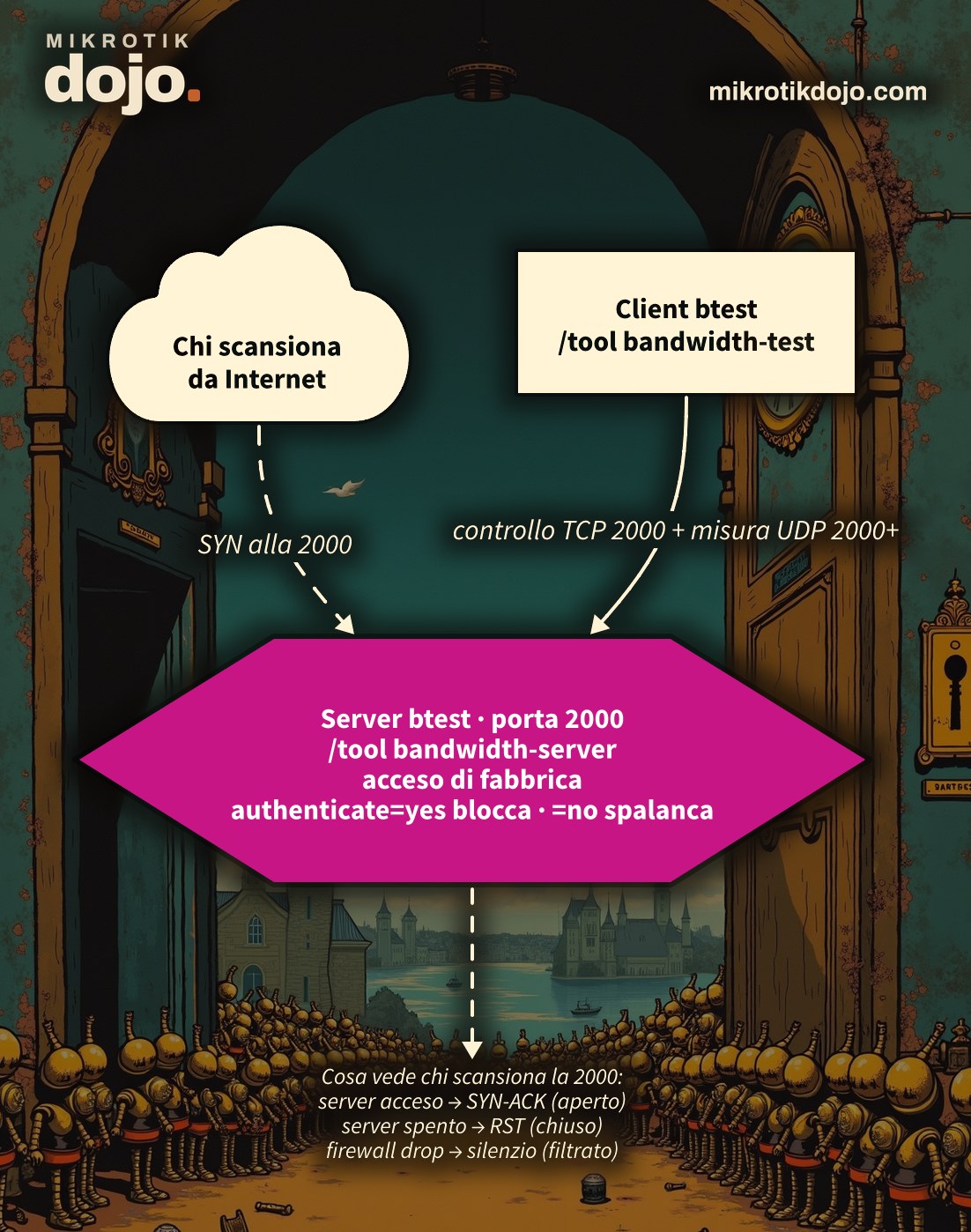
The bandwidth test has two halves. On one side is the client (/tool bandwidth-test): the one that initiates the measurement. On the other side is the server (/tool bandwidth-server): the one that accepts the measurement and acts as the partner. To measure bandwidth, the client floods the link with packets as fast as it can and counts how many arrive on the other side. In practice, it is a controlled, intentional flood.
The mechanism uses two channels:
- a TCP control channel on port 2000: the client connects, announces itself, and — if required — authenticates;
- the actual measurement traffic, which starts from UDP port 2000 and up (one port per session: 2001, 2002, 2003…). Alternatively, the test can run entirely over TCP.
Useful terminology: direction=transmit measures traffic from the client to the server, receive the reverse, and both both directions. Keep this in mind, because “who generates the traffic” changes depending on the direction.
Step 2: The factory state is surprising
Take a clean router (here, a freshly reset CHR) and look at the bandwidth test server without having touched anything:
/tool bandwidth-server print enabled: yes
authenticate: yes
allocate-udp-ports-from: 2000
max-sessions: 100
allowed-addresses4:
allowed-addresses6:Three things to note. The server is already enabled: yes: nobody enabled it, it was like that out of the box. It requires authentication (authenticate: yes), and that is our luck. And the list of allowed addresses (allowed-addresses4) is empty, which here means “anyone”. On a router without a firewall — a CHR, or a device freshly reset before you add rules — this means port 2000 responds to the world.
⚠️ Warning: “enabled by default” does not mean “wide open”. With authentication enabled, you still need valid router credentials to use it. But the port is visible, and that alone is already information you are giving to anyone scanning.
Step 3: What a scanner sees on port 2000
On the WAN of a public router, port TCP 2000 is constantly being probed: these are automatic scans looking specifically for bandwidth servers left open. We put a sniffer on the segment and examine the three possible cases, packet by packet. It is the same “open / closed / filtered” pattern that any port scanner would use. (Here the sniffer is on the segment; you can receive the same traffic remotely using dojo.tzsp, which reads the TZSP mirror from RouterOS.)
Server running: the port responds (open)
IP scanner.51912 > router.2000: Flags [S]       # il SYN dello scanner
IP router.2000 > scanner.51912: Flags [S.]      # SYN-ACK: "ci sono"
IP scanner.51912 > router.2000: Flags [.]        # ACK
The TCP handshake completes. For the scanner, this is the answer it was looking for: there is a bandwidth server here.
Server stopped: port closed
IP scanner.40100 > router.2000: Flags [S]       # il SYN
IP router.2000 > scanner.40100: Flags [R.]      # RST: "qui non c'è niente"
With /tool bandwidth-server set enabled=no, the router actively refuses the connection with an RST. The port appears closed. The scanner knows this in one go, but at least it does not find a service to probe.
Port filtered by the firewall: silence
IP scanner.40300 > router.2000: Flags [S]       # SYN
IP scanner.40300 > router.2000: Flags [S]       # SYN (ritrasmesso)
IP scanner.40300 > router.2000: Flags [S]       # ...e ancora, nessuna risposta
With an input rule in drop, the router does not respond at all: the scanner retransmits the SYN a few times and then gives up, timing out. From the outside, you cannot even tell if the router exists. This is the best outcome, and we achieve it in Step 7.
Step 4: with authentication, the port talks but does not yield
Let’s run a test against our factory-default router (authentication enabled) with a wrong password. Here is what the sniffer captures:
Flags [S] / [S.] / [.]          # stretta di mano TCP sulla 2000: completata
Flags [P.] len 4  →             # il server manda la sua sfida
Flags [P.] len 16 ←             # il client prova a rispondere
Flags [P.] len 50 ↔             # scambio di autenticazione
Flags [F.]                      # il server chiude la connessione
And the client says:
status: connecting
status: authentication failed
The port talked — handshake and authentication challenge — but without valid credentials, the server closes and that’s it. No UDP packets, no measurement traffic. The moral: authentication enabled (the default) does its job. The trouble starts when someone turns it off.
Step 4-bis: is the authentication encrypted? No (but the password does not travel in clear text)
A legitimate question: when the test authenticates, do the credentials pass in clear text like on the non-SSL API? You cannot guess — you capture. I started a server with authenticate=yes, gave the user the password dojo12345! and ran the test with those credentials, sniffing the entire TCP 2000 control channel at full packet level. Three things, all read from the capture:
- No TLS. No
ClientHello, no encryption: the control channel is plain TCP. - The username travels in clear text.
adminis readable as-is in the packet. - The password does not. The string
dojo12345!does not appear anywhere: zero occurrences in the entire capture.
So how does the server verify it? With a challenge/response: the server sends a random value, and the client responds with a 16-byte digest (MD5 scheme, the same as the old Winbox login pre-6.43). It is the block that immediately follows admin\0 in the authentication packet — actually captured:
0x0030:  ...2761 646d 696e 0066 303b 9477   ..'admin.f0;.w
0x0040:  b356 5ea2 62b6 d537 8106 4340 ...   .V^.b..7..C@...
         └─ "admin" ─┘    └──── 16 byte di digest (NON la password) ────┘
So a sniffer does not read the password on the fly. But “not in clear text” does not mean “secure”:
- There is no encryption: the username is exposed, and the entire exchange can be captured by anyone on the path.
- Whoever captures
username + sfida + rispostahas everything needed for an offline brute-force, and here “offline” means fast: MD5 on a modern GPU is processed at billions of attempts per second, without ever touching the router again or generating a log. A weak password — yes, even one likedojo12345!against a good dictionary — falls in seconds. The barrier is the length and entropy of the password, not the protocol. - There is no server authentication and no replay protection: that channel is only as secure as the underlying network.
This is not theory — it is CVE-2018-14847 (as already reproduced in the lab). In 2018, a flaw in the Winbox parser (port 8291) allowed an unauthenticated attacker to read arbitrary files from the router — including user.dat, the user database, from which passwords can be recovered. This led to one of the largest waves of compromises ever seen on RouterOS — approximately 200,000 routers infected for cryptojacking (along with VPNFilter and similar threats). MikroTik addressed the issue by changing the login scheme in version 6.43. The digest you just saw passing over the btest belongs to that pre-6.43 world: it is the same reason why it should never be exposed.
Bottom line: the bandwidth test does not provide a secure channel. It protects the password behind a challenge (not immediately readable), but leaves the username exposed and vulnerable to offline cracking. The two defenses that matter are those in Step 7: a strong password and, above all, the port closed to external access — so that the exchange to be sniffed never even arrives.
Step 5: Without authentication, the router becomes a traffic megaphone
You may come across the quick “solution” for a test that won’t start: authenticate=no. Here is what it really means. We set it on the server and launch the test from another machine without passing any credentials:
# sul router "vittima" (NON fatelo su un router esposto):
/tool bandwidth-server set authenticate=no
The test starts anyway. After the brief handshake on port 2000, the sniffer fills up with this:
IP attaccante.2259 > router.2003: UDP, length 1472
IP attaccante.2260 > router.2003: UDP, length 1472
IP attaccante.2259 > router.2003: UDP, length 1472
... (centinaia di pacchetti al secondo)
Anyone who finds that port can now use your router as a flood partner. With direction=receive, they can have it sent from your router: it is your outbound bandwidth and your CPU working for them. With both, in both directions. A router is a very efficient traffic generator: this is exactly why authenticate=no on a device reachable from the Internet is a gift to outsiders.
This is not spoofed reflection. Be careful not to confuse this with amplification attacks like DNS or NTP: there, one UDP packet with a spoofed source is enough to bounce a huge response toward an unaware victim. Not here. The control channel is TCP on port 2000, and you cannot complete a TCP handshake with a fake address — the SYN-ACK from the router would return to the spoofed IP, not to the attacker. Therefore, the source is self-validated, and the UDP flood cannot be redirected to a third party: the target is always and only the router itself, its CPU, and its bandwidth.
⚠️ Warning: never set authenticate=no on a router that has a foot on the Internet. If a test “does not start”, the problem is the credentials or the firewall, not the authentication: it is solved with the right user, not by turning off the lock.
Step 6: legitimate use (how to measure properly)
Having stated the risk, the tool is useful. To measure bandwidth towards another MikroTik that you control, from the client you launch:
/tool bandwidth-test address=198.51.100.1 direction=both \
user=admin password=LA-TUA-PASSWORD duration=10s(198.51.100.1 is the address of the server router; the credentials are those of the server.) During the test you see the numbers scroll: tx-total-average, rx-total-average, lost packets and the CPU load on both sides (local-cpu-load, remote-cpu-load).
⚠️ Warning: the bandwidth test saturates the link for the duration of the test. On a production link this means degrading everything else for those seconds; on small devices the limit is set by the CPU, not the line, and the number you read is that one. Do it on links you can afford to fill, and for a few seconds only.
Step 7: how to close it (in layers)
From the simplest to the most robust. Do what is needed for your case — often the first one is enough.
If you do not use it: turn off the server
/tool bandwidth-server set enabled=noPort 2000 goes from “open” to “closed” (that RST from Step 3). No server, no attack surface. This is the right choice for the majority of routers, which have never used a bandwidth server.
If you use it: keep authentication and restrict addresses
Leave authenticate=yes (never touch it) and, if possible, tell the server from which addresses to accept, using the service’s built-in list:
/tool bandwidth-server set authenticate=yes allowed-addresses4=203.0.113.10/32With the list populated, a test coming from an address outside the list is not even negotiated: the client stays on connecting and goes to can not connect. Only the address in the list (here your management station) can start the measurement. It is an ACL that lives in the service, before and beyond the firewall.
In any case: close the port from the WAN with the firewall
The defense that matters for an exposed router is not letting those packets arrive from the public network. Two targeted rules in input (comment will remind you why they are there):
/ip firewall filter
add chain=input in-interface-list=WAN protocol=tcp dst-port=2000 \
    action=drop comment="btest: drop control port from WAN"
add chain=input in-interface-list=WAN protocol=udp dst-port=2000-2100 \
    action=drop comment="btest: drop measurement ports from WAN"
The first rule — the one on TCP 2000 — is the essential one: without the control channel, no test starts. The second also closes the UDP measurement ports, for completeness. From outside, the port becomes filtered: total silence, as in Step 3.
If you have already done the basic router hardening, your input probably already drops everything coming from the WAN that is not explicitly allowed: in that case port 2000 is already closed and these two rules are just an explicit confirmation. You can verify it by watching the counters of the drop rules while someone knocks.
For the complete list of properties of the two commands, see the MikroTik manual: Bandwidth Test.
Frequently asked questions
Is the bandwidth server really enabled by default?
Yes: on RouterOS /tool bandwidth-server it is born with enabled=yes and authenticate=yes. On a router with the default configuration there is also a firewall that blocks the WAN; on a CHR or on a device just reset, until you set the rules, port 2000 is reachable. Check with /tool bandwidth-server print.
Why do I see so many attempts on port 2000 in the WAN logs?
Because automatic scanners specifically look for open bandwidth servers. A SYN on port 2000 is a question: “Is there a server here?”. If you close the port with the firewall, the question goes unanswered and you stop appearing in their lists.
What is the difference between stopping the server and closing it with the firewall?
Stopping the server (enabled=no) causes the port to respond with an RST: the scanner immediately understands that it is closed. The firewall in drop does not respond at all: the port appears filtered and the router is invisible from outside. If you do not use the server, do both: stop it and keep it out of the WAN with the firewall.
Does running the test consume my bandwidth or theirs?
It depends on the direction. transmit measures from client to server, receive from server to client, both both. With receive, your router is the one sending: if the server is yours and open, a stranger can make you send traffic using your outbound bandwidth and your CPU.
If I block port 2000, do I break anything?
No, unless you actually use the bandwidth test towards that router from outside. The tests you launch yourself towards other routers continue to work: the block is in input and only concerns those who want to use the server on your device.
Tested in the lab on PNETLab with CHR RouterOS 7.24.5 (stable): factory state of the bandwidth-server (enabled, with authentication, empty address list); real capture of the three scanner cases on port 2000 (SYN-ACK with server enabled, RST with server disabled, no response with the drop of the firewall); test with wrong password (authentication failed, no measurement traffic) and with authentication disabled (UDP flood from port 2000 upwards without credentials); restriction with allowed-addresses4 and block in input verified with the sniffer on the test segment; full-packet capture of the TCP 2000 control channel during an authenticated test (password dojo12345!), showing the absence of TLS, the username in clear text and the password as an MD5 challenge/response digest — never in clear text.