
Why does encrypted DNS bypass the router?
Classic DNS travels in clear text on port 53: the router sees it, can redirect it to itself, filter it, and log it. That is what we do in the howto on transparent DNS with NAT bridge, and it works well with PCs, cameras, and smart TVs.
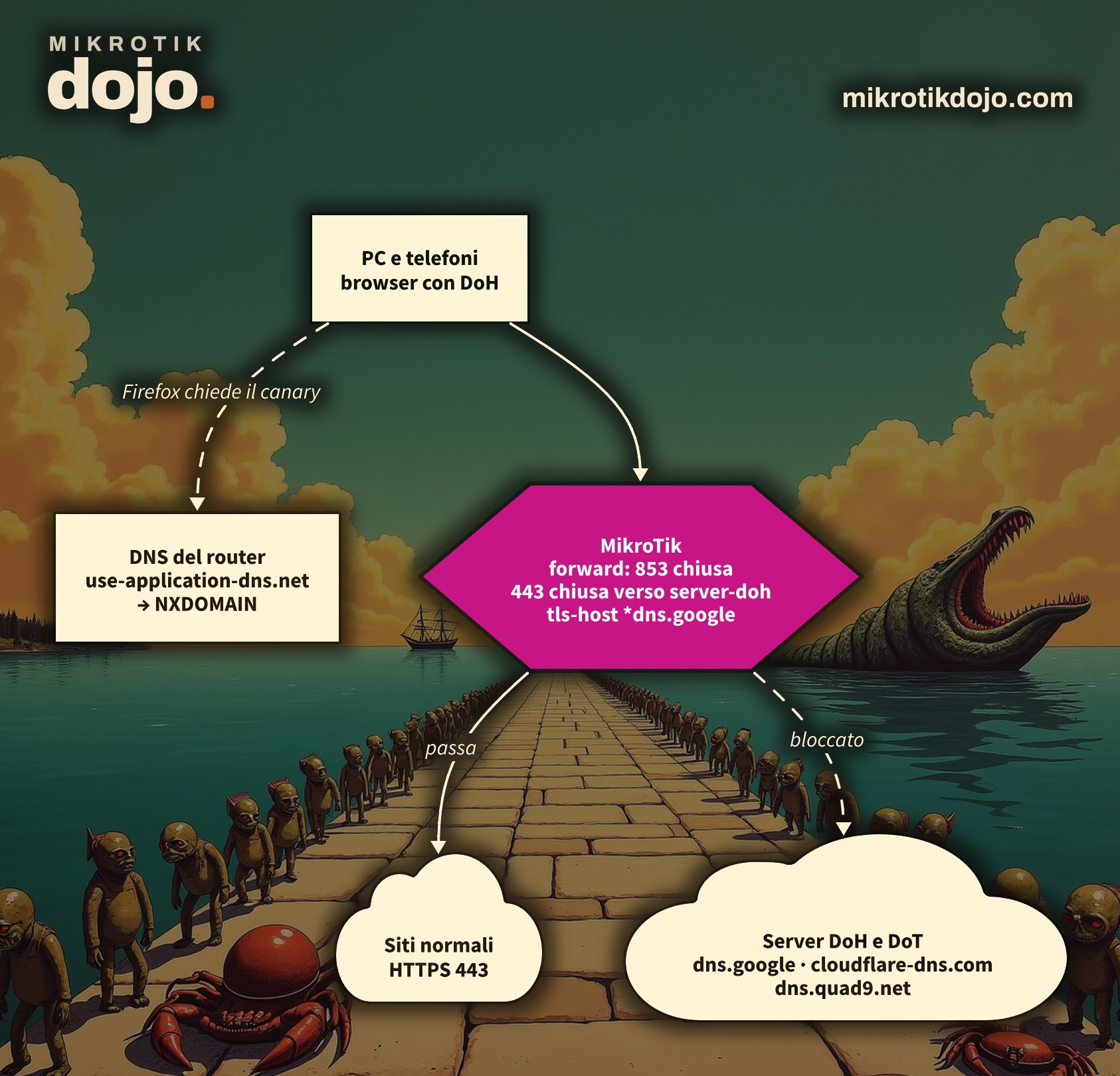
Encrypted DNS does not. There are two ways to do it, and both slip past the router’s notice:
- DNS over TLS (DoT): requests travel encrypted on a dedicated port, 853. This is what Android uses with the “Private DNS” option;
- DNS over HTTPS (DoH): requests travel inside a normal HTTPS connection, on port 443, the same as all websites. This is what browsers use: Firefox, Chrome, Edge.
You can block DoT with a single rule. You cannot block DoH: you cannot close port 443 without closing the internet. You fight it by recognizing who the connection is going to. In the lab, I tested four techniques, one after another, from a Linux PC behind the MikroTik: in the end, DoT and DoH to Cloudflare, Google, and 1.1.1.1 were blocked, and normal browsing worked.
Step 1: how do I block DNS over TLS?
It is a port: close it in the forward chain, for all traffic passing through the router.
/ip firewall filter
add chain=forward protocol=tcp dst-port=853 action=reject reject-with=tcp-reset \
    comment="Blocca DNS over TLS" place-before=[find action=fasttrack-connection]
add chain=forward protocol=udp dst-port=853 action=drop \
    comment="Blocca DNS over QUIC" place-before=[find action=fasttrack-connection]
place-before=[find action=fasttrack-connection] places the rule right before fasttrack, at the top of the chain. Do not use destination=0 or place-before=0: on the default firewall, rule 0 is the dynamic rule for fasttrack counters, and RouterOS responds with cannot move builtin.
The UDP rule covers DNS over QUIC, the younger sibling of DoT, which uses the same port. reject with tcp-reset immediately tells the device that the path is closed, instead of letting it wait: an Android phone with automatic Private DNS falls back to normal DNS.
In the lab, before: kdig +tls @1.1.1.1 mikrotik.com responded. After: no response, neither from 1.1.1.1 nor from 8.8.8.8.
Step 2: how do I identify DoH servers?
DoH servers are few and famous: Google, Cloudflare, Quad9, OpenDNS, AdGuard. RouterOS allows you to put a name instead of an address in an address list: the router resolves it itself and keeps the addresses updated.
/ip firewall address-list
add list=server-doh address=dns.google
add list=server-doh address=one.one.one.one
add list=server-doh address=cloudflare-dns.com
add list=server-doh address=mozilla.cloudflare-dns.com
add list=server-doh address=dns.quad9.net
add list=server-doh address=doh.opendns.com
add list=server-doh address=dns.adguard-dns.com
Check the result:
/ip firewall address-list print where list=server-dohUnder each name, dynamic entries (flag D) with their addresses appear: dns.google brings 8.8.8.8 and 8.8.4.4, one.one.one.one brings 1.1.1.1 and 1.0.0.1, dns.quad9.net brings 9.9.9.9. That is why you should not manually add the addresses as well: in the lab, with 8.8.8.8 written together with dns.google, the router responded with already have such entry. Names in lists are explained in the MikroTik manual: Address-lists.
Step 3: how do I block DoH to those servers?
Close port 443, TCP and UDP (HTTP/3 travels over UDP), only towards the list:
/ip firewall filter
add chain=forward protocol=tcp dst-port=443 dst-address-list=server-doh \
    action=reject reject-with=tcp-reset comment="Blocca DoH verso i server noti" \
    place-before=[find action=fasttrack-connection]
add chain=forward protocol=udp dst-port=443 dst-address-list=server-doh \
    action=drop comment="Blocca DoH su HTTP/3" place-before=[find action=fasttrack-connection]
In the lab, from the PC behind the router, before these rules, DoH requests to cloudflare-dns.com, to dns.google, and directly to https://1.1.1.1/dns-query all responded; after, none did. And https://mikrotik.com continued to open.
⚠️ Warning: 8.8.8.8, 1.1.1.1 and 9.9.9.9 remain reachable on port 53. You are only blocking their encrypted DNS; standard DNS towards them continues to work, unless you redirect it to the router as in transparent DNS.
Step 4: and the name inside the TLS connection?
When a browser opens an HTTPS connection, it writes the site name it wants in clear text in the first packet (the SNI). The firewall matcher tls-host reads it, and it is useful for DoH servers that frequently change their address because they are behind a CDN:
/ip firewall filter
add chain=forward protocol=tcp dst-port=443 tls-host=*dns.google \
    action=reject reject-with=tcp-reset comment="Blocca DoH per nome" \
    place-before=[find action=fasttrack-connection]
Two things I have seen in the lab, and one thing the manual says:
- the rule must be placed before fasttrack and
accept established, which is the reason forplace-before. The first TLS packet arrives when the connection is already “established”: at the end of the chain, the default rule accepts it before your rule ever sees it. Placed at the end, DoH passed; placed before fasttrack, it was blocked. If your firewall does not have fasttrack,place-beforefinds nothing and the rule ends up at the end: move it aboveaccept establishedyourself; - it does not work without a name:
https://1.1.1.1/dns-querydoes not have a name inside, and with onlytls-hostit passed. This is why the list from step 2 is also needed; - the manual warns that the matcher does not see the name if the first TLS packet is split into multiple segments, which happens with recent browsers.
tls-hostis a reinforcement, not the primary defense.
All matchers are in the MikroTik manual: Filter.
Step 5: how do I disable Firefox’s DoH without touching the PCs?
Before enabling DoH on its own, Firefox asks the network DNS for the name use-application-dns.net. If the response is “does not exist”, it understands that the network wants to manage DNS and leaves DoH disabled. A single static entry is enough:
/ip dns static add name=use-application-dns.net type=NXDOMAINIn the lab, when asked to the router, use-application-dns.net responds “not found”; when asked directly to 9.9.9.9, it responds normally. Therefore, it only works if the PCs use the router’s DNS: the default DHCP provides it, and for devices that have a hardcoded DNS, there is transparent DNS with bridge NAT. Static entries are in the MikroTik manual: DNS.
This applies only to automatic activation: if the user has manually enabled DoH, Firefox will still use it, and there the rules from steps 3 and 4 apply.
Step 6: how do I verify that everything is closed?
From a Linux PC behind the router:
kdig +tls @1.1.1.1 mikrotik.com
curl -H 'accept: application/dns-json' 'https://cloudflare-dns.com/dns-query?name=mikrotik.com&type=A'
curl 'https://dns.google/resolve?name=mikrotik.com&type=A'
curl -I https://mikrotik.com/
The first three must fail, the last one must respond. On the router, the counters show what is working:
/ip firewall filter print stats where comment~"Blocca"What do I check before putting it into production?
- it is not a perfect wall: anyone using a DoH server that is not in the list, or a VPN, will pass. For corporate devices, the definitive solution is to disable DoH via browser policies (Firefox, Chrome, and Edge have them) and private DNS on managed phones; the router covers everything else;
- keep the list maintained: if a service stops working, check the counters from step 6 before looking elsewhere;
- the rules are in forward and do not touch the router itself, which continues to use its own DNS, even in DoH if you have configured it;
- the router that decides the DNS for the entire network must be protected: follow the Basic Hardening of a MikroTik router.
How it works internally, in the Dojo Knowledge base: address lists, including DNS names, rule order and the dummy rule for fasttrack.
Tested in the lab on PNETLab with CHR RouterOS 7.24.5 (stable) and a Debian 12 client behind the router, with the default firewall and fasttrack enabled: DoT to 1.1.1.1 and 8.8.8.8 blocked, address list with the DoH server names (and the error when adding the addresses as well), DoH to cloudflare-dns.com, dns.google and 1.1.1.1 blocked while normal browsing works, tls-host effective only at the top of the chain and useless without a name, use-application-dns.net in NXDOMAIN from the router’s DNS. Firefox’s behavior with the canary domain comes from Mozilla’s documentation.
Frequently asked questions
How do I block DNS over HTTPS with MikroTik?
With an address list containing the DoH server names (dns.google, cloudflare-dns.com, dns.quad9.net…), which the router resolves on its own, and two forward rules closing TCP and UDP port 443 to that list. As a reinforcement, the tls-host matcher at the top of the chain.
How do I block DNS over TLS?
By closing port 853 in forward, TCP for DoT and UDP for DNS over QUIC. reject with tcp-reset immediately reverts devices in automatic mode back to normal DNS.
Why does the tls-host rule block nothing?
Usually because it is placed after fasttrack or after the accept established: the first TLS packet belongs to an already established connection and is accepted before. It must be moved to the top. Additionally, it does not work with connections to an IP address without a name, nor when the first TLS packet is split into multiple segments.
How do I disable Firefox’s automatic DoH across the network?
By having the router’s DNS respond “does not exist” to the name use-application-dns.net, using /ip dns static add name=use-application-dns.net type=NXDOMAIN. This only works if the PCs use the router’s DNS and if the user has not manually enabled DoH.