
What is it for?
You arrive at a client’s site: the operator manages the router, DHCP is handled by the operator as well, and you cannot touch anything. Yet they ask you to block some websites, resolve internal names, or simply see who is requesting what. And half of the devices, cameras and smart TVs in particular, do not even ask the router for DNS: they have 8.8.8.8 hardcoded.
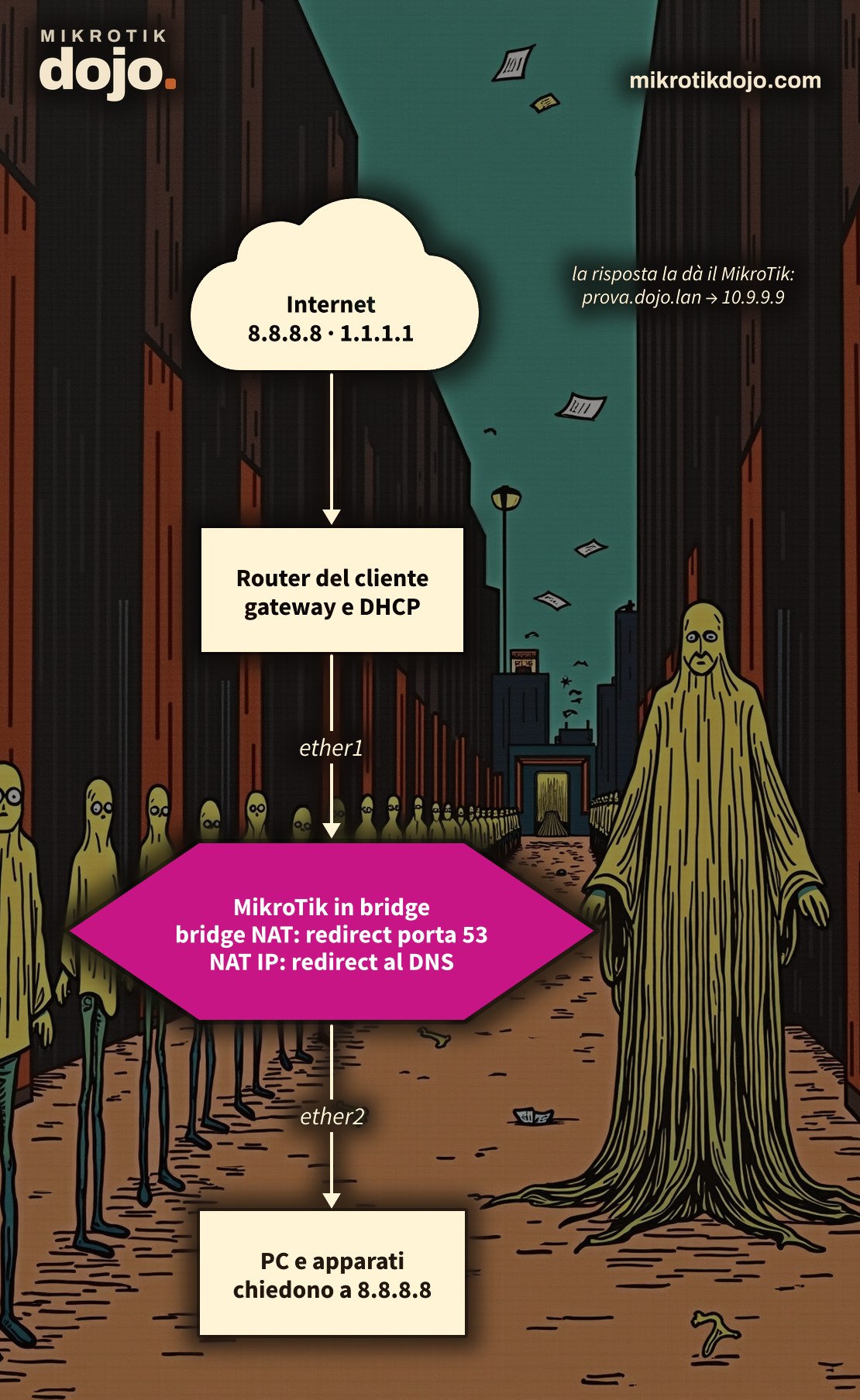
The solution is a MikroTik placed in the middle as a piece of cable, bridging the client’s network and their router. It is invisible to everyone: same addresses, same gateway, same DHCP. But every DNS request that passes through it, destined for any server, is intercepted and answered by the MikroTik.
The trick lies in two rules: one in the bridge NAT, which sends the request “up” to the router, and one in regular NAT, which delivers it to the router’s DNS. Both are required, and in the lab I tested what happens when one is missing.
Step 1: how do I put the MikroTik in bridge mode?
A bridge with two ports: ether1 towards the client’s router, ether2 towards the network (the switch, the devices).
/interface bridge add name=br-trasp
/interface bridge port
add bridge=br-trasp interface=ether1
add bridge=br-trasp interface=ether2
/ip dhcp-client add interface=br-trasp
The DHCP client on the bridge serves the MikroTik itself: it gets an address from the client’s network, along with the gateway and DNS from the operator’s router. This gives it internet access to resolve names it does not know. Nothing changes for the PCs: they continue to get their address from the previous router.
⚠️ Warning: if you connect to the MikroTik via ether1 or ether2, adding them to the bridge will disconnect you for a few seconds. Prepare everything from another port, or via WinBox using the MAC address.
Step 2: how do I enable the router’s DNS?
/ip dns set allow-remote-requests=yesNow the MikroTik responds to incoming DNS requests. If you use the firewall from Basic Hardening of a MikroTik Router, add the bridge to the LAN list, otherwise the requests will be dropped on input:
/interface list member add list=LAN interface=br-traspStep 3: why is regular NAT not enough?
The first instinct is the usual redirect rule:
/ip firewall nat
add chain=dstnat protocol=udp dst-port=53 action=redirect to-ports=53
add chain=dstnat protocol=tcp dst-port=53 action=redirect to-ports=53
Add it, we need it. But on its own, it does nothing: in the lab, its counters remained at zero. Traffic passing through a bridge does not reach the IP layer, so the IP firewall does not see it at all: the bridge is the piece of cable, and the cable does not look inside the packets.
Step 4: how do I send DNS to the router using bridge NAT?
Bridge NAT works inside the bridge, on frames. The redirect action does one thing: instead of passing the frame from one port to another, it delivers it to the router itself.
/interface bridge nat
add chain=dstnat in-interface=ether2 mac-protocol=ip ip-protocol=udp dst-port=53 action=redirect
add chain=dstnat in-interface=ether2 mac-protocol=ip ip-protocol=tcp dst-port=53 action=redirectin-interface=ether2: only requests coming from the client’s network; traffic from the operator’s router side passes without issues;mac-protocol=ipis needed to useip-protocolanddst-port;- UDP and TCP: large DNS responses travel over TCP.
Now the request reaches the router, the NAT from Step 3 sees it and forwards it to the MikroTik’s DNS. The two rules work as a relay: bridge NAT sends the packet to the router, IP NAT delivers it to the DNS. The bridge NAT actions are listed in the MikroTik manual: Bridging and Switching.
What if you remove the rule from Step 3? In the lab, the request reaches the router, but it is addressed to 8.8.8.8: the router forwards it to Google, just as it would with any other packet, and Google responds. You need both rules.
Step 5: how do I verify it works?
Add a name that exists only on the MikroTik:
/ip dns static add name=prova.dojo.lan address=10.9.9.9Then, from a PC on the network, query an external DNS server for it:
host prova.dojo.lan 8.8.8.8
nslookup prova.dojo.lan 1.1.1.1
Google does not know what prova.dojo.lan is. If the response is 10.9.9.9, the MikroTik answered. In the lab, before the rules: “not found”. After: prova.dojo.lan has address 10.9.9.9, querying 8.8.8.8, 1.1.1.1, and 9.9.9.9, also over TCP. On the router, the counters increase:
/interface bridge nat print stats
/ip firewall nat print stats
Step 6: what do I do with this now?
All DNS traffic for the network goes through you. For example, to block a site and all its subdomains:
/ip dns static add name=tiktok.com type=NXDOMAIN match-subdomain=yesWhoever queries www.tiktok.com to any DNS server is told it does not exist. Tested in the lab, both towards 8.8.8.8 and towards 1.1.1.1.
The same scheme works for other services: change the port in the two rules and route to the router whatever you need.
What do I check before putting it into production?
- Encrypted DNS cannot be intercepted: browsers and phones using DNS over HTTPS (DoH) or DNS over TLS (port 853) still pass through. For a serious filter, you must block those as well: how to do this is in the howto on how to block DNS over HTTPS and DNS over TLS;
- if the MikroTik goes down, the bridge is interrupted and the network loses connectivity to the router: use it where you can power it reliably;
- all DNS traffic passes through the CPU, the rest does not. For an office, this is negligible;
- the MikroTik is on the client’s network with its own address and open DNS: protect it with the Basic Hardening of a MikroTik Router.
Tested in the lab on PNETLab with CHR RouterOS 7.24.5 (stable) in bridge between a Debian 12 client and another router with DHCP: IP NAT only (counters at zero), bridge NAT plus IP NAT (MikroTik response towards 8.8.8.8, 1.1.1.1, and 9.9.9.9, over UDP and TCP), bridge NAT only (Google response), blocking a domain with type=NXDOMAIN.
Frequently asked questions
How do I intercept DNS with a MikroTik in bridge mode?
With two rules: in bridge NAT (/interface bridge nat), a redirect for port 53, which routes the request to the router, and in IP NAT, a redirect towards port 53, which delivers it to the MikroTik’s DNS. DNS must be enabled with allow-remote-requests=yes.
Why doesn’t the firewall NAT see traffic in bridge mode?
Because traffic crossing a bridge stays at the Ethernet level and does not pass through the IP firewall. The redirect of bridge NAT lifts it to the router, and from there IP NAT sees it.
Do I need use-ip-firewall?
No. With the redirect of bridge NAT, only DNS requests are lifted to the router; everything else crosses the bridge without passing through the IP firewall.
Does it work with encrypted DNS?
No: DNS over HTTPS and DNS over TLS do not use port 53 and cannot be read. However, they can be blocked: port 853, an address list of DoH servers, and Firefox’s canary domain, as explained in the howto on how to block DNS over HTTPS and DNS over TLS.