
Why make MikroTik talk to Telegram?
Because the warning email you read the next morning, the message on your phone you read right away. A router that writes you “the main line went down” or “there’s a rogue DHCP on the LAN” while it’s happening is worth more than ten graphs you look at the next day.
In this howto we build just one thing: a telegram script that sends a message. Once it’s there, every other Dojo howto that has to warn someone uses it, from Netwatch to the PoE watchdog: one line and the router writes to you.
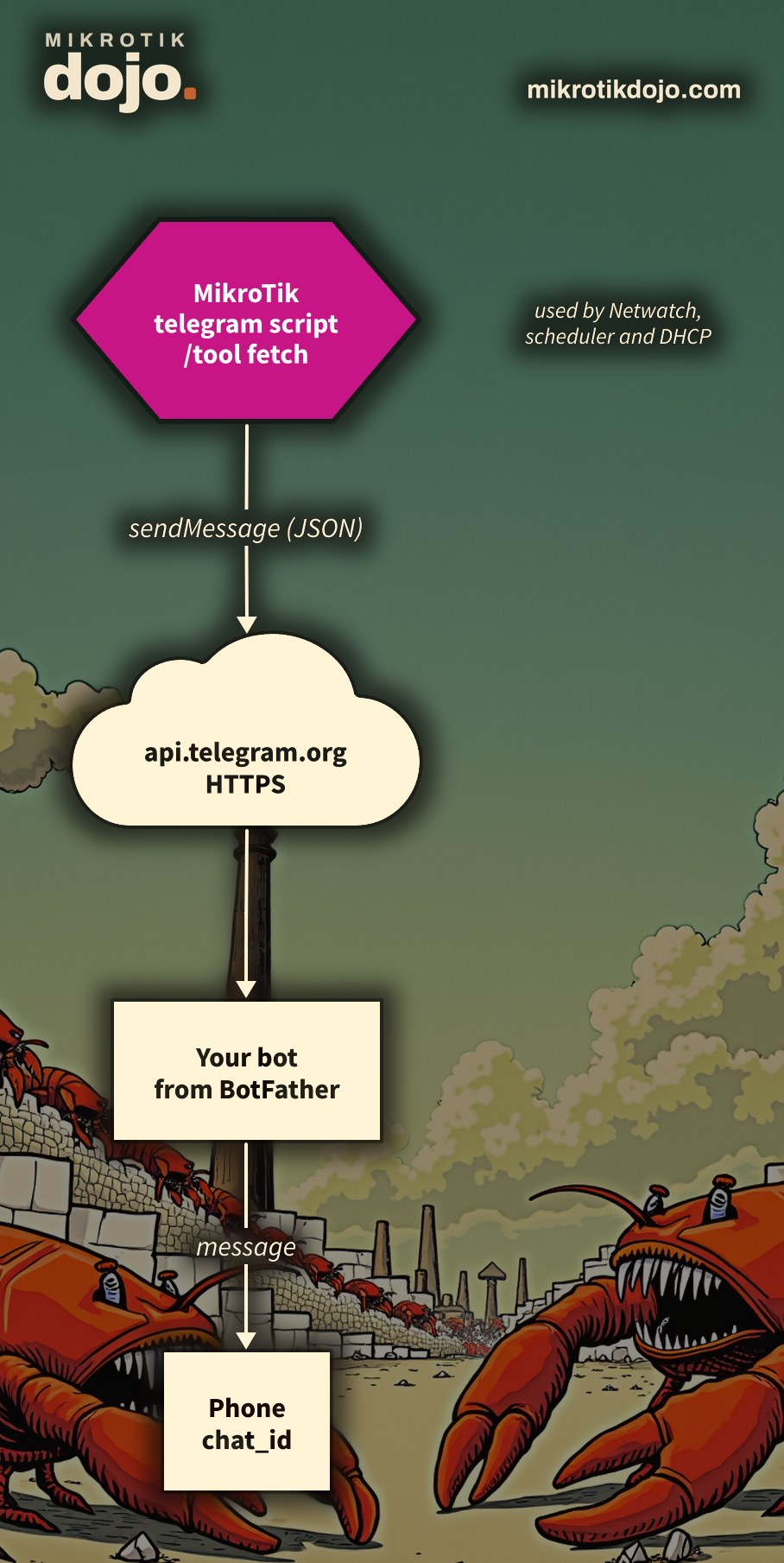
Step 1: how do I create the bot?
The messages are sent by a bot, an automated Telegram account. You create it by talking to another bot, Telegram’s official one:
- on Telegram search for @BotFather and send it
/newbot; - give the bot a name (for example “Office Router”) and a username ending in
bot(for examplerouterufficio_bot); - BotFather replies with the token, a string like
123456789:AAH…. Copy it.
A tip born in the field: if you mistype the name or the username, don’t edit the message, send a new one. BotFather reads only new messages and, if you edit one, it loses its place halfway through and replies with a generic error. When in doubt, /cancel and start over with /newbot.
⚠️ Warning: the token is the bot’s password. Whoever has it can send messages in its name. If it ends up where it shouldn’t, BotFather generates a new one and the old one stops working.
Step 2: who should the bot write to?
The bot writes to a chat, identified by a number, the chat_id. To find it out:
- open the chat with your bot, press Start and send it any message, for example “hi” (a bot can’t write first to someone who has never written to it);
- from the browser open
https://api.telegram.org/botTOKEN/getUpdates, putting your token in place of TOKEN; - in the reply look for
"chat":{"id":: the number that follows is yourchat_id.
Want the alerts in a group, for example the technicians’ one? Add the bot to the group, send a message in the group, and repeat point 2: a group’s chat_id is a negative number, for example -1001234567890.
Step 3: can the router reach Telegram?
The router has to resolve api.telegram.org and go out to the internet over HTTPS. A quick test:
/ping api.telegram.org count=3If it answers, you’re ready. If it doesn’t resolve the name, check the router’s DNS (/ip dns print).
Step 4: how do I create the telegram script?
A script that holds the sending “engine.” Put your token and your chat_id in place of the example ones:
/system script add name=telegram policy=read,write,test source={
:local token "123456789:AAH-example-token"
:local chat "987654321"
:local text ([/system identity get name] . ": " . $1)
/tool fetch url=("https://api.telegram.org/bot" . $token . "/sendMessage") http-method=post \
    http-header-field="Content-Type: application/json" check-certificate=yes \
    http-data=[:serialize to=json value={"chat_id"=$chat; "text"=$text} options=json.no-string-conversion] \
    output=none
}
What it does, line by line:
$1is the text you pass it; in front of it it puts the router’s name (/system identity), so when you have twenty routers you know right away who’s writing to you;/tool fetchcalls the Telegram API over HTTPS;check-certificate=yesverifies that the other end really is Telegram, with the certificates already present in RouterOS;:serialize to=jsonbuilds the message in JSON and handles quotes, slashes, and accented characters on its own, which written by hand would break everything. Thejson.no-string-conversionoption keeps thechat_idfrom turning into a number with decimals (without it,"987654321"becomes987654321.000000).
/tool fetch and all its parameters are in the MikroTik manual: Fetch.
Step 5: how do I send the first message?
You turn the script into a function with :parse and then call it. From the terminal, everything inside the braces (a :local variable lives only inside its block):
{
:local telegram [:parse [/system script get telegram source]]
$telegram "hello, this is the router"
}
On the phone a message arrives like Office Router: hello, this is the router. You can also compose the text on the fly:
$telegram ("RouterOS " . [/system resource get version] . ", uptime " . [/system resource get uptime])The same two lines go in any script that has to warn you: a scheduler, a Netwatch, a DHCP alert. How :parse and functions work you’ll find in the MikroTik manual: Scripting.
⚠️ Warning: why not a global function? It would seem handier to define $telegram once with :global. I tried it: from the terminal it works, but in the Netwatch scripts the global function comes out empty and the message doesn’t go, with no error in the log. With :parse every script loads its own copy at the moment and it works everywhere, even right after a reboot.
Step 6: how do I get warned when the router reboots?
A reboot you didn’t ask for is always news: a power outage, a crash, someone who pulled the plug. A startup scheduler tells you:
/system scheduler add name=telegram-startup start-time=startup on-event={
    :delay 30s
    :local telegram [:parse [/system script get telegram source]]
    $telegram ("rebooted, RouterOS " . [/system resource get version])
}
The :delay 30s gives the router time to have internet. In the lab, after a reboot, the message arrived in less than a minute:
CHR: rebooted, RouterOS 7.24.5 (stable)Step 7: how do I tell if something’s wrong?
Every send leaves a line in the log:
/log print where topics~"fetch"Download from api.telegram.org FINISHED: the message went out;FAILED: ERROR parsing http: 401 …: the token is wrong or has been revoked;FAILED: Status 400, Bad Request: thechat_idis wrong, or you never wrote to the bot from the chat;- no line: the script didn’t run. Check that the script is named exactly
telegramand, from the terminal, that you put the lines inside the braces.
What do I check before putting it into production?
The token is written in the script, and it shows up in two places you wouldn’t expect. I verified it: /system script export reports it in full and, when you add or edit the script, the system log too records the whole source, token included. So:
- the exports and logs you send around, for support or on a forum, have to be scrubbed of the token; if you send the logs to an external syslog, remember the token is there too;
- access to the router has to be protected: follow the Basic hardening of a MikroTik router;
- one bot per customer, not one for everyone: if a token leaks, you redo just that one.
Now the router knows how to write: in the other Dojo howtos, when an alert is needed, the two lines from step 5 are all it takes.
Tested in the lab on PNETLab with a CHR running RouterOS 7.24.5 (stable) and a real bot: creation with BotFather, chat_id from getUpdates, message received on the phone (with accented characters), JSON with quotes and slashes, startup message after a reboot, 400 and 401 errors in the log, token visible in the export.
Frequently asked questions
How does a MikroTik router send a Telegram message?
With /tool fetch toward the Telegram bot API, the sendMessage method, passing the chat_id and the text in JSON. You need a bot created with @BotFather and its token.
How do I find the chat_id?
Write a message to the bot, then open https://api.telegram.org/bot<token>/getUpdates: the number after "chat":{"id": is the chat_id. For a group it’s a negative number.
Why doesn’t the message arrive?
Look at /log print where topics~"fetch": 401 means the token is wrong, 400 means the chat_id is wrong or the bot was never contacted. If there’s no line, the script didn’t run.
Why doesn’t the global $telegram function work in Netwatch?
Because the Netwatch scripts don’t see the global functions created by another session: the variable comes out empty and the message doesn’t go. Loading the script with :local telegram [:parse [/system script get telegram source]] it works in any context.
Can I send messages with accented characters and quotes?
Yes, if you build the JSON with :serialize to=json: RouterOS escapes quotes and slashes on its own and lets accented characters through.