
It’s Friday evening, you’ve just pushed a wrong configuration to a branch router and… silence. No ping, no Winbox, no SSH: you’ve locked yourself out of IP. By the book you’d get in the car. With RoMON, instead, you open Winbox at the office, click the branch router that shows up on its own in a list — with no IP address, across the network — and you fix it in thirty seconds. It looks like magic. But magic, when you put it under the sniffer, always tells you something more — and in this case something that concerns your security. In this article we figure out what RoMON is, switch it on in the lab, and then point Wireshark at it to see, packet by packet, what really travels on the wire. The answer will make you think about where you keep it on.
Related: Device-mode on RouterOS and the howto what a scanner sees of a MikroTik. Here it’s the same spirit: looking at a management service through the eyes of whoever is on the network.
Step 1: what RoMON is (and what it isn’t)
RoMON stands for Router Management Overlay Network: a management network that lives at Layer 2 and makes RouterOS routers talk to each other by MAC address, building an overlay that is entirely independent of IP. In plain terms: you can reach and manage a router even without an IP, with the wrong IP, or in a different subnet — as long as there’s Ethernet adjacency, directly or through other RoMON nodes (it’s multi-hop: the overlay routes between peers).
Two things to make clear right away, because they matter:
- It’s proprietary to MikroTik. Not an IETF standard, there’s no RFC: RoMON speaks RoMON only with other RouterOS devices. It’s a management plane all of their own.
- It’s one more management plane — and like every management plane, it’s a surface to protect. We’ll see that all too well.
The upside is undeniable: it’s the lifesaver when you’ve locked yourself out, the zero-config discovery hands you the whole “cloud” of adjacent routers, and multi-hop reaches even the distant ones. The part to understand is what happens on the cable.
Step 2: switching it on, and watching the neighbors appear
In the lab we have two CHR 7.25 routers — we’ll call them R-office and R-branch — connected by a plain Ethernet link with not a single IP address on it. You turn it on with one line, per-interface or globally:
/tool romon set enabled=yesAnd it all happens at once. From R-office we ask who’s there:
/tool romon discover duration=6

  ADDRESS            COST  H  PATH               L2MTU  IDENTITY  VERS  BOARD
A 52:54:00:BB:00:01   200  1  52:54:00:BB:00:01   1500  R-branch  7.25  CHR
Without having configured anything — no IP, no routing — R-office already knows that over there is R-branch, running RouterOS 7.25 on a CHR, which MAC it answers on, at what “cost” and how many hops. From here you get into it in Winbox or SSH over the overlay, as if it had an IP.
The chain: three routers, and the map of the whole network
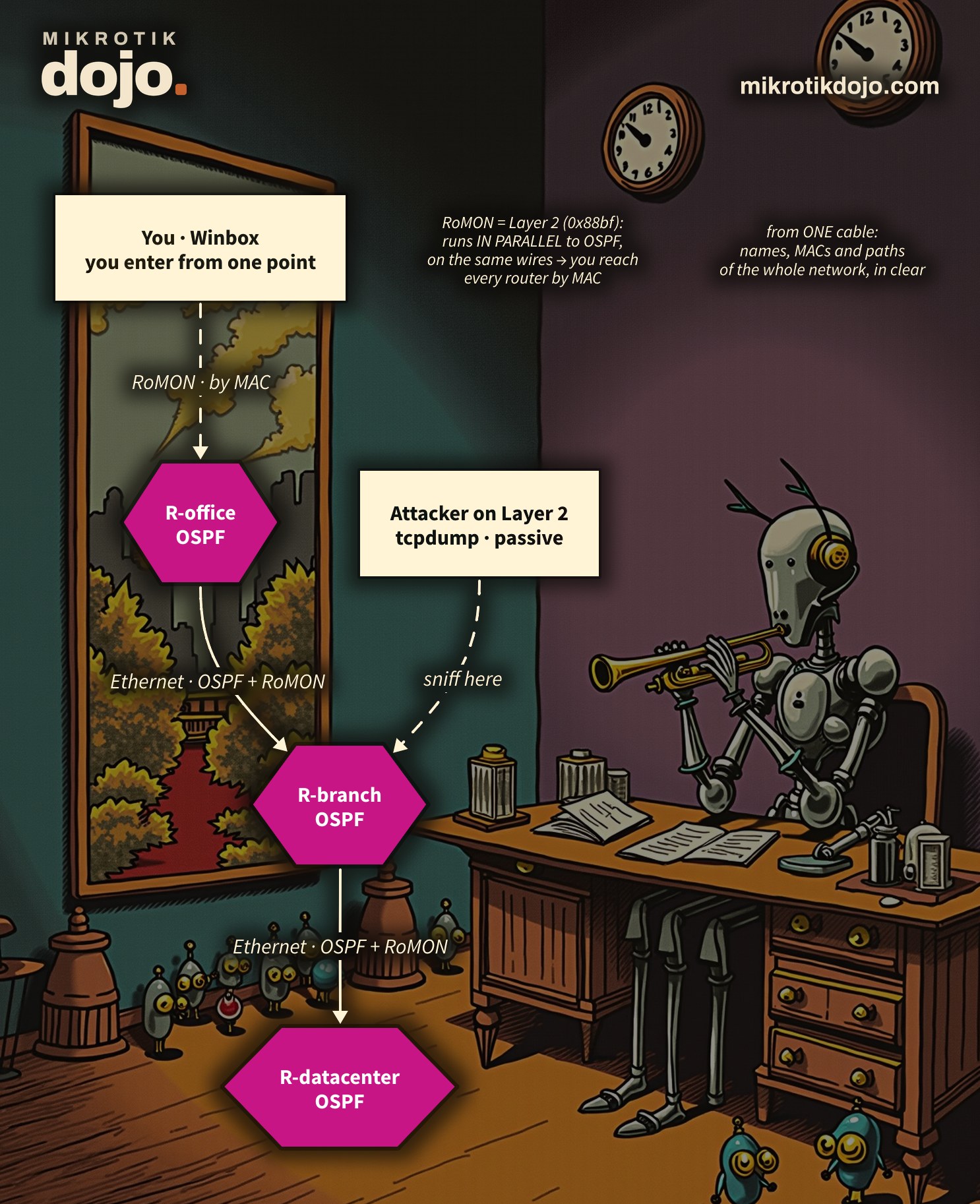
The nice — and dangerous — part arrives with more than two routers. Let’s add a third, R-datacenter, connected to R-branch on another segment. Now the topology is R-office — R-branch — R-datacenter, and R-office and R-datacenter do not see each other directly. And yet, from R-office:
/tool romon discover

ADDRESS            COST  HOPS  PATH               IDENTITY       BOARD
52:54:00:BB:00:01   200   1    52:54:00:BB:00:01  R-branch       CHR
52:54:00:CC:00:01   400   2    52:54:00:BB:00:01  R-datacenter   CHR
R-office sees R-datacenter too, at 2 hops, and the PATH field says exactly the thing you care about: to get there I pass through R-branch (MAC 52:54:00:BB:00:01). That’s the chain: you connect to the first, you see the second and the third, and you reach the third via the second. The intermediate RoMON routers act as bridges, hop after hop.
Now the point that matters in the real world — and the one that’s often misunderstood. Picture a routed network with OSPF: dozens of routers, each adjacent to others. If you enable RoMON on all the adjacent nodes, you get a management overlay that covers the entire OSPF network: you enter from any one router and reach all the others by MAC, regardless of IP. But careful: RoMON does not travel inside OSPF or BGP and is not routed at L3. It runs in parallel, on the same wires: every OSPF adjacency is also an Ethernet adjacency, and there the 0x88bf frames pass and get relayed by the routers. It’s a plane of its own, Layer 2, that mirrors your routed topology but is independent of it (it works even if OSPF is broken — that’s why it’s the lifesaver). To cross a purely L3 segment (routed, with no Layer 2 — for example an IP tunnel) you instead have to extend Layer 2, with an EoIP: inside that, RoMON frames travel.
Step 3: under the sniffer — the protocol confesses
We put a Linux box with a NIC on that segment (here it’s the lab host) and capture. First question: what “language” does RoMON speak? Let’s filter for what we find:
# tcpdump on the two routers' network
52:54:00:aa:00:01 > 01:80:c2:00:88:bf, ethertype 0x88bf, length 98
There’s RoMON’s signature: a dedicated EtherType, 0x88bf, and a fixed destination MAC, 01:80:c2:00:88:bf (a group address: that’s how nodes announce themselves to anyone on the segment). No IP, no TCP/UDP ports: pure Ethernet. So far, interesting but harmless. But then we look inside a discovery frame, in ASCII:
0x0070:  0000 0000 0000 0000 0309 522d 6669 6c69   ..........R-bran
0x0080:  6368 0004 0407 1966 0005 0343 4852 0604   ch....f...CHR..

  "identity" field (type 03, length 08):  52 2d 62 72 61 6e 63 68  = "R-branch"
  "board"    field (type 05, length 03):  43 48 52                 = "CHR"
Here’s the twist: the router’s identity (R-branch, in full), the board (CHR), the version, the MACs — are all written in the clear. And note the shape: it’s a plain type-length-value structure (03 08 = “identity, 8 bytes”, then the name’s bytes; 05 03 = “board, 3 bytes”, then “CHR”). A ten-line parser reads it with no effort — you don’t even need RouterOS. There is no encryption. Anyone on that Layer 2, even without taking part in RoMON, even without knowing anything about RouterOS, reads the map of your management plane: names, models, versions, topology. It’s gold for an attacker doing recon: in seconds, passively, they know which routers you have and what they’re called, without touching an IP or sending a packet.
And it gets worse, because that capture was on a single link — the one between R-office and R-branch. Yet in those frames we also found, in the clear, R-datacenter, which is two hops away and isn’t even on that segment: 54 frames with its name, its MAC cited 90 times. In the hex the name is there in full (03 0c = “identity, 12 bytes”, then 52 2d 64 61 74 61 63 65 6e 74 65 72 = “R-datacenter”). The reason is the relaying: R-branch repeats onto that link what it knows about the other nodes too. The consequence is serious — and it applies to the whole OSPF network we talked about: an attacker only needs a tap at any one point of the management plane to map the entire fabric — all the routers, names, MACs, paths — staying completely passive. One cable, the whole map.
This already answers the first question — RoMON is not encrypted. The documentation confirms it: RoMON authenticates and protects integrity (with an MD5 hash of the message, plus anti-replay), but it offers no confidentiality. And “authenticate” doesn’t mean “hide”. Keep it in mind, because it’s the trap of the next step.
Step 4: the secret — a lock, not a curtain
The right reaction is: “OK, then I’ll set a secret“. You do, and you should:
/tool romon set secrets=dojosecret123With the secret, whoever doesn’t know it cannot take part in the overlay nor manage your routers. You can see it on the wire too: new frames appear, of a different type (here 58 bytes), whose content is an opaque blob — the MD5 authentication at work:
52:54:00:bb:00:01 > 01:80:c2:00:88:bf, ethertype 0x88bf, length 58
  0x0000:  0501 003a 0000 0000 0000 0004 b2ab 6722
  0x0010:  ffe0 1a36 a092 ee72 5086 7d02 75a7 ee97
  0x0020:  1e44 af61 1ba3 10de 287c f055
  # unreadable: it's the hash that authenticates, not encrypted content
Looks solved. But let’s redo the capture with the secret active and count what’s still readable in the clear:
capture with secret active:  628 frames total
  frames containing "R-branch" in the clear:  54
  frames containing "CHR"      in the clear:  72
Fifty-four frames with the router’s name in the clear, while the secret is on. The secret added authentication (the 0x05 frames), but the discovery frames keep shouting who you are, exactly as before. It’s the central lesson of this article: the secret is a lock, not a curtain. It stops an outsider from getting in and commanding; it does not stop them from looking. Confidentiality, RoMON simply doesn’t have.
Step 5: and if the secrets don’t match?
To close the loop, we give R-branch a secret different from R-office’s, and from R-office we try to discover it:
[R-branch] /tool romon set secrets=ANOTHERSECRET
[R-office] /tool romon discover duration=6
  ADDRESS   COST  H  PATH   L2MTU  IDENTITY  VERS  BOARD
  (no row — R-branch does not appear)
Perfect: with a different secret, R-office does not discover nor manage R-branch via RoMON. The control plane is protected. But — and here the logic closes — the passive sniffer on the segment still sees R-branch in the clear, because its announcement beacons remain broadcast. Control: blocked. Information: always exposed.
Step 6: can you make a “Linux box that speaks RoMON”?
A natural question, and the answer has two halves.
Passive collection: yes, it’s trivial. A Linux machine with a NIC on the RoMON segment — no RouterOS, no secret — sniffs and decodes the metadata: identity, board, version, MAC, topology. We’ve just done it. And it works even if there’s a secret, because the secret doesn’t encrypt. That’s why RoMON on an untrusted Layer 2 is a gift to whoever does reconnaissance.
Active participation: harder. Making a Linux box talk as a RoMON peer (announce itself, query, get routed) means reverse-engineering a proprietary, undocumented protocol. On a domain without a secret it’s plausible to build a client that joins and enumerates actively; with the secret the MD5 authentication stops you, unless you know (or crack) the secret. And that’s exactly the difference you expected: without auth yes, with auth no.
Step 7: how to secure it (the real point of this article)
RoMON is very useful. The point isn’t to turn it off out of fear, but to confine it, because its trust boundary is the Layer 2 it lives on. The rules:
- Always set a secret (even more than one, for rotation):
/tool romon set secrets=.... It blocks unauthorized participation. But remember Step 4: necessary, not sufficient. - Restrict where it speaks. By default RoMON is active on all interfaces. With
/tool romon portyou forbid it on WAN and user ports and keep it only on a trusted management VLAN/port. - Never toward the WAN or an L2 shared with strangers: there it becomes both a free map and a potential vector for lateral movement.
- Protect the reached routers anyway. RoMON tunnels Winbox/SSH to the remote devices: those sessions keep their encryption (SSH is encrypted, modern Winbox too), but if the destination router has a weak password, RoMON is just the highway to get there.
- Keep it off if you don’t use it (it’s off by default) and watch the discovery: a “guest” router brought in by an attacker would show up among your nodes.
And let’s widen the view, because RoMON isn’t alone: it belongs to the same “management over Layer 2” family as MAC-server (mac-telnet, mac-winbox) and discovery/MNDP (the CDP/LLDP neighbors). The golden rule holds for all of them together: RoMON, MAC-server and discovery must be confined to a management interface/VLAN and removed from WAN and user ports. It’s the same principle as device-mode: powerful functions are kept off or circumscribed until they’re really needed.
Frequently asked questions
Is RoMON encrypted?
No. It uses an MD5 hash for authentication, integrity and anti-replay, but it does not encrypt the content. Identity, board, version, MACs and topology travel in the clear on the segment, even with a secret set.
So what’s the secret for?
To stop whoever doesn’t know it from taking part in the overlay and managing your routers. It’s a lock on control, not a curtain on information: a passive observer still sees the map.
Is it a standard? Can I use it with other brands?
No: RoMON is proprietary to MikroTik, there’s no RFC. It only talks to other RouterOS devices.
Is it used only from Winbox, or also from the command line / a Linux PC?
From a RouterOS device you use it from the CLI too: /tool romon discover lists the neighbors, then you get in by tunneling Winbox or SSH over the overlay. The “human” client to exploit multi-hop, though, is Winbox (including the macOS/Linux versions): there is no RoMON client from a PC terminal, and SSH does not enter RoMON (SSH needs an IP). If what you want is a terminal on a nearby MikroTik without IP from a Linux box, the tool is the sibling protocol MAC-Telnet: the open-source mactelnet client opens a shell on the router by MAC — but only in direct adjacency, one hop, not across the RoMON overlay. The same package ships mndp, which from Linux discovers nearby MikroTik devices: another reminder of how talkative Layer 2 is.
Does it really work without IP?
Yes: it works at Layer 2, by MAC, independent of IP. That’s what makes it the recovery tool when you’ve locked yourself out of addressing — we used it in the lab on a link without even an IP on it.
What can an attacker on my Layer 2 actually do?
Passively, map your routers (names, versions, boards, MACs) without sending anything. Actively, if you haven’t set a secret, try to take part and move laterally. That’s why RoMON must be confined to a trusted L2.
Tested in the lab on two CHR RouterOS 7.25 (stable) routers, identities R-office and R-branch, connected by an Ethernet link with no IP at all, with a Linux box listening on the segment (tcpdump). Confirmed on the wire: RoMON uses EtherType 0x88bf and destination MAC 01:80:c2:00:88:bf; with /tool romon set enabled=yes the discovery reveals the neighbor’s identity, version (7.25), board (CHR), MAC, cost and hops. The discovery frames contain identity and board in the clear (e.g. bytes …0343 4852 = “CHR”): RoMON does not encrypt (it authenticates/protects integrity with an MD5 hash). Setting a secret makes opaque authentication frames appear (type 0x05), but a clean capture with the secret active still counted 54 frames with “R-branch” and 72 with “CHR” in the clear out of 628 — the secret protects control, not confidentiality. With a different secret on the two nodes, discovery/management via RoMON fails, while the passive sniffer keeps seeing the identity. Generic device; the MACs shown are from the lab.