
Why write the username in the log?
In the howto on how to log the hotspot users’ traffic we saw how to record every new connection. The day you really need it, for example for an authority’s request about a certain address at a certain time, the ordeal begins: figuring out which user had that private address at that moment, cross-referencing the firewall log with the login log. Back in 2016 I asked myself: what if the name were already there, in every line?
How does it work?
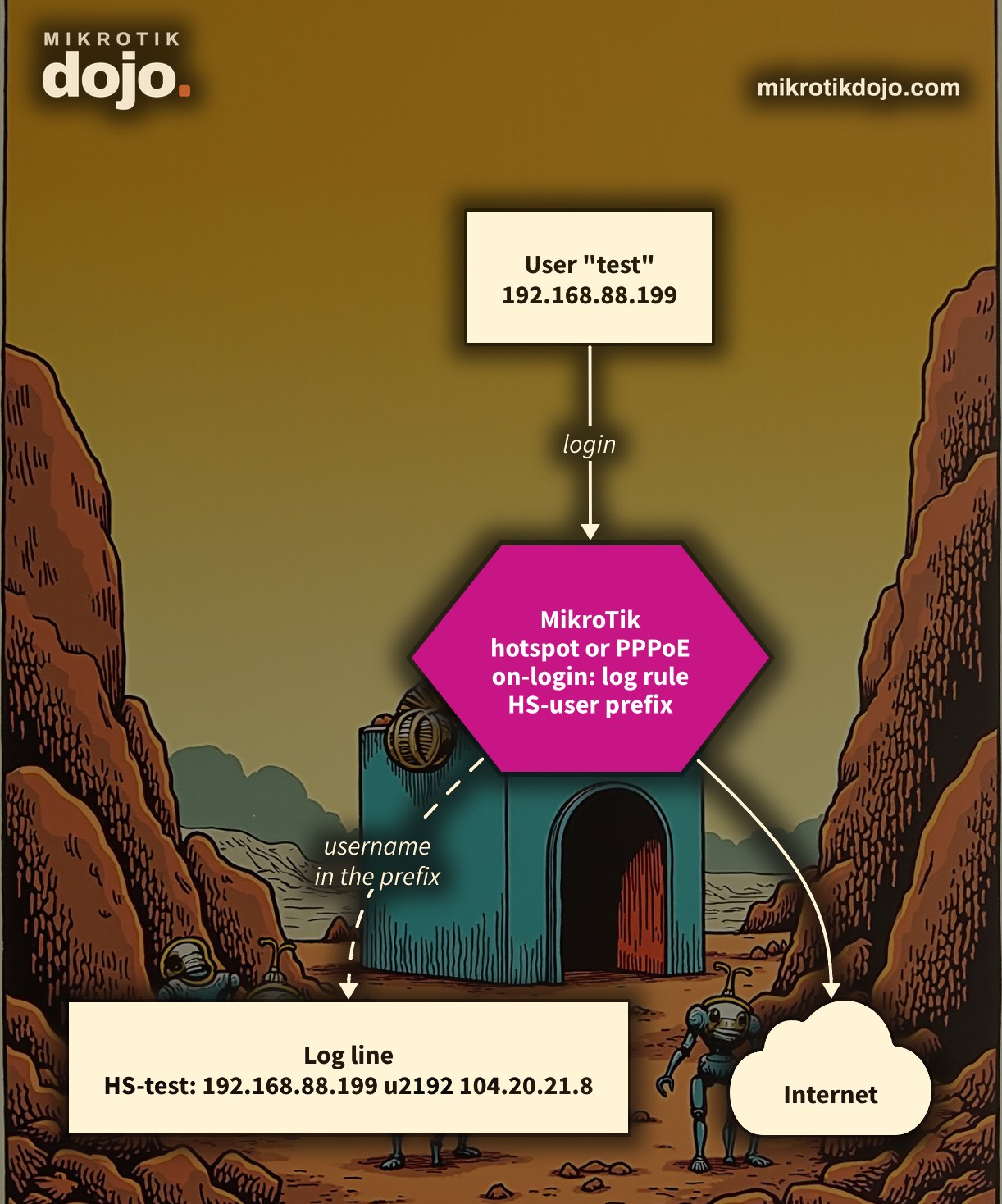
A firewall rule’s log-prefix is fixed text: it can’t contain variables. So you need one rule per user, created when the user comes in and deleted when they go out:
- at login, a script creates an
action=logrule withsrc-addressequal to the user’s address andlog-prefixequal to their name; - at logout, the script deletes that rule, recognizing it by the comment.
Step 1: is the general log rule there?
This howto starts from the log rule in the previous howto, the one with the comment Hotspot connection log. The per-user rules will go right before it.
There’s one detail to sort out. action=log writes the line and lets the packet pass to the next rule: if the general rule also catches the authenticated users, every connection ends up in the log twice, once with the name and once without. In the lab that’s exactly what happened. The fix is to have the general rule log only the clients that aren’t authenticated yet:
/ip firewall filter set [find comment="Hotspot connection log"] hotspot=from-client,!authStep 2: how do I set up the hotspot scripts?
In the on-login and on-logout scripts of the hotspot user profile you already have the variables $user (the username) and $address (the client’s address) ready to use.
/ip hotspot user profile set [find name=default] on-login={
    /ip firewall filter add chain=forward src-address=$address connection-state=new \
        action=log log-prefix=("HS-" . $user) comment=("user-log " . $address) \
        place-before=[find comment="Hotspot connection log"]
} on-logout={
    /ip firewall filter remove [find comment=("user-log " . $address)]
}
If your users are on a profile other than default, change the name. The other user-profile settings are in the MikroTik manual: HotSpot User Profiles.
Step 3: how do I check that it works?
Log in with a user and open a site. On the router, the user’s rule should show up:
/ip firewall filter print where comment~"user-log"And in the log, instead of the generic HS, there’s the name. In my lab, with the user test:
firewall,info HS-test forward: in:bridge-lan out:ether5, connection-state:new src-mac 50:00:00:1E:00:00, proto TCP (SYN), 192.168.88.199:38646->104.20.21.8:80, len 60If your users sign in with their cell number, the log shows the number directly. At logout the rule disappears on its own: run the first command again to check.
Step 4: what about PPPoE?
Same logic, in the on-up and on-down scripts of the PPP profile. The variables are $user and $"remote-address", in quotes because of the hyphen:
/ppp profile set [find name=default] on-up={
    /ip firewall filter add chain=forward src-address=$"remote-address" connection-state=new \
        action=log log-prefix=("PPP-" . $user) comment=("user-log " . $"remote-address")
} on-down={
    /ip firewall filter remove [find comment=("user-log " . $"remote-address")]
}
In the lab, with a PPPoE client cliente1:
firewall,info PPP-cliente1 forward: in:<pppoe-cliente1> out:bridge-lan, connection-state:new proto ICMP (type 8, code 0), 10.99.0.2->192.168.88.199, len 56On disconnect the rule is deleted. PPP profiles and scripts are in the MikroTik manual: PPP User Profiles.
Step 5: what happens if the router reboots?
The rules the scripts create are ordinary firewall rules: after a reboot they stay there, while the users have to log in again. The orphaned rules do no harm, but they’re confusing: a startup script cleans them up.
/system scheduler add name=clean-user-logs start-time=startup \
    on-event="/ip firewall filter remove [find comment~\"^user-log \"]"
Step 6: are there any downsides?
Yes, to weigh:
- one rule per user: with a few hundred users it’s not a problem, with thousands the firewall gets longer and every new connection crosses more rules. For large networks a RADIUS with accounting is better, tying user and address in its database;
- order matters: the per-user rules have to sit before the general rule, which stays to cover the clients that aren’t authenticated yet.
Step 7: what do I check before putting it into production?
A router that keeps the users’ names next to their browsing has to be protected first. If you haven’t done it yet, follow the Basic hardening of a MikroTik router.
Tested in the lab on PNETLab with a CHR running RouterOS 7.24.5 (stable): hotspot with login from a Linux client, PPPoE between two CHRs, automatic creation and deletion of the rules, log lines with the username, cleanup at startup.
Frequently asked questions
Can you use a variable in a MikroTik firewall’s log-prefix?
No, the log-prefix is fixed text. To get the username in the log you create one rule per user, with the login script, and delete it at logout.
Which variables are available in the hotspot’s on-login scripts?
In the hotspot user-profile scripts you use $user, the username, and $address, the client’s IP address.
And in the PPPoE scripts?
In the on-up and on-down scripts of the PPP profile you use $user and $"remote-address", the address assigned to the client, written in quotes because of the hyphen.
Why does every connection show up twice in the log?
Because action=log doesn’t stop the packet: the user’s rule logs it and then the general rule does too. With hotspot=from-client,!auth on the general rule, the authenticated users show up only once, with their name.
What happens to the rules if the router reboots?
The rules the scripts create stay, while the users have to reconnect. A scheduler script with start-time=startup deletes them at reboot, so no orphaned rules are left.
This howto brings up to RouterOS 7 a 2016 article from my old blog wirelessguru.it, now offline.