
Why is setting up two gateways not enough?
In 2015, you would write gateway=172.23.0.1,10.0.0.1 and the router would alternate packets between the two lines. Today, almost everything is HTTPS, with sessions tied to the IP address: if a session changes its public IP address midway, banks, webmail, and cloud services will close it.
In RouterOS 7, ECMP, meaning multiple default routes with the same distance, is already better than the old round robin: by default, it selects the line using a calculation based on the source and destination addresses, so the same PC to the same site always exits through the same line. However, you do not know which line it is, you cannot give more weight to the faster line, and connections arriving from the internet are not guaranteed to return via the correct line. To have control, you need PCC.
How does PCC work?
The per-connection-classifier matcher in the firewall calculates a hash on the addresses and ports of each new connection and puts it in a “bucket”. With two lines, there are two buckets (2/0 and 2/1): each connection ends up in one of them and stays there until the end. The work is done in three steps:
- mark new connections with PCC;
- convert the connection mark into a “routing mark”;
- route each routing mark out through its respective line, using a dedicated routing table.
The example schema:
- WAN1:
ether1, address10.6.0.10/12, gateway10.0.0.1(my lab network); - WAN2:
ether2, address192.168.200.2/24, gateway192.168.200.1(the second line); - LAN:
bridge-lan, network192.168.88.0/24.
⚠️ Warning: the addresses of the two WANs are from my lab. Replace them with those of your lines: the router address on each line and the corresponding gateway (the operator’s modem or router).
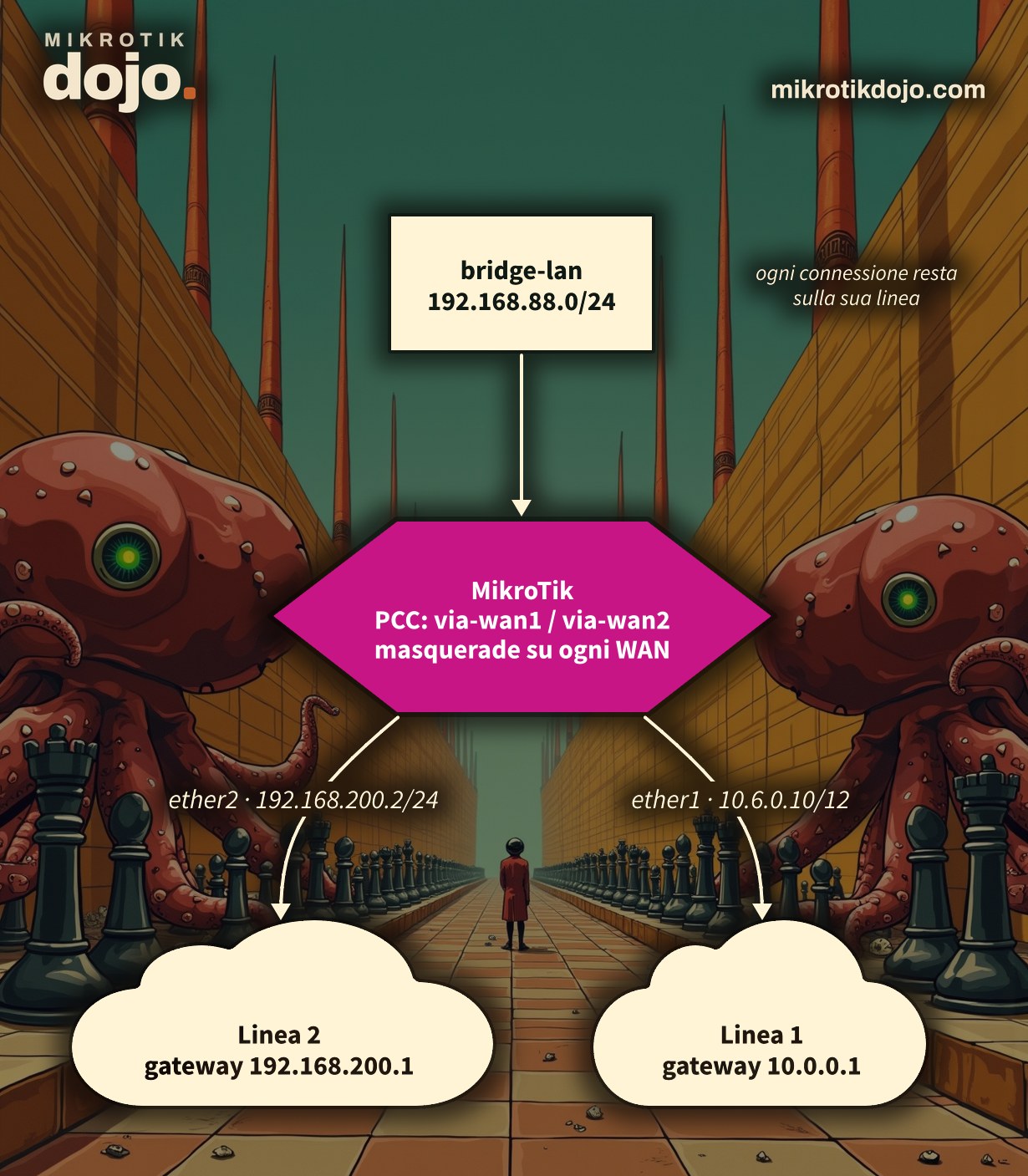
Step 1: how do I configure the two WANs?
One address for each line and DNS. We add the default routes in Step 5, because they are also needed for the PCC tables.
/ip address add address=10.6.0.10/12 interface=ether1 comment="WAN1"
/ip address add address=192.168.200.2/24 interface=ether2 comment="WAN2"
/ip dns set servers=10.0.0.1
To check the addresses of the two lines, use the Dojo IP calculator, for WAN1 and for WAN2: verify that each gateway is in the same network as the router’s address.
Before moving on, check that both gateways respond:
/ping 10.0.0.1 count=3
/ping 192.168.200.1 count=3
Step 2: how do I create the routing tables?
In RouterOS 7, each routing mark corresponds to a table, which must be created before use. One per line:
/routing table add name=via-wan1 fib
/routing table add name=via-wan2 fib
Step 3: how do I mark connections with PCC?
This is the core. The mangle rules, with their meaning explained right below:
/ip firewall mangle
add chain=prerouting in-interface=ether1 connection-mark=no-mark action=mark-connection new-connection-mark=wan1-conn passthrough=yes comment="Entrate da WAN1"
add chain=prerouting in-interface=ether2 connection-mark=no-mark action=mark-connection new-connection-mark=wan2-conn passthrough=yes comment="Entrate da WAN2"
add chain=prerouting in-interface=bridge-lan dst-address-type=!local connection-mark=no-mark \
    per-connection-classifier=both-addresses-and-ports:2/0 action=mark-connection new-connection-mark=wan1-conn passthrough=yes comment="PCC secchio 0"
add chain=prerouting in-interface=bridge-lan dst-address-type=!local connection-mark=no-mark \
    per-connection-classifier=both-addresses-and-ports:2/1 action=mark-connection new-connection-mark=wan2-conn passthrough=yes comment="PCC secchio 1"
add chain=prerouting in-interface=bridge-lan connection-mark=wan1-conn action=mark-routing new-routing-mark=via-wan1 passthrough=no
add chain=prerouting in-interface=bridge-lan connection-mark=wan2-conn action=mark-routing new-routing-mark=via-wan2 passthrough=no
add chain=output connection-mark=wan1-conn action=mark-routing new-routing-mark=via-wan1 passthrough=no
add chain=output connection-mark=wan2-conn action=mark-routing new-routing-mark=via-wan2 passthrough=no- the first two rules ensure that connections arriving from the internet (for example, remote access to the router) return via the same line;
- the third and fourth rules divide connections originating from the LAN between the two buckets;
dst-address-type=!localexcludes traffic directed to the router itself; - the last four rules convert the connection mark into a routing mark, for LAN traffic and for traffic generated by the router.
All variants of the classifier (addresses only, ports only, more buckets) are in the MikroTik manual: Per connection classifier.
Step 4: how do I exclude the WAN networks from the PCC?
There is a trap that old tutorials do not mention. From the LAN, open the page of the line 2 modem, 192.168.200.1: the PCC rolls the dice even for that connection, and in half of the cases it sends it towards the line 1 gateway, where the line 2 modem is not present. In the lab, out of ten attempts, the page opened five times.
The solution: a rule that bypasses the PCC for traffic destined to the WAN networks, placed before the two buckets.
/ip firewall address-list add list=reti-wan address=10.0.0.0/12 comment="Rete WAN1"
/ip firewall address-list add list=reti-wan address=192.168.200.0/24 comment="Rete WAN2"
/ip firewall mangle add chain=prerouting in-interface=bridge-lan dst-address-list=reti-wan \
    action=accept comment="Reti delle WAN: niente PCC" place-before=[find comment="PCC secchio 0"]
With this rule, ten out of ten attempts.
Step 5: how do I set up the routes?
A default route for each table, plus those from the main table as a fallback:
/ip route
add dst-address=0.0.0.0/0 gateway=10.0.0.1 routing-table=via-wan1 check-gateway=ping comment="PCC WAN1"
add dst-address=0.0.0.0/0 gateway=192.168.200.1 routing-table=via-wan2 check-gateway=ping comment="PCC WAN2"
add dst-address=0.0.0.0/0 gateway=10.0.0.1 distance=1 check-gateway=ping comment="Principale WAN1"
add dst-address=0.0.0.0/0 gateway=192.168.200.1 distance=2 check-gateway=ping comment="Riserva WAN2"
Step 6: how do I configure the NAT?
LAN users must go out with the address of the line they are using: one masquerade for each WAN.
/ip firewall nat
add chain=srcnat out-interface=ether1 action=masquerade comment="NAT WAN1"
add chain=srcnat out-interface=ether2 action=masquerade comment="NAT WAN2"
Step 7: how do I verify that connections are split?
From the LAN, open a few websites, then on the router check the counters of the PCC rules and the marked connections:
/ip firewall mangle print stats where comment~"PCC"
/ip firewall connection print count-only where connection-mark=wan1-conn
/ip firewall connection print count-only where connection-mark=wan2-conn
In the lab, with twenty connections from a single LAN PC, the buckets split 11 and 9: the PCC does not make equal parts to the millimeter, but with many connections it gets very close. An even more direct test: from two different PCs, open a site that shows the public IP address; often they will go out through different lines.
Step 8: what happens if a line goes down?
check-gateway=ping makes the router check the gateway every 10 seconds: if it does not respond, the route is disabled. Connections marked for that line no longer find a route in their table and fall back to the main table, therefore to the other line.
I tested it by turning off line 2: after about twenty seconds, the WAN2 routes became inactive and all new connections, even those from the line 2 bucket, went out through line 1. Twelve requests out of twelve, no errors.
The limitation is that check-gateway only checks the first hop: if the modem responds but the operator is down, the router does not notice. For a true check, you need to verify an address on the internet, using recursive routes or Netwatch: this is a separate topic that deserves a dedicated howto. For basic schemes, see the MikroTik manual: Load Balancing.
What if the lines have the same gateway?
This is the typical case of a WISP with multiple CPEs towards the same PPPoE server: three pppoe-out with the same remote gateway. Use the interface name as the gateway, because these are point-to-point links:
/ip route add dst-address=0.0.0.0/0 gateway=pppoe-out1 routing-table=via-wan1
/ip route add dst-address=0.0.0.0/0 gateway=pppoe-out2 routing-table=via-wan2
What do I check before putting it into production?
Two lines mean two open ports on the internet. Before connecting them, follow the Basic Hardening of a MikroTik router and put both WANs in the firewall’s WAN interface list.
Tested in the lab on PNETLab with CHR RouterOS 7.24.5 (stable), two lines (the second via another CHR) and a Linux client: connection splitting, access to the second line’s modem with and without excluding the WAN networks, second line failure with check-gateway.
Frequently asked questions
What is the difference between ECMP and PCC on MikroTik?
ECMP distributes traffic across multiple default routes with the same distance, selecting the line based on an address calculation; PCC assigns each connection to a line using the mangle firewall and keeps it there until the end, providing full control over buckets, weights, and the return of incoming connections.
Does PCC sum the speed of the lines?
PCC sums the overall capacity: multiple connections together use all the lines. A single connection, for example a download, remains on a single line and does not become faster than that line.
Why can’t I open the modem page with PCC active?
Because PCC sends a portion of those connections toward the gateway of the other line. A mangle rule with action=accept for the WAN networks, placed before the buckets, solves the problem.
Why do I have to create routing tables in RouterOS 7?
In RouterOS 7, a routing mark corresponds to a routing table, which must be created first with /routing table add name=... fib; in RouterOS 6, you only needed to write the mark name in the route.
How do I give more weight to a faster line?
With more PCC buckets: with three buckets (3/0, 3/1, 3/2), assign two to the fast line and one to the other, achieving a connection split of approximately two to one.
This howto updates a 2015 article from my old blog wirelessguru.it, which is now offline, to RouterOS 7.