
Why write the username in the log?
In the howto on how to log hotspot user traffic, we saw how to annotate every new connection. The day it really matters, for example for an authority request regarding a specific address at a specific time, the ordeal begins: figuring out which user had that private address at that moment, by cross-referencing the firewall log with the login log. In 2016, I asked myself: what if the name were already there, in every line?
How does it work?
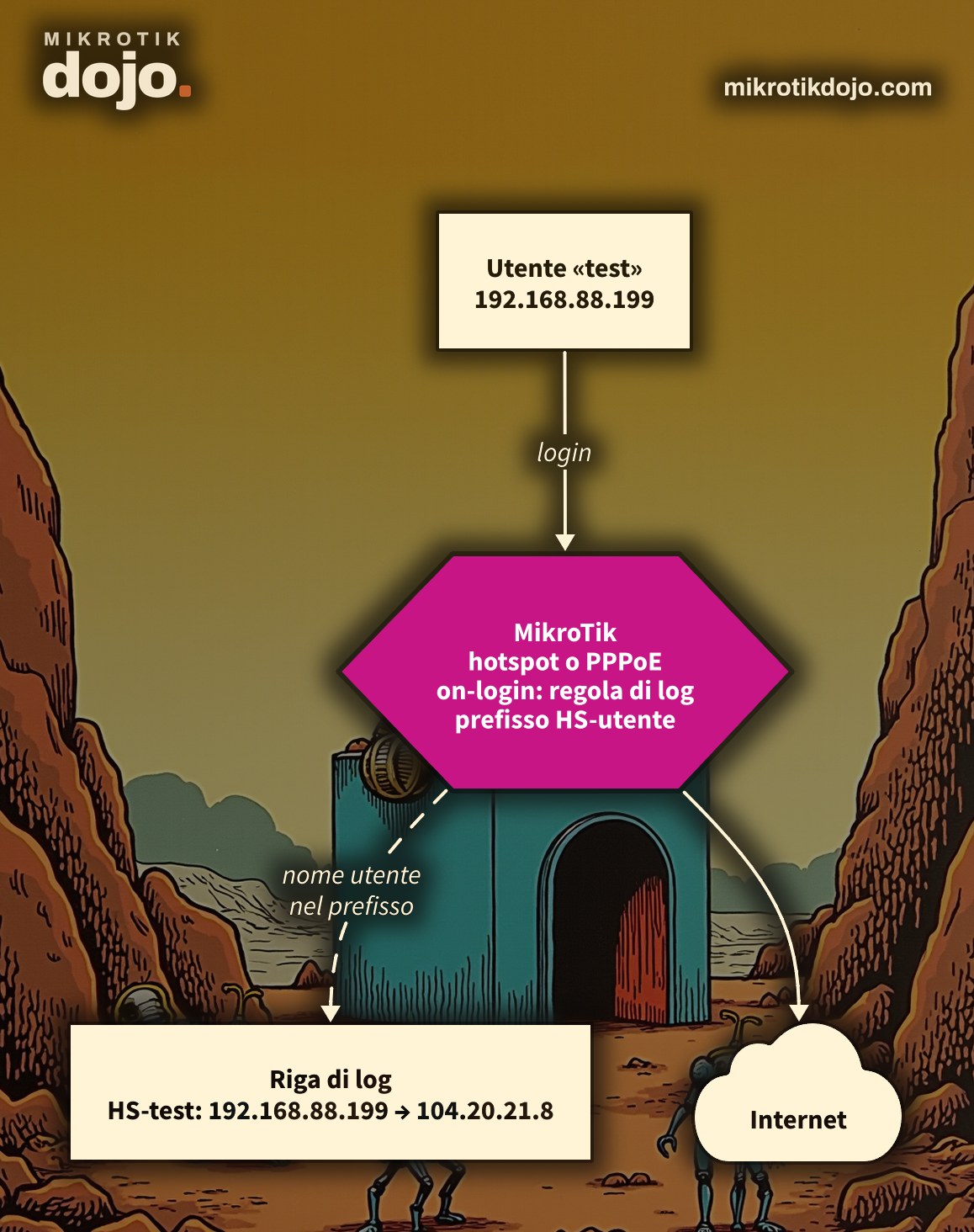
The log-prefix of a firewall rule is fixed text: it cannot contain variables. Therefore, you need one rule per user, created when the user logs in and deleted when they log out:
- at login, a script creates a
action=logrule withsrc-addressequal to the user’s address andlog-prefixequal to their name; - at logout, the script deletes that rule, identifying it by the comment.
Step 1: is there a general log rule?
This howto starts from the log rule in the previous howto, the one with the comment Log connessioni hotspot. The per-user rules will be placed immediately before it.
There is a detail to fix. action=log writes the line and passes the packet to the next rule: if the general rule also captures authenticated users, every connection ends up in the log twice, once with the name and once without. This is exactly what happened in the lab. The solution is to make the general rule log only clients that are not yet authenticated:
/ip firewall filter set [find comment="Log connessioni hotspot"] hotspot=from-client,!authStep 2: how do I configure the hotspot scripts?
In the on-login and on-logout scripts of the hotspot user profile, you already have the variables $user (the username) and $address (the client’s address) ready.
/ip hotspot user profile set [find name=default] on-login={
    /ip firewall filter add chain=forward src-address=$address connection-state=new \
        action=log log-prefix=("HS-" . $user) comment=("log-utente " . $address) \
        place-before=[find comment="Log connessioni hotspot"]
} on-logout={
    /ip firewall filter remove [find comment=("log-utente " . $address)]
}
If your users use a profile other than default, change the name. The other user profile settings are in the MikroTik manual: HotSpot User Profiles.
Step 3: how do I verify it works?
Log in with a user and open a website. On the router, the user’s rule must appear:
/ip firewall filter print where comment~"log-utente"And in the log, instead of the generic HS, there is the name. In my lab, with the user test:
firewall,info HS-test forward: in:bridge-lan out:ether5, connection-state:new src-mac 50:00:00:1E:00:00, proto TCP (SYN), 192.168.88.199:38646->104.20.21.8:80, len 60If users register with their mobile phone number, the number appears directly in the log. At logout, the rule disappears on its own: repeat the first command to check.
Step 4: what about PPPoE?
Same logic, in the on-up and on-down scripts of the PPP profile. The variables are $user and $"remote-address", in quotes because of the hyphen:
/ppp profile set [find name=default] on-up={
    /ip firewall filter add chain=forward src-address=$"remote-address" connection-state=new \
        action=log log-prefix=("PPP-" . $user) comment=("log-utente " . $"remote-address")
} on-down={
    /ip firewall filter remove [find comment=("log-utente " . $"remote-address")]
}
In the lab, with a PPPoE client cliente1:
firewall,info PPP-cliente1 forward: in:<pppoe-cliente1> out:bridge-lan, connection-state:new proto ICMP (type 8, code 0), 10.99.0.2->192.168.88.199, len 56Upon disconnection, the rule is deleted. PPP profiles and scripts are in the MikroTik manual: PPP User Profiles.
Step 5: what happens if the router reboots?
The rules created by the scripts are normal firewall rules: after a reboot, they remain there, while users must log in again. Orphaned rules do no harm, but they cause confusion: a startup script cleans them up.
/system scheduler add name=pulisci-log-utenti start-time=startup \
    on-event="/ip firewall filter remove [find comment~\"^log-utente \"]"
Step 6: are there any drawbacks?
Yes, consider the following:
- one rule per user: with a few hundred users, this is not a problem; with thousands, the firewall rule list grows longer and every new connection must traverse more rules. For large networks, it is better to use RADIUS with accounting, which links the user and the address in its database;
- order matters: the per-user rules must be placed before the general rule, which remains to cover clients that have not yet authenticated.
Step 7: what should I check before putting it into production?
A router that stores user names alongside their browsing activity must be protected first. If you have not done this yet, follow the Basic hardening of a MikroTik router.
Tested in a lab environment on PNETLab with CHR RouterOS 7.24.5 (stable): hotspot with login from a Linux client, PPPoE between two CHR instances, automatic creation and deletion of rules, log lines containing the user name, and cleanup on startup.
Frequently asked questions
Can I use a variable in the log-prefix of a MikroTik firewall rule?
No, log-prefix is fixed text. To have the user name in the log, you create a rule for each user via the login script and delete it on logout.
Which variables are available in hotspot on-login scripts?
In the hotspot user profile scripts, you use $user, the user name, and $address, the client’s IP address.
And in PPPoE scripts?
In the on-up and on-down scripts of the PPP profile, you use $user and $"remote-address", the address assigned to the client, which must be enclosed in quotes because of the hyphen.
Why does each connection appear twice in the log?
Because action=log does not stop the packet: it is logged by the user rule and then again by the general rule. With hotspot=from-client,!auth on the general rule, authenticated users appear only once, with their name.
What happens to the rules if the router reboots?
The rules created by the scripts remain, while users must reconnect. A script in the scheduler with start-time=startup deletes them on reboot, so no orphaned rules are left behind.
This howto updates a 2016 article from my old blog wirelessguru.it, which is now offline, to RouterOS 7.