
There’s a way to turn a harmless router into a megaphone to hit someone else, without ever getting inside it. It’s called DNS amplification. In this article we see it live in the lab — 21 bytes becoming 1017 — we look at what really knocks on the Dojo’s door, and we close the hole. No attack code: just the mechanism, observed from the defender’s side.
A couple of words on how DNS works
DNS is the internet’s address book: you ask “what’s the address of example.com?” and a resolver answers with the number. The question and the answer are two packets, almost always over UDP, port 53: one goes, one comes back, with no connection established.
A DNS zone doesn’t hold only addresses. There are many record types: A (IPv4), AAAA (IPv6), MX (mail), TXT (free text), NS (the zone’s servers). And, if the zone is signed with DNSSEC — the mechanism that adds a cryptographic signature to answers so the client can check they weren’t tampered with — big records appear too: RRSIG (the signatures), DS, and above all DNSKEY, which holds the public keys used to verify those signatures.
And here’s the point that matters to us: a query like DNSKEY (or the old ANY, “give me everything”) is small, but the answer can be big, because it carries several keys or records. Small question, large answer: keep it in mind.
The trick is in UDP
UDP has no handshake. When you send a UDP packet, you write the sender’s address yourself, and nobody along the way really checks it: the network trusts you. This is called spoofing: forging the sender.
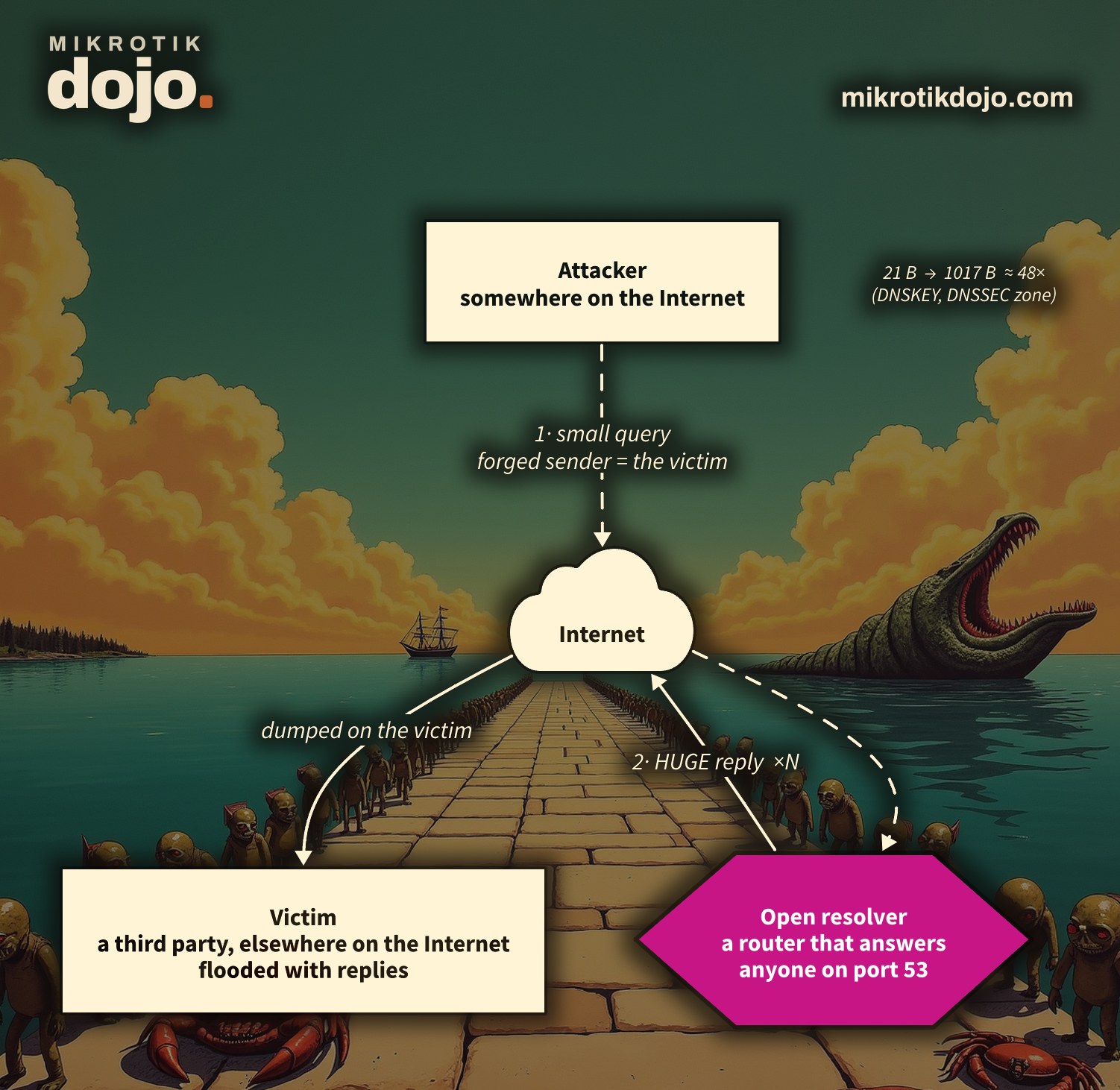
Put the two things together — a small question with a large answer, and a forgeable sender — and you have the attack:
- the attacker sends the resolver a small question (a
DNSKEY), but writes as the sender the victim’s address, not their own; - the resolver, politely, answers… the victim, with a much bigger packet;
- multiply by thousands of questions per second, from many “open” resolvers at once: the victim drowns under answers it never asked for.
The attacker spends little (small questions), the victim pays it all (large answers), and the resolver in the middle — maybe your router — lends its face and its bandwidth. That’s why it’s called reflection and amplification.
Is it a protocol weakness?
Yes and no, and that’s the interesting part. There’s no single DNS “bug” to fix: the attack combines three design choices, each useful, and uses them crooked.
- DNS runs over UDP for speed: billions of tiny questions a day, without the overhead of the TCP handshake. It’s efficient. The flip side is that UDP doesn’t verify the sender — but that’s UDP’s nature, not a mistake.
- The large answers come from DNSSEC, that is from a defense: the keys and signatures (
DNSKEY,RRSIG) exist to guarantee DNS answers aren’t forged. The amplification’s “fuel” is literally a security feature. - A resolver that answers is doing its job. The problem arises only when it answers anyone from the internet: that’s a misconfiguration, not a protocol flaw.
The real weakness, the one that holds everything up, is a different one and it’s not DNS’s: it’s that packets with a forged sender travel the internet. If no one could lie about their own address (that’s the BCP38 recommendation we discuss below), amplification wouldn’t exist. That’s why you don’t just “fix DNS”: you defend by not being a megaphone, and upstream by not letting forged senders through.
In one line: it’s like mailing a thousand postcards with your address as the sender to a thousand companies that reply with heavy catalogs. The post, the catalogs and the companies are doing normal things; the trick is the fake sender.
The lab proof: 21 bytes becoming 1017
In the lab I turned on a MikroTik’s “resolver for everyone” (/ip dns set allow-remote-requests=yes) and asked it a single DNSKEY question for the org domain, capturing with the sniffer. Here are the two real packets:
20:44:15.801  172.31.255.254.58865 > 172.31.255.1.53   DNSKEY? org.          (21)    frame 63 B
20:44:15.802  172.31.255.1.53 > 172.31.255.254.58865   5/0/0 DNSKEY×5        (1017)   frame 1059 B
The question is 21 bytes of DNS, the answer 1017 (five DNSKEY records): almost 48 times bigger. Counting the headers, on the wire it’s 63 bytes against 1059: still almost 17 times. Picture this answer multiplied and sent to a victim who never asked for it.
Technical note: the old ANY question yields less today (resolvers “minimize” it; in my lab it was about 7×). That’s why modern attacks use DNSKEY and DNSSEC-signed zones, where answers stay large.
What really knocks on the door
It’s not theory. The sniffer on the Dojo’s WAN, as I write, sees this arriving, over and over:
<sender-masked> > <our-IP>.53   ANY? dhitc.com   frame 80 B   (qtype 255)
… 111,115 questions like this in a single capture file
Someone is trying to use the Dojo as a megaphone toward a decoy domain (dhitc.com), with 80-byte ANY questions, in bursts, from a narrow block of addresses (I mask them: over UDP they could be forged, i.e. the victim and not the attacker). The target, our public address, I masked too.
The difference from the lab? There the resolver was open and answered. The Dojo’s gateway instead drops these in input and generates nothing: no answer leaves, no victim is hit, and the router stays at low CPU (in the last measured hour: 128,622 questions dropped, average CPU 1.8%). Not answering is the defense.
Want to see it live? I’ve put the Dojo’s router on air: on the The Dojo under siege page you can watch, in real time, what’s knocking on the WAN right now — including this DNS amplification. And there’s a switch: you can turn the firewall off “for pretend” and see with your own eyes what would happen if the Dojo answered — the missiles that would fly toward the victims — without it actually happening. It’s the most direct way to grasp what the drop rule stops, especially with DNS amp.
And every Sunday morning there’s the Siege Report: an hour of real traffic told minute by minute, with the numbers, the countries and Suricata’s verdict.
How to defend yourself
1. Don’t be an open resolver
It’s the golden rule: your router must answer DNS questions only from those inside your network, never from those arriving from the internet. Two moves, better both.
The first: don’t offer the resolver to the world. If you don’t need allow-remote-requests, keep it off; if you need it for the LAN, close the door from the WAN with the firewall anyway. Mind the order: at the top of the input chain there must always be the acceptance of return traffic, then the drops.
# always first: let return traffic of the router's own connections back in
/ip firewall filter
add chain=input action=accept connection-state=established,related,untracked comment="accept replies to the router's own connections"
add chain=input action=drop   connection-state=invalid comment="drop invalid"
# then: nobody from the WAN may query the router's resolver
add chain=input in-interface=ether1 protocol=udp dst-port=53 action=drop comment="DNS: never from the WAN (udp)"
add chain=input in-interface=ether1 protocol=tcp dst-port=53 action=drop comment="DNS: never from the WAN (tcp)"
(Instead of ether1 put your WAN interface, or an interface-list like WAN.) A natural question: don’t these rules block the router’s own DNS resolution? No, and it’s a useful subtlety. When the router resolves on its own, its question goes out to an upstream server’s port 53; the answer comes back in input with a destination of a high, ephemeral port, not 53. The drops above match the destination 53, that is only the questions arriving at the router’s resolver: they don’t touch the answers to the router’s own queries (which come back via the first rule, established) nor the LAN clients (which query the router from the LAN interface, not from ether1). On the Dojo’s gateway these rules, in the capture hour, stopped the 128,622 questions from before: read the counter with /ip firewall filter print stats.
It’s not theory: watching the gw’s connection table while it resolves on its own, its queries go out like this (public IP masked):
<WAN-IP>:39613 -> 8.8.8.8:53
<WAN-IP>:45781 -> 8.8.8.8:53
<WAN-IP>:35633 -> 8.8.8.8:53
The source port is always a random high port (39613, 45781…), never 53: so the reply comes back on that ephemeral port, far from our drop. And that randomness is no small detail: it’s an extra defense against cache poisoning. To poison the DNS cache — inject a fake answer before the real one — an attacker must guess, besides the 16-bit transaction ID, the source port too: randomizing it raises the wall enormously. RouterOS does it by default, which is why you see scattered ports here and not a fixed 53.
2. UDP vs TCP: why TCP can’t be forged
The trick works because UDP doesn’t verify the sender. TCP instead starts with a three-way handshake: whoever opens the connection must receive the server’s reply to go on. If you’ve forged the sender, that reply goes to the victim, not to you, and the connection never starts: with TCP, reflection doesn’t work. Serious resolvers use this with response rate limiting (RRL): when they suspect abuse, they truncate the UDP answer and force the client to retry over TCP — an attacker forging the sender can’t complete the TCP and stops. It’s a defense of dedicated resolvers (BIND, Unbound); on the router the practical defense stays closing the resolver.
3. DoH and DoT: what they fix (and what they don’t)
DNS over HTTPS (DoH, port 443) and DNS over TLS (DoT, port 853) wrap DNS inside TLS: it travels encrypted and over TCP. Two consequences: no one along the way can read or tamper with your questions, and — being over TCP — they’re not an amplification vector. RouterOS can use an upstream DoH server (/ip dns use-doh-server) for its own requests. Careful not to mix the planes, though: DoH/DoT protect your DNS requests; they don’t by themselves stop your router from acting as a UDP megaphone. The defense against amplification stays not answering strangers on port 53. (The opposite control, stopping clients from bypassing your DNS with DoH, is another topic: see the howto Block DNS over HTTPS and DNS over TLS.)
4. Upstream: the anti-spoofing filter (BCP38)
The root of the problem is that UDP with a forged sender travels the internet. The official recommendation to stop it is BCP38 (the IETF document RFC 2827, “Network Ingress Filtering”): every operator should drop packets leaving its network whose sender doesn’t belong to that network. If it were applied everywhere, spoofing — and thus amplification — would disappear. It’s an “altruistic” defense (the beneficiaries are victims elsewhere, not whoever applies it), which is why it’s only partly adopted; the extension for multi-homed networks is BCP84 (RFC 3704).
You can do your part: don’t let forged senders leave your network. On the MikroTik you turn on reverse-path filtering
/ip settings set rp-filter=strictwhich drops packets whose sender wouldn’t route back out of that interface. Your defense stays not amplifying; this is the part that’s on everyone: don’t let forged senders through.
The check
After closing the resolver, try the same question from outside again: no answer should come. In the lab, with allow-remote-requests=no, the DNSKEY org timed out; reopening it, the 1017 bytes came back. And the drop rule’s counter grows with every blocked attempt: that’s where you see, numbers in hand, how many questions you did not amplify.
Tested in the lab on PNETLab with a CHR running RouterOS 7.24.5 (stable): open resolver, measured DNSKEY org 21→1017 bytes (~48×) with a real capture, defense with allow-remote-requests=no and with the drop rules in input. The incoming traffic is observed on the Dojo’s real WAN (sniffer): third-party addresses and the Dojo’s public address masked, aggregate counts, no answer was ever generated toward real victims.
Frequently asked questions
Is my MikroTik an open resolver without my knowing?
It can be, if you turned on allow-remote-requests=yes and didn’t close port 53 from the WAN. Check with /ip dns print and with the firewall’s input rules. When in doubt, add the two drop rules above.
Why is the answer bigger than the question?
Because the question asks for “everything” or the DNSSEC keys, and the answer carries several records (here five DNSKEY). A few bytes of question, many of answer: that’s amplification.
If I drop DNS questions from the WAN, do I break anything?
No, as long as you don’t need to be a public DNS on the WAN (almost nobody does). Your LAN clients keep using the router’s resolver normally; you only block strangers.
Does DoH protect me from amplification?
No, they’re two different things. DoH encrypts and uses TCP, so it protects your requests and isn’t an amplification vector, but it doesn’t stop your router from answering strangers on UDP 53: that’s the firewall’s job.