
Why hide routers from traceroute?
If you manage a WISP or ISP network, a traceroute from a customer’s PC maps your backbone: address by address, every router between them and the internet. It is not a vulnerability in itself, but it is a free map: anyone wanting to attempt a brute force or a DoS already knows which ports to knock on.
How does the TTL trick work?
Every IP packet has a counter, the TTL. Every router that forwards it decrements it by one; when it reaches zero, the router drops the packet and replies to the sender with a “time exceeded”. Traceroute exploits exactly this: it sends packets with TTL 1, 2, 3… and notes who responds at each step.
The trick: if the router increments the TTL by one as soon as the packet enters, the forwarding decrement brings it back to the starting value. The TTL never reaches zero on that router, so it never responds: for traceroute, it does not exist.
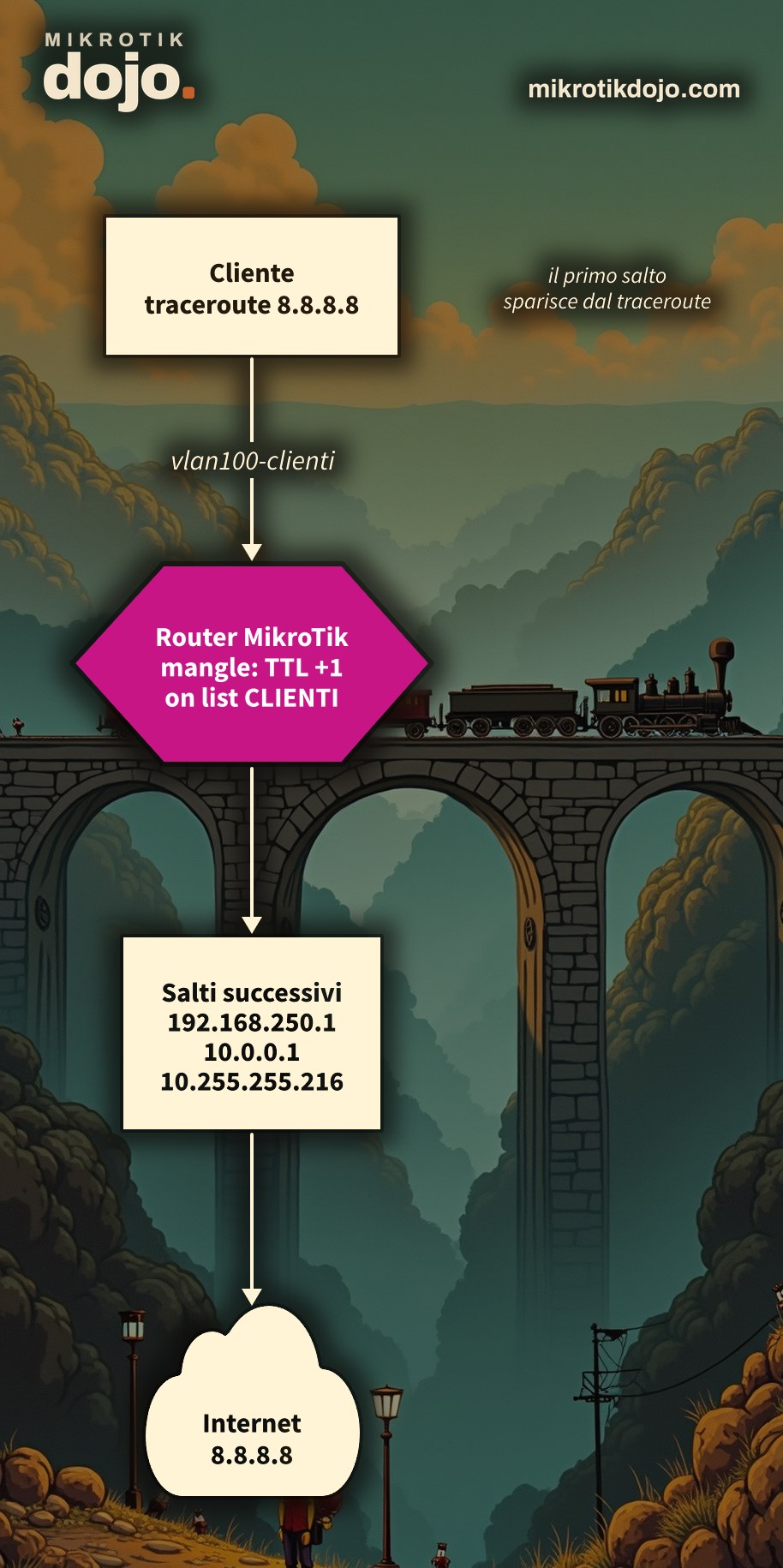
Step 1: What is the network like from the customer’s perspective?
Before hiding anything, look at what is visible today. From a customer’s PC:
tracert 8.8.8.8         (Windows)
traceroute 8.8.8.8      (Linux e macOS)
In the lab, I ran the same test with ping -t 1, ping -t 2, and so on from a Linux PC: it is a manual traceroute, one hop at a time. Before the change:
From 192.168.88.1 icmp_seq=1 Time to live exceeded
From 192.168.250.1 icmp_seq=1 Time to live exceeded
From 10.0.0.1 icmp_seq=1 Time to live exceeded
From 10.255.255.216 icmp_seq=1 Time to live exceeded
The first hop, 192.168.88.1, is the MikroTik router we want to make disappear.
Step 2: What are the customer interfaces?
The rule must be applied only to traffic coming from customers, not to all traffic (we will see why in Step 6). We collect the customer interfaces in a list:
/interface list add name=CLIENTI
/interface list member add list=CLIENTI interface=vlan100-clienti
Replace vlan100-clienti with your ports, VLANs, or bridges towards customers. If customers connect via PPPoE, their interfaces are created and destroyed with each connection: instead of adding them manually, let every session from the PPP profile they use enter the list:
/ppp profile set [find name=default] interface-list=CLIENTIUse the name of your customers’ profile if it is not default.
Step 3: How do I add the rule?
A single mangle rule, in prerouting, limited to the customer list:
/ip firewall mangle add chain=prerouting in-interface-list=CLIENTI \
    action=change-ttl new-ttl=increment:1 passthrough=yes \
    comment="Nasconde questo router al traceroute dei clienti"
This must be repeated on every router you want to hide: each one compensates only for its own decrement. Other mangle actions, including change-ttl, are in the MikroTik manual: Mangle.
Step 4: How do I verify it works?
Run the traceroute again from the customer. In the lab, same test as Step 1, after the rule:
From 192.168.250.1 icmp_seq=1 Time to live exceeded
From 10.0.0.1 icmp_seq=1 Time to live exceeded
From 10.255.255.216 icmp_seq=1 Time to live exceeded
From 172.29.0.9 icmp_seq=1 Time to live exceeded
192.168.88.1 is gone: the first to respond now is the next router. Everything else works as before.
I also tested with fasttrack enabled, as in the factory configuration: the router remains hidden. From the router, you can check that the rule is working by looking at the counters:
/ip firewall mangle print stats where comment~"traceroute"Step 5: What about IPv6?
Same principle, but in IPv6 the counter is called hop limit:
/ipv6 firewall mangle add chain=prerouting in-interface-list=CLIENTI \
    action=change-hop-limit new-hop-limit=increment:1 passthrough=yes \
    comment="Nasconde questo router al traceroute IPv6 dei clienti"
Step 6: Why not on all interfaces?
For two reasons.
- Troubleshooting: you will also use traceroute to locate a fault. If the rule applies everywhere, your routers disappear for you as well. By limiting it to clients, you can still see them from the NOC.
- Routing loops: the TTL exists precisely to make packets that are looping die. If two routers in a loop increment each other’s TTL, a packet never expires and consumes bandwidth until the loop is resolved. With the rule applied only on ingress from clients, the packet is incremented only once, at the boundary, and the TTL resumes its function within the backbone.
⚠️ Warning: hiding routers does not protect them. Anyone who already knows their addresses can still reach them: the real protection is the input firewall, which you can find in Basic hardening of a MikroTik router. Do this before putting the router into production, then add this rule.
Tested in the lab on PNETLab with CHR RouterOS 7.24.5 (stable) and a Linux client: TTL of hops before and after the rule, with and without fasttrack, IPv6 rule and interface list from the PPP profile.
Frequently asked questions
How do I hide a MikroTik router from traceroute?
With a mangle firewall rule in prerouting using action=change-ttl new-ttl=increment:1: the incremented TTL compensates for the decrement during forwarding, and the router does not appear among the traceroute hops.
Does the rule slow down the router?
Not in any appreciable way: it is a modification of an IP header field. On routers with heavy traffic, it is still advisable to limit it to client interfaces, which is also the safest choice.
Can I still run traceroute from my own network?
Yes, if the rule is limited with in-interface-list to client interfaces: traffic originating from the NOC or the backbone is not modified, and the routers remain visible.
How do I add PPPoE clients to the interface list?
From the PPP profile: with interface-list=CLIENTI in the profile used by clients, each PPPoE session automatically enters the list when it connects.
Is this a real security measure?
It is a privacy measure: it hides the network topology from curious clients. It does not replace the input firewall on routers, which remains the real protection against access and attacks.
This howto updates a 2015 article from my old blog wirelessguru.it, now offline, to RouterOS 7.