
What is Passpoint?
Think of your phone’s Wi-Fi when you change city: the phone moves from one of the carrier’s cells to the next without asking you anything, because the SIM is already your credential. Passpoint brings the same idea to Wi-Fi. The phone recognizes a “friendly” network on its own, authenticates with the credentials it already has and connects, encrypted, with no login pages and no password to ask for at the counter.
There are three names, and they point to the same thing seen from different sides:
- IEEE 802.11u is the standard: it lets the access point say who it is before the phone connects;
- Hotspot 2.0 is the specification that uses 802.11u to let the phone choose and connect automatically;
- Passpoint is the Wi-Fi Alliance’s certification program that guarantees phones and access points speak the same language.
How does the phone choose the right network?
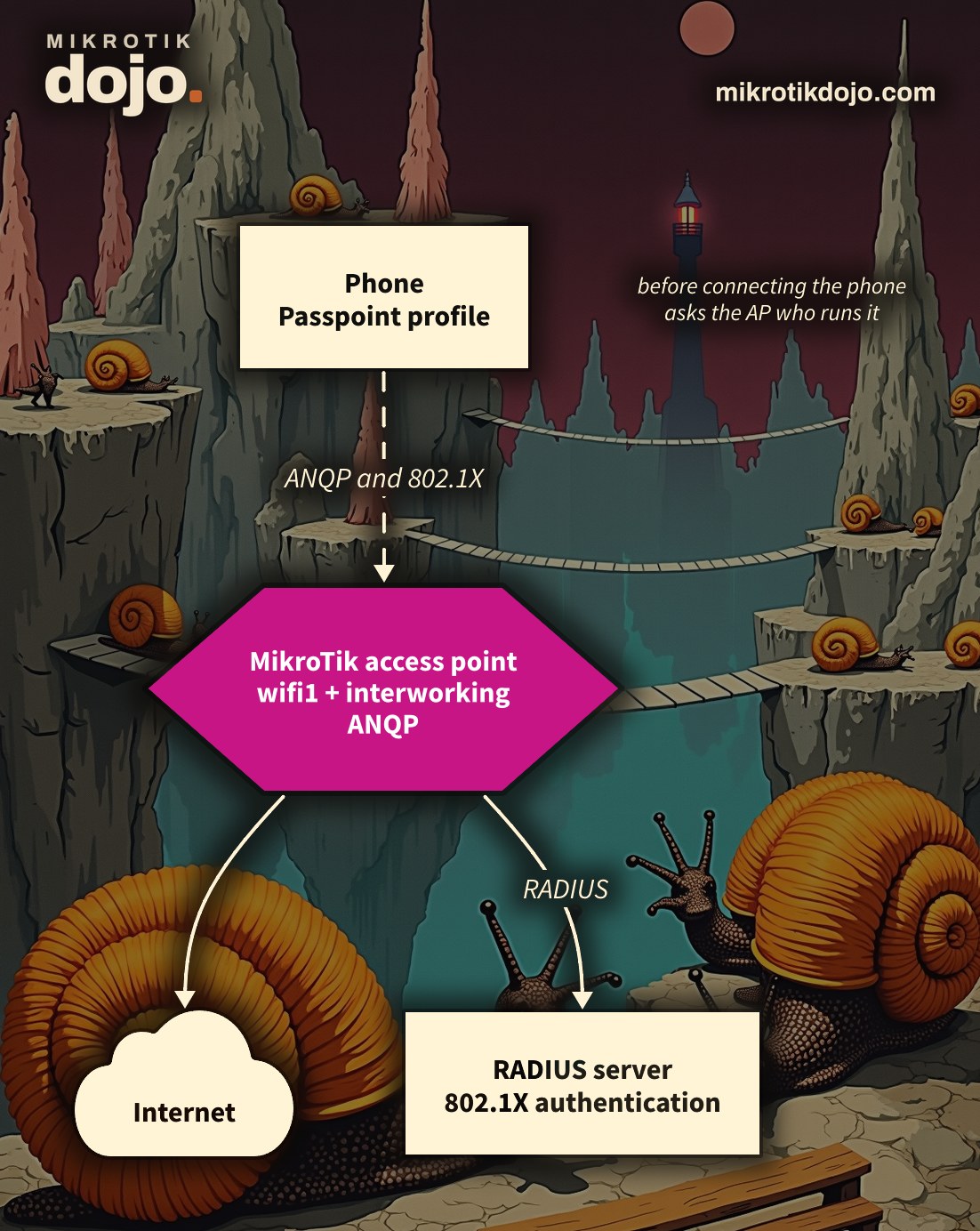
With a little conversation that happens before the connection:
- the access point announces in its beacons that it supports Hotspot 2.0;
- the phone, which has a Passpoint profile installed, asks it questions with the ANQP protocol (Access Network Query Protocol): who runs the network? Which domains and which realms do you accept? Are you part of any roaming consortium? Is there internet, and how loaded is the line?
- if the answers match its profile, the phone connects and authenticates with WPA2 or WPA3-Enterprise (802.1X): the credentials go to a RADIUS server, which says yes or no;
- if no network matches, the phone stays quiet: it never connects to a network it doesn’t know.
The credentials can be of three kinds: the phone’s SIM (EAP-SIM, EAP-AKA), a certificate (EAP-TLS) or username and password (EAP-TTLS). The profile can come from the mobile carrier, from an app or a website, or from a federation like eduroam (universities and research institutions) or OpenRoaming.
What advantages does it have over a captive portal?
- No login page. The captive portal lives on HTTP redirects, and today almost everything is HTTPS: apps hang, the phone says “connected, no internet” and the user gives up. With Passpoint there’s no page at all.
- Encrypted traffic over the air. A hotspot with a captive portal is an open network: everything that isn’t HTTPS travels in the clear between the phone and the antenna. With Passpoint each user has their own encryption key, as in a company.
- No fake networks. The phone trusts the network only if the authentication server proves who it is with a valid certificate. Whoever turns on an access point with the same name in the parking lot gets nothing.
- Automatic roaming. The same profile works in all of a chain’s venues, in all of a town’s buildings or, with a federation, around the world: the student with eduroam gets onto the Wi-Fi of a university in another city without asking anyone anything.
- One identity per connection. The RADIUS knows who connected, when and with which address, and the logs don’t depend on the MAC address, which modern phones change at will.
- Less work at the counter. No password to print on a sign and change every month, no customer asking “what’s the Wi-Fi password?”.
And the downsides?
There are some, and it’s fair to say them up front:
- you need an authentication infrastructure: a RADIUS server and valid certificates, not just the access point;
- the phones have to have the profile: either you distribute it yourself (with an app or a registration page) or you join a federation that already distributes it;
- for a passing guest, with no profile, Passpoint does nothing: for them you still need a normal network, maybe with a captive portal alongside.
In short: for the bar down the street the captive portal is still the simplest choice. For a chain, a town, a campus, a hospital or a network that wants to let in eduroam or OpenRoaming users, Passpoint is the right way.
What had I found back in 2017?
Poking around the terminal of a RouterBOARD with RouterOS 6.33, one Tab too many had shown an undocumented submenu, interworking-profiles, with entries like hotspot20, ASRA and 3GPP. It was the sign that MikroTik was working on it. Today that work has become an official feature, in the wifi package too.
Step 1: can my access point do it?
You need the wifi package, the one for 802.11ax radios and some 802.11ac ones. Check that the menu is there:
/interface wifi print
/interface wifi interworking print
On devices with the historic wireless package the same feature is in /interface wireless interworking-profiles, with very similar parameters.
Step 2: how do I create the interworking profile?
The profile holds what the access point announces to the phones. A starting example for a restaurant:
/interface wifi interworking add name=passpoint-bar internet=yes network-type=public-chargeable \
    venue=assembly-restaurant hotspot20=yes domain-names=example.com \
realms="example.com:eap-tls"internet=yes: the network gives internet access;network-type: the type of network published, for examplepublic-free(free public),public-chargeable(paid public),private;venue: the type of place, in thegroup-typeform of the 802.11u standard. A restaurant, for example, is in the assembly group, along with theaters and stadiums:assembly-restaurant;hotspot20=yes: turns on Hotspot 2.0;domain-namesandrealms: the domains and the realms of the accepted credentials, with the EAP method (hereeap-tls). These are exactly the answers the phone gets with ANQP and compares with its profile;- to join a federation you add the
roaming-ois, the identifiers of the roaming consortium that the federation gives you.
⚠️ Warning: in old notes you’ll find values like chargeable-public or business-restaurant. In RouterOS 7.24.5 they answer syntax error: the right values are public-chargeable and assembly-restaurant. You see the full list with the Tab key after network-type= and venue=.
Check the profile:
/interface wifi interworking print detailStep 3: how do I assign it to the radio?
The radio configuration uses WPA2/WPA3-Enterprise authentication toward a RADIUS (in the example 10.6.0.60, to replace with your server’s address):
/interface wifi configuration add name=cfg-passpoint ssid="Passpoint" mode=ap country=Italy \
    interworking=passpoint-bar security.authentication-types=wpa2-eap,wpa3-eap security.eap-accounting=yes
/radius add service=wireless address=10.6.0.60 secret="radius-secret"
/interface wifi set [find default-name=wifi1] configuration=cfg-passpoint disabled=no
country isn’t a detail: it decides which channels and which power levels the radio can use. Then check that the radio has started:
/interface wifi monitor wifi1 onceIt should say state: running with the chosen channel. All the parameters, with a complete example, are in the MikroTik manual: Interworking for WiFi6.
Step 4: what do you need besides the MikroTik?
The most demanding part isn’t the access point:
- a RADIUS server that authenticates the credentials (for example FreeRADIUS);
- Passpoint profiles installed on the phones, or an agreement with an organization that already distributes them, like eduroam for universities and research institutions or OpenRoaming;
- valid certificates for EAP authentication.
If you need a network for those who don’t have the profile, you can keep a classic hotspot alongside Passpoint: there’s the howto on how to create a Wi-Fi hotspot with MikroTik.
Step 5: what do I check before putting it into production?
An access point that talks to a RADIUS server guards a shared secret: the router must be protected like the server. Follow the Basic hardening of a MikroTik router and use a long RADIUS secret, different for each access point.
Tested in the lab on a routerboard with 802.11ax Wi-Fi running RouterOS 7.24.5 (stable) and the wifi package: interworking profile, WPA2/WPA3-Enterprise configuration and a radio started with the profile assigned. The full authentication with a RADIUS and a phone with a Passpoint profile was not tested.
Frequently asked questions
What’s the difference between Hotspot 2.0 and Passpoint?
They’re the same thing seen from two sides: Passpoint is the Wi-Fi Alliance’s certification program, Hotspot 2.0 the name of the technology, based on the IEEE 802.11u standard.
Does MikroTik support Hotspot 2.0?
Yes: in RouterOS 7, with the wifi package, the /interface wifi interworking menu lets you configure the Hotspot 2.0 and 802.11u parameters to assign to the radio configuration.
Which values does venue accept?
Values in the group-type form of the 802.11u standard, for example assembly-restaurant, business-bank or mercantile-shopping-mall. The full list is shown with the Tab key in the terminal.
Do you need a captive portal with Passpoint?
No. With Passpoint the phone authenticates on its own with WPA2 or WPA3-Enterprise using its profile’s credentials, with no login page.
What do you need to make Passpoint work?
Besides compatible access points you need a RADIUS server, the certificates for EAP authentication and profiles installed on the users’ devices, or membership in a federation like eduroam or OpenRoaming.
This howto brings up to RouterOS 7 a 2017 article from my old blog wirelessguru.it, now offline.