
What problem does IP Cloud solve?
Many lines, especially home and small-office ones, have a public address that changes: today it’s one, after the next modem reboot it’s another. To reach the router from outside — for a VPN or for support — you’d have to know the new address every time.
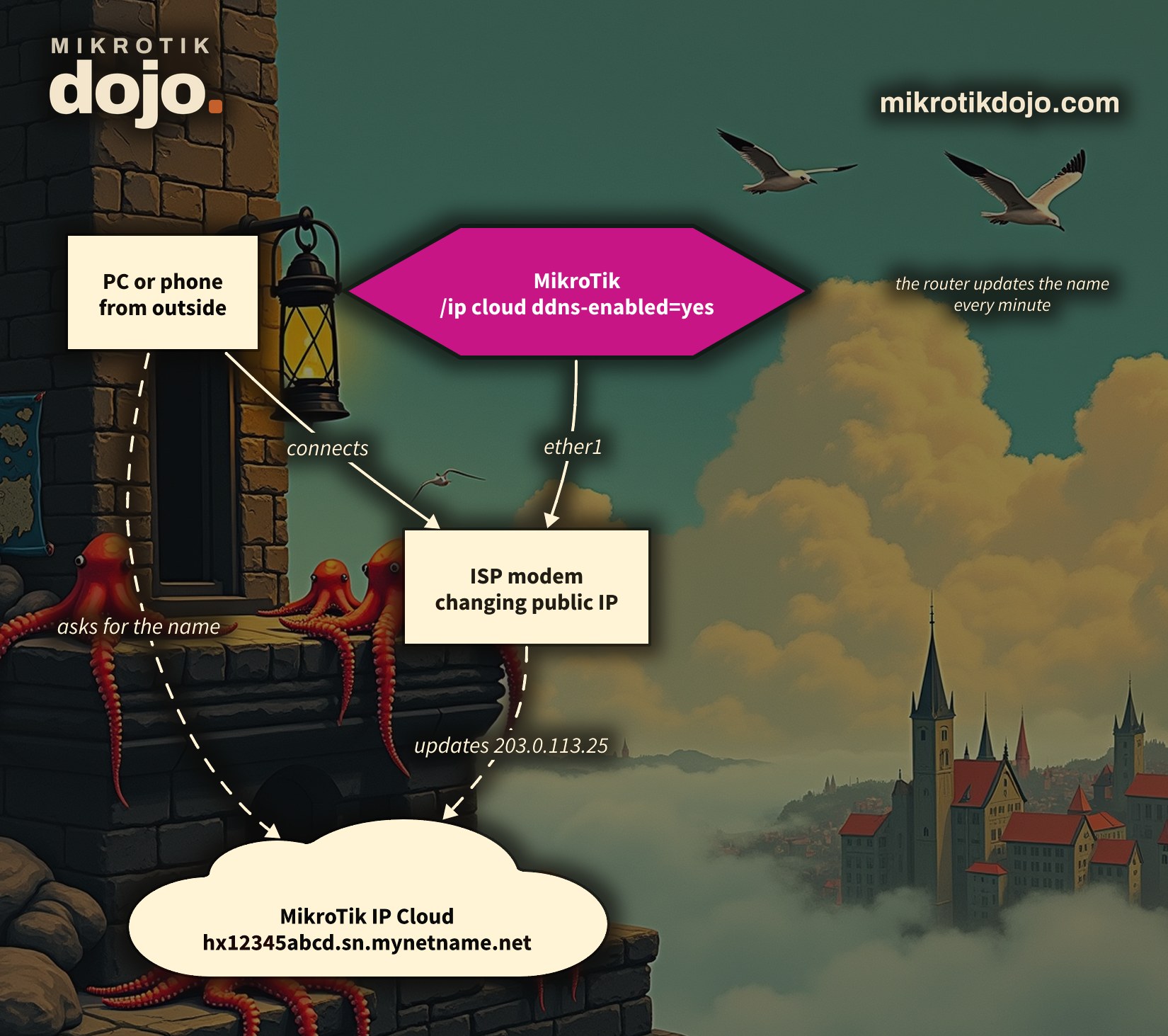
IP Cloud is MikroTik’s free dynamic DNS: it gives the router a fixed name, like serial-number.sn.mynetname.net, and keeps it always pointed at the current public address. You remember the name, the router takes care of the rest. No account to create, no external services.
Step 1: how do I turn it on?
One line:
/ip cloud set ddns-enabled=yesAfter a few seconds the router has registered. Look at the result:
/ip cloud printOn my lab’s routerboard this came out (I changed the public address and serial number myself):
          ddns-enabled: yes
       public-address: 203.0.113.25
             dns-name: hx12345abcd.sn.mynetname.net
               status: updated
              warning: Router is behind a NAT. Remote connection might not work.
The name is the router’s serial number, in lowercase, followed by .sn.mynetname.net. It’s fixed: it doesn’t change with the address and you can’t choose it.
Step 2: how do I check that the name works?
From any PC, inside or outside the network:
nslookup hx12345abcd.sn.mynetname.net
dig +short hx12345abcd.sn.mynetname.net
It must answer with the public-address from step 1. The name has a TTL of 60 seconds: when the address changes, within a minute or two the name follows it. If you want to force an update right away:
/ip cloud force-updateStep 3: what does “Router is behind a NAT” mean?
That the router doesn’t have the public address on one of its interfaces: in front there’s a modem or another router doing NAT. That’s the case in my lab, and in a great many installations with the ISP modem in front of the MikroTik.
The name works all the same: the router updates it every minute with the address the MikroTik server sees, that is, the modem’s. But a connection coming from the internet stops at the modem, unless on the modem you’ve forwarded to the MikroTik the port you need (for example the UDP port of the WireGuard VPN). Without that forward the name points to the right place, but the port is closed.
Step 4: does the name open the router to the internet?
No, and this is important. The name only helps you find the router: it opens no port and doesn’t change the firewall. If the router is protected, it stays protected.
⚠️ Warning: the name is the serial number. The serial number is printed on the label, on the box and shows up in the installation photos: whoever knows it also knows your public address. It’s not a secret and it doesn’t need to be. Security is done by the firewall, so before using IP Cloud on a production router follow the Basic hardening of a MikroTik router.
Step 5: and now what do I do with it?
The fixed name is the ingredient that was missing to reach the router from outside the right way:
- as the endpoint of a WireGuard VPN: the phone or the laptop connect to the name, not the address, and the VPN works even when the address changes. That’s exactly what we do in the howto on the WireGuard VPN from the phone;
- as the address for port knocking toward WinBox, if you’ve chosen that route: there’s the dedicated howto on port knocking on MikroTik.
There’s also Back To Home, MikroTik’s ready-made VPN that you turn on from the phone app and that works even behind NAT, going through a MikroTik server. It’s handy for a home router; for a professional installation I prefer a VPN of my own, under my control.
Step 6: how do I turn it off?
/ip cloud set ddns-enabled=autoauto is the factory value: the name stays active only if you use Back To Home, otherwise the router asks the MikroTik server to delete it and within a few minutes it stops answering. All the options are in the MikroTik manual: Cloud.
How it works under the hood, in the Dojo’s Knowledge base: IP Cloud inside: where it gets the address, NAT and CGNAT, Back To Home.
Tested in the lab on a routerboard with RouterOS 7.24.5 (stable), behind the home modem’s NAT: activation, name registration, resolution from the PC, force-update.
Frequently asked questions
Is MikroTik’s IP Cloud free?
Yes: it’s included in RouterOS, you don’t need an account and it has no cost. The router gets a name like serial-number.sn.mynetname.net.
Can I choose the DNS name?
No, the name is always the router’s serial number in lowercase followed by .sn.mynetname.net. If you need a name of your own, you can create a CNAME record in your domain pointing to that name.
Does it work if the MikroTik is behind the ISP modem?
The name does: it points to the modem’s public address and updates every minute. To actually reach the MikroTik from outside, though, you have to forward the port you need on the modem.
Does turning on IP Cloud expose the router to the internet?
No. The name only helps you find the router, it opens no port and doesn’t change the firewall. The protection stays the input firewall’s.