What is port knocking?
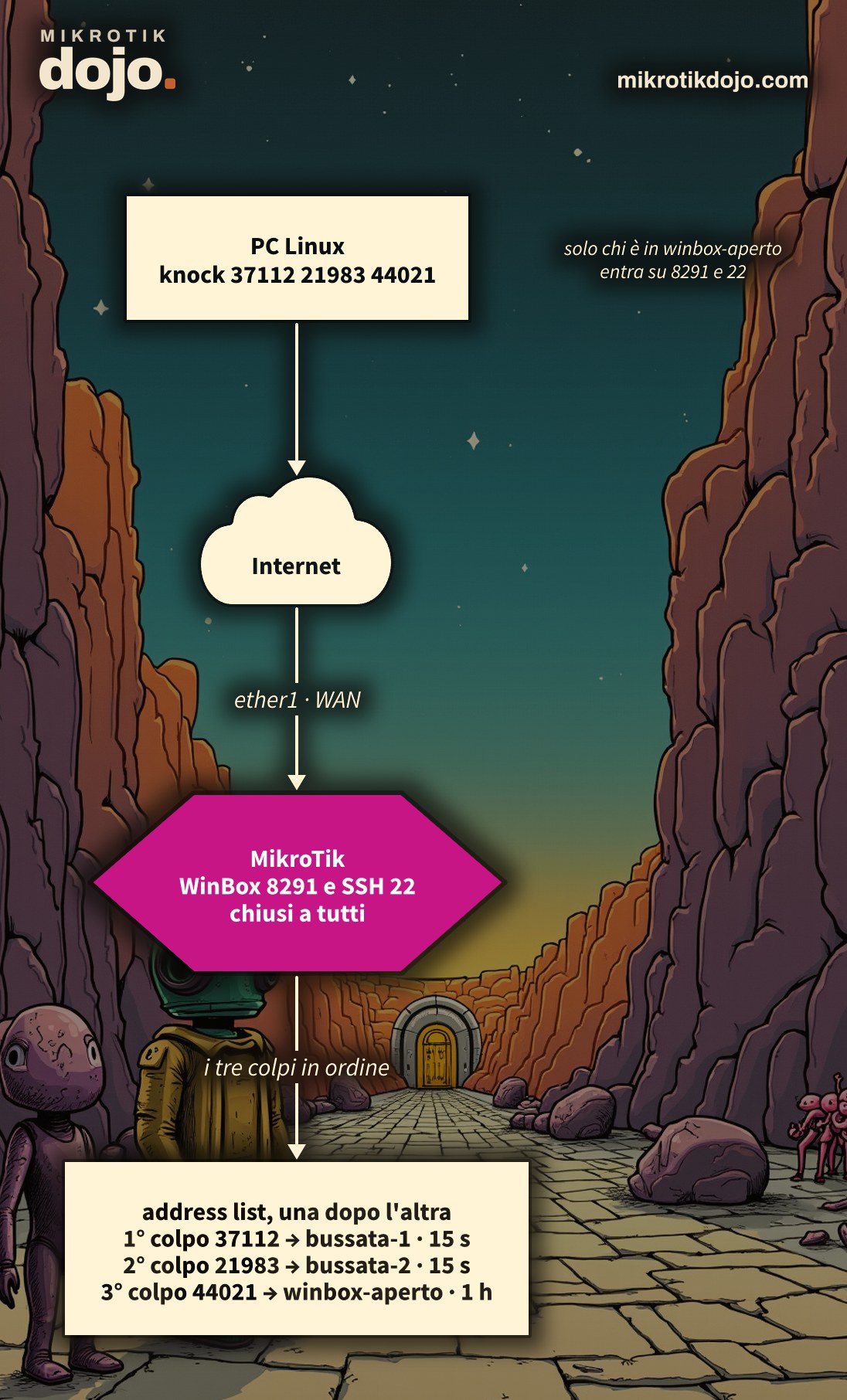
It is a secret door, like in the movies: the router’s management port stays closed to everyone and opens only to those who “knock” in the right way, meaning they touch certain ports in a sequence that only you know. To anyone scanning the internet, the router is a wall: WinBox and SSH do not respond at all. You knock three times, and for an hour the door is open, but only for your address.
I use it when I need to access a router remotely and a VPN is not available, or not yet set up. It does not replace a VPN or a strong password: it is an extra lock in front of the door.
Step 1: where do I start?
Start with a router that has the input firewall configured according to the Basic hardening of a MikroTik router: the interface list WAN and, at the end of the chain input, the rule that drops everything coming from the internet. The rules in this how-to must go before that drop rule.
Pick three random ports, above 1024 and not in ascending order. In the example they are 37112, 21983 and 44021: make up your own. We will see the reason for the random order in step 5.
Step 2: how do I build the lock?
Three rules, one for each knock. Each correct knock adds your address to an address list that lasts a few seconds; the next knock is valid only if you are already in the list from the previous knock.
/ip firewall filter
add chain=input protocol=tcp dst-port=37112 in-interface-list=WAN action=add-src-to-address-list \
    address-list=bussata-1 address-list-timeout=15s comment="Knock 1"
add chain=input protocol=tcp dst-port=21983 in-interface-list=WAN src-address-list=bussata-1 \
    action=add-src-to-address-list address-list=bussata-2 address-list-timeout=15s comment="Knock 2"
add chain=input protocol=tcp dst-port=44021 in-interface-list=WAN src-address-list=bussata-2 \
    action=add-src-to-address-list address-list=winbox-aperto address-list-timeout=1h comment="Knock 3: porta aperta"
add chain=input protocol=tcp dst-port=8291,22 in-interface-list=WAN src-address-list=winbox-aperto \
action=accept comment="WinBox e SSH dopo la bussata"- the knocks receive no response: after being logged, the packet continues and ends up in the final drop rule. From the outside they look like closed ports, just like any others;
address-list-timeout=15s: you have 15 seconds between one knock and the next, then the sequence must be restarted;winbox-apertolasts an hour: during that hour WinBox (8291) and SSH (22) respond only to your address.
The rules must be above the rule that drops traffic from the internet. Check the order:
/ip firewall filter print where chain=inputYou can find how address lists with timeout work in the MikroTik manual: Address-lists.
Step 3: how do I knock from Linux?
The most convenient way is the knock command, which on Debian and Ubuntu is in the knockd package:
sudo apt install knockd
knock -d 300 IP-DEL-ROUTER 37112 21983 44021
-d 300 waits 300 milliseconds between one knock and the next. Immediately after, open WinBox or SSH to the router.
Do not want to install anything? nc is enough, which is available almost everywhere:
for p in 37112 21983 44021; do nc -z -w1 IP-DEL-ROUTER $p; sleep 0.3; doneOr just bash, without any extra program:
for p in 37112 21983 44021; do timeout 1 bash -c "echo > /dev/tcp/IP-DEL-ROUTER/$p" 2>/dev/null; donePut it in a small script, for example ~/bin/bussa-ufficio, so you do not have to remember the ports:
#!/bin/bash
# bussa al router dell'ufficio e apre WinBox/SSH per un'ora
knock -d 300 IP-DEL-ROUTER 37112 21983 44021 && ssh admin@IP-DEL-ROUTER
Step 4: how do I verify it works?
In the lab I tested from an external Linux PC:
- before knocking, port 8291 is closed: no response;
- after
knock, or after the cycle withncor with bash, port 8291 responds; - knocking in the wrong order (
44021 21983 37112) leaves the port closed.
On the router you can see who knocked and how much time they have left:
/ip firewall address-list print where list~"bussata|winbox-aperto"
/ip firewall filter print stats where comment~"Knock|bussata"
Each correct knock increments the counter of its rule by one.
Step 5: how secure is it?
More secure than an open port, less secure than a VPN. Three things to know:
- the random order matters: many scanners probe ports in ascending order. With an ascending sequence, sooner or later a scanner would “knock” in the right order by chance. With 37112, then 21983, then 44021, no;
- whoever sees your traffic sees the sequence: the packets travel in clear text. From a hotel Wi-Fi, anyone listening on the network could replay them. This is why, behind the port, you still need robust username and password, or better, SSH keys;
- the port opens for an address: if you are behind a shared NAT (a hotspot, a mobile network), it opens for everyone exiting with the same public IP address as yours, for one hour.
For everyday management, the right path remains the WireGuard VPN from the hardening. Port knocking is the spare key under the doormat: convenient, but to be used knowing it is there.
Step 6: how do I set a trap for those guessing?
The lock from Step 2 has a flaw: whoever fails can retry as many times as they want. A patient scanner, touching thousands of ports, can eventually hit the right sequence. The trap closes this path: whoever knocks in the wrong order, or touches a port next to the correct ones, ends up in a blacklist and for 10 minutes the router ignores them completely, even if they then knock correctly.
Four more rules, on the same sequence as Step 2:
/ip firewall filter
add chain=input in-interface-list=WAN src-address-list=bussata-blocco action=drop \
    comment="Trappola: chi ha sbagliato resta fuori" place-before=[find comment="Knock 1"]
add chain=input protocol=tcp dst-port=21983 in-interface-list=WAN src-address-list=!bussata-1 \
    action=add-src-to-address-list address-list=bussata-blocco address-list-timeout=10m \
    comment="Trappola: colpo 2 fuori ordine" place-before=[find comment="WinBox e SSH dopo la bussata"]
add chain=input protocol=tcp dst-port=44021 in-interface-list=WAN src-address-list=!bussata-2 \
    action=add-src-to-address-list address-list=bussata-blocco address-list-timeout=10m \
    comment="Trappola: colpo 3 fuori ordine" place-before=[find comment="WinBox e SSH dopo la bussata"]
add chain=input protocol=tcp dst-port=37111,37113,21982,21984,44020,44022 in-interface-list=WAN \
    src-address-list=!winbox-aperto action=add-src-to-address-list address-list=bussata-blocco \
address-list-timeout=10m comment="Trappola: porte accanto" place-before=[find comment="WinBox e SSH dopo la bussata"]- whoever failed stays out: this is the first rule of the lock (
place-beforeplaces it above “Knock 1”). Anyone inbussata-bloccois dropped before reaching the knocks, so they cannot retry until the entry expires; - out-of-order knock: if the second knock arrives from someone who did not send the first, or the third without the second, that address goes to the blacklist. This is exactly what a scanner doing sequential port probing does;
- adjacent ports: the ports immediately above and below the correct ones (37111 and 37113 for 37112, and so on). A real knocker never touches them; someone scanning ports one after another will inevitably hit them;
- the trap rules are placed below the knock rules and above the WinBox and SSH accept: this way a correct knock puts you in the knock list first, and the trap finds you already there and leaves you alone.
The adjacent ports change with your sequence: for each port, write the one with a number lower and the one with a number higher. You can see who ended up in the trap like this:
/ip firewall address-list print where list=bussata-blocco
/ip firewall filter print stats where comment~"Trappola"
⚠️ Warning: the blacklist blocks all traffic from that address to the router, not just WinBox. If you get the sequence wrong from a location where you manage other services, you wait 10 minutes. For the same reason, knock with a program that sends one packet per port: knock works fine; with nc and bash, keep the timeout at 1 second as in the examples of Step 3.
How it works internally, in the Dojo Knowledge base: address lists, interface lists, rule order in the input chain, scan detection with psd, Safe Mode.
Tested in the lab on PNETLab with CHR RouterOS 7.24.5 (stable) and a Debian 12 client: the port is closed before the knock, opened after using knock, with nc, and with pure bash; it remains closed if the sequence is sent in the wrong order. Address list with timeout. Trap tested on RouterOS 7.24.5 (stable) with a routerboard and an external client: the wrong order or hitting the adjacent port adds the address to the blacklist, and the correct sequence immediately after no longer opens the port; the correct knock continues to work.
Frequently asked questions
What is port knocking on MikroTik?
It is a sequence of firewall rules that opens a port, for example the WinBox port, only for the address that has previously touched certain ports in a specific order. On RouterOS, this is implemented using add-src-to-address-list rules and an address list with a timeout.
How do I knock on the router from Linux?
Using the knock command from the knockd package (knock -d 300 IP porta1 porta2 porta3), or with a loop of nc -z, or with bash using /dev/tcp, without installing anything.
Why must the ports not be in ascending order?
Because many scanners probe ports in ascending order: with an ascending sequence, they might complete it by chance. A scattered sequence avoids this issue.
Does port knocking replace a VPN?
No. The knocks travel in clear text and can be observed and replayed. It is an additional layer of protection in front of WinBox and SSH; for everyday remote management, the right solution remains a VPN such as WireGuard.
What is the port knocking trap?
These are additional rules that blacklist, for 10 minutes, anyone who knocks in the wrong order or touches the ports adjacent to those in the sequence. A scanner probing ports sequentially will trigger this immediately and can no longer guess the sequence through brute force. How to configure it.