
What is Netwatch for?
Netwatch is RouterOS’s sentry: every so often it knocks on an address and, when it stops answering or starts again, it runs a script. The script can do whatever you want; the most useful of all is to warn you. It’s the difference between “the customer calls you at 9 because the warehouse camera has been off since last night” and “at 23:14 it lands on your phone: warehouse camera not responding.”
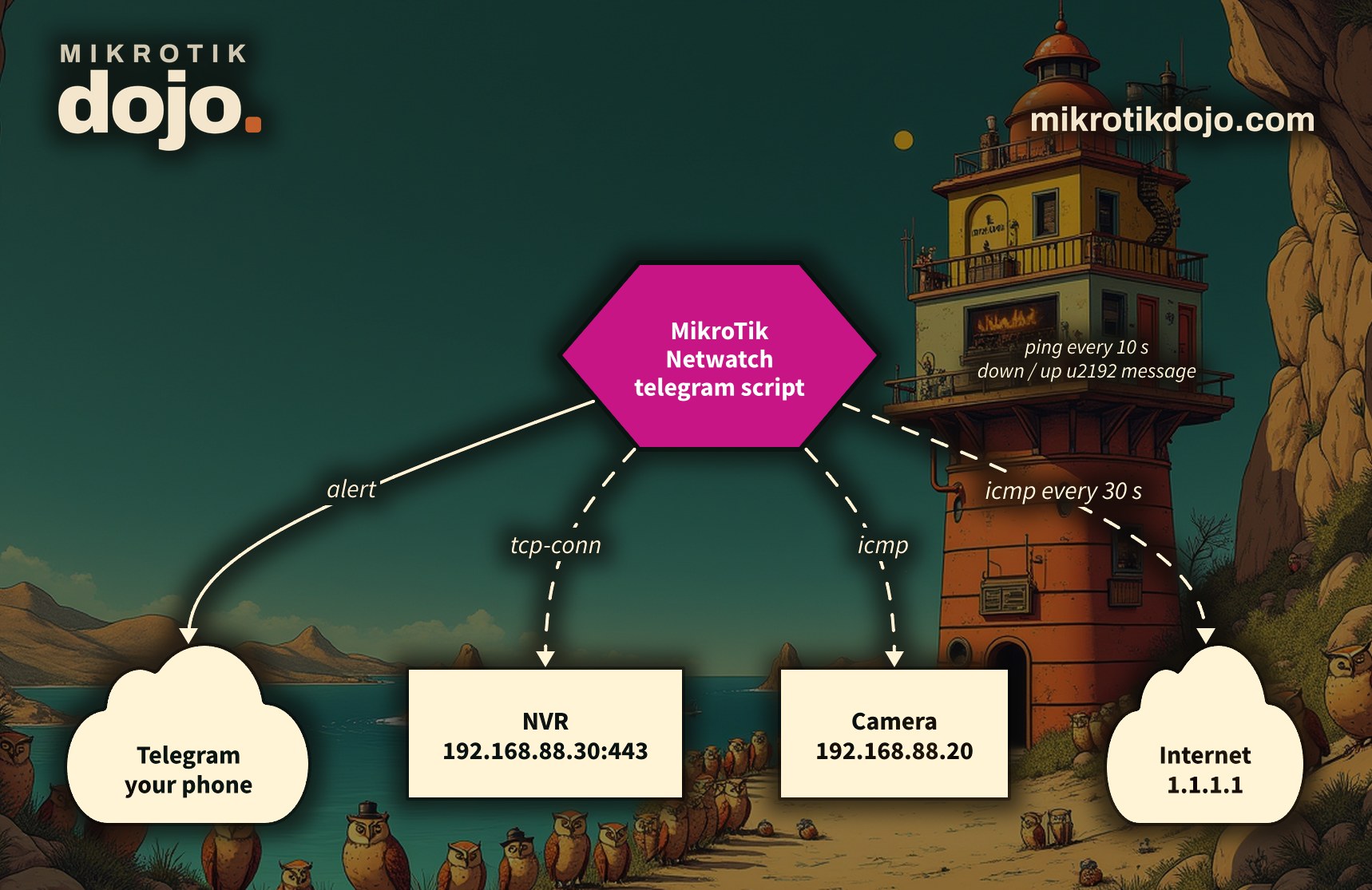
In this howto Netwatch watches two things: a device on the network (a camera) and the internet line. The alerts arrive on Telegram.
Step 1: does the router already know how to write on Telegram?
The alerts use the telegram script from the howto on how to connect MikroTik to Telegram. If you haven’t done it yet, start there: it’s a few minutes. Check that it works:
{
:local telegram [:parse [/system script get telegram source]]
$telegram "test before Netwatch"
}
If the message arrives on the phone, you’re ready.
Step 2: how do I watch a device?
One Netwatch per device, with two scripts: one for when it goes down and one for when it comes back. In the example the entrance camera is 192.168.88.20: use your device’s address.
/tool netwatch add name=telecamera-ingresso host=192.168.88.20 type=icmp interval=10s \
    ignore-initial-up=yes \
    down-script={
        :local telegram [:parse [/system script get telegram source]]
        $telegram ("ALERT: " . $name . " (" . $host . ") is not responding")
    } \
    up-script={
        :local telegram [:parse [/system script get telegram source]]
        $telegram ("OK: " . $name . " (" . $host . ") reachable again")
}type=icmp: every 10 seconds (interval) it sends a burst of pings and decides whether the device is up or down;- in the scripts
$nameand$hostare already ready: the Netwatch name and the watched address. So the same script works for every device; ignore-initial-up=yesI explain in step 5.
To check the device’s address and network there’s the Dojo’s IP calculator.
Step 3: how do I test it?
Unplug the device’s cable, or turn off the router port it’s connected to, and wait about twenty seconds. In the lab, unplugging and plugging the port back in, this showed up in the log:
netwatch,info event down [ telecamera-ingresso ]
fetch,info Download from api.telegram.org FINISHED
netwatch,info event up [ telecamera-ingresso ]
fetch,info Download from api.telegram.org FINISHED
And on the phone the two messages arrived, “ALERT: telecamera-ingresso (…) is not responding” and then “OK: … reachable again”. You see the state of all the sentries like this:
/tool netwatch print
/log print where topics~"netwatch"
Step 4: how do I watch the internet line?
Same Netwatch, but toward an address on the internet that always answers the ping, for example 1.1.1.1:
/tool netwatch add name=internet host=1.1.1.1 type=icmp interval=30s \
    thr-avg=300ms thr-loss-percent=50 ignore-initial-up=yes \
    down-script={
        :local telegram [:parse [/system script get telegram source]]
        $telegram "ALERT: the internet line is down"
    } \
    up-script={
        :local telegram [:parse [/system script get telegram source]]
        $telegram "OK: the internet line is back"
    }
Here the two thresholds matter:
thr-avg: if the average latency goes over this value, for Netwatch the line is down. Out of the box it’s 100 ms: on a 4G, satellite, or heavily loaded radio link, a line that works can look dead. With 300 ms you’re more tolerant;thr-loss-percent: the percentage of lost pings beyond which the line is down.
But how does it warn you if the line is down? The “down” message goes out when the internet isn’t there, so it’s lost. If you have a second line the message goes out through that; if you have only one, you still get the “OK” when it comes back, and just knowing there was an outage, and at what time, is valuable. As an alternative, in the “down” script you can write to the log or send an email to an internal server.
Step 5: what happens after a reboot?
Two things to know, seen in the lab:
- after startup Netwatch waits 5 minutes before beginning (
startup-delay). During those minutes all the sentries stay in theunknownstate: that’s normal, it’s not a fault; - when the 5 minutes are up each sentry goes from “unknown” to “up” and, out of the box, runs the “up” script. With ten watched devices, at every reboot you get ten “OK” messages.
ignore-initial-up=yesskips exactly that first “up”. The first “down,” on the other hand, stays: if after the reboot a device isn’t responding, you want to know.
To know when the router itself reboots there’s the scheduler in step 6 of the Telegram howto.
Step 6: can you watch something more than a ping?
Yes. Besides icmp, Netwatch can do other kinds of check:
tcp-conn: opens a TCP connection on a port, for example 554 on a camera or 443 on a server. The ping can answer even when the service is dead;http-getandhttps-get: request a web page and check the response code;dns: query a DNS server and check that it answers.
/tool netwatch add name=nvr-web host=192.168.88.30 type=tcp-conn port=443 interval=30sThe thresholds and options of each kind of check are in the MikroTik manual: Netwatch.
What do I check before putting it into production?
A router that watches the network and sends messages has to be protected in turn. If you haven’t done it yet, follow the Basic hardening of a MikroTik router. And really test every sentry at least once, by unplugging the cable: an alert you never tested is an alert that won’t arrive.
Tested in the lab on PNETLab with a CHR running RouterOS 7.24.5 (stable), a Linux client as the watched device, and a real Telegram bot: “down” and “up” alerts received on the phone, internet line with custom thresholds, the 5-minute wait after the reboot and the initial “up” message, ignore-initial-up. The tcp-conn type and the other check types come from the MikroTik documentation.
Frequently asked questions
What is Netwatch in MikroTik?
It’s a RouterOS tool that periodically checks an address (with ping, a TCP connection, HTTP, or DNS) and runs a script when the address stops answering or becomes reachable again.
Why does Netwatch stay in the unknown state after a reboot?
Because out of the box it waits 5 minutes from startup before beginning the checks (startup-delay). After the 5 minutes, the sentries switch to “up” or “down”.
How do I avoid one message per device at every reboot?
With ignore-initial-up=yes: Netwatch skips the “up” script on the first check after startup, but still runs the “down” one if a device isn’t responding.
Why does Netwatch say the line is down when the internet works?
Probably because of the latency: with type=icmp the out-of-the-box average latency threshold (thr-avg) is 100 ms, and on loaded 4G, satellite, or radio links it gets exceeded. Raise the threshold, for example to 300 ms.
Which variables can I use in the Netwatch scripts?
Among others $name and $host, the sentry’s name and the watched address, plus the statistics of the last check. The ones with a hyphen are written in quotes, for example $"done-tests".