
What damage does a second DHCP server do?
Clients accept the first offer that arrives. If there’s a second server on the network, some of the devices get the wrong address, gateway and DNS: no internet, unreachable printers, and a patchy fault that drives crazy anyone trying to make sense of it. The culprit, usually, is a home router plugged in the wrong way by someone with the best of intentions. In the worst case it’s put there on purpose, to hijack the traffic.
I saw it happen in the lab: with a second server on the same LAN, the test PC got 192.168.250.198 with the rogue server’s gateway, instead of its usual 192.168.88.199. No error, no warning: that PC simply wasn’t on the right network anymore.
MikroTik gives you two tools: the alert, which warns you, and DHCP snooping, which blocks.
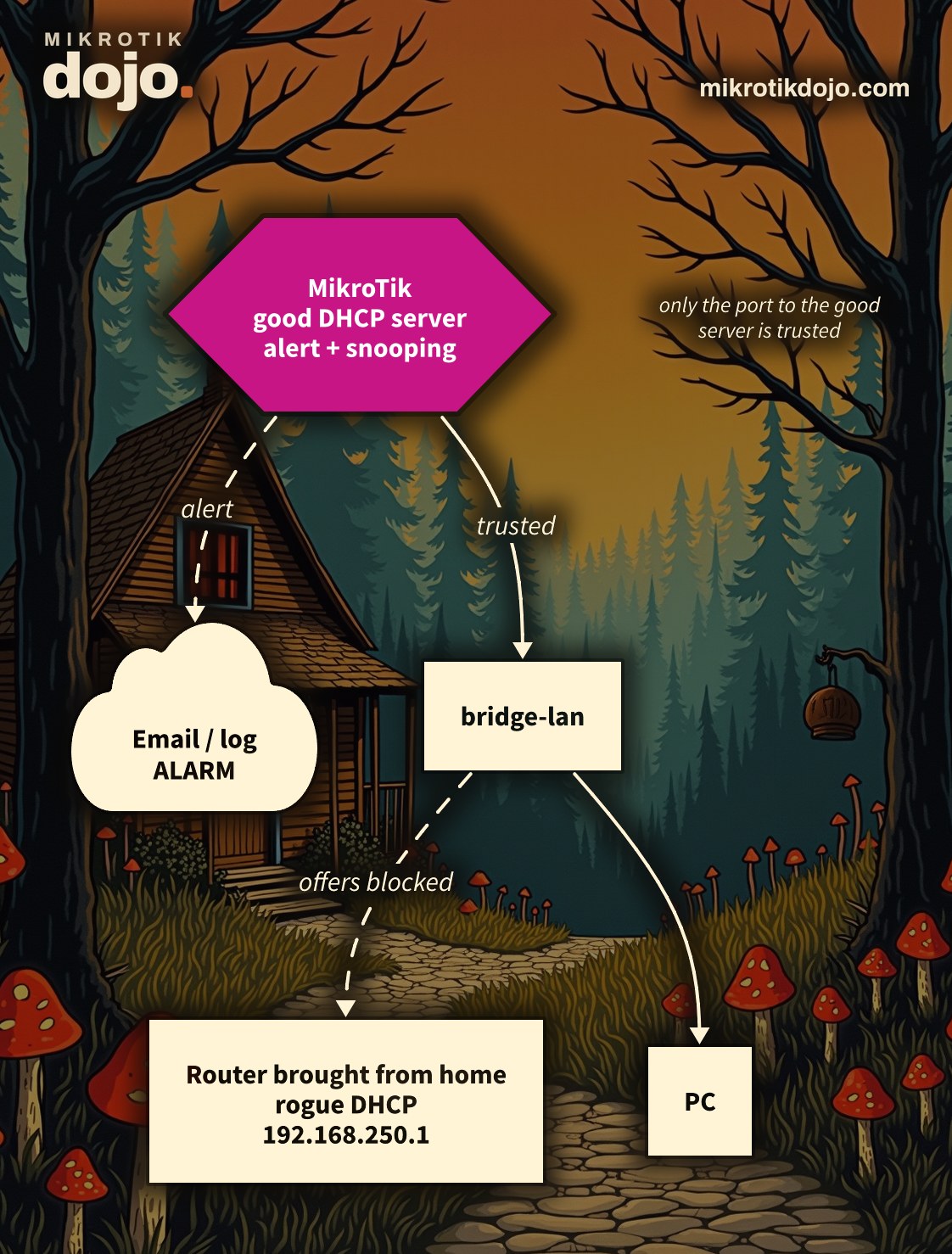
Step 1: which is the good DHCP server?
Before hunting for the rogue one, know the legitimate one. If the DHCP server is the router itself, you see it here:
/ip dhcp-server printThe router’s own server never triggers the alarm: there’s no need to declare it. If instead the legitimate server is another machine (a Windows Server, another router), you need its MAC address, to list as a valid server in step 2.
In the examples the LAN ports are in the bridge-lan bridge: replace the name with yours.
Step 2: how do I get MikroTik to warn me?
With the DHCP server alert: you give it the interface to watch and, if there is one, the MAC of the legitimate server that isn’t the router. Any other server that answers triggers the warning.
/ip dhcp-server alert add interface=bridge-lan valid-server=00:0C:42:8D:D1:30 \
    alert-timeout=1h on-alert=":log warning \"Unauthorized DHCP server on bridge-lan\""
/ip dhcp-server alert enable [find interface=bridge-lan]
⚠️ Warning: alerts are born disabled. Without the second line the alert just sits there, with its X in front, and warns nobody. It’s the most common mistake: I’ve made it too.
interface: if the LAN ports are in a bridge, you watch the bridge, not the single ethernet port;valid-server: the MAC of the legitimate DHCP server, only if it isn’t the router itself. If the server is the router, you can leave it out;alert-timeout: how long before the router “forgets” a rogue server it has already found; if it’s still there, a new warning fires.
So it doesn’t miss the replies sent directly to the clients, the alert also behaves like a DHCP client: about once a minute it sends a request of its own and listens for who answers. That’s why it shouldn’t go on an interface where the router itself gets its address over DHCP, for example the WAN toward the modem. The details are in the MikroTik manual: DHCP Alerts.
When the rogue one shows up, this appears in the log (real lab output):
dhcp,critical,error dhcp alert on bridge-lan: discovered unknown dhcp server, mac 50:00:00:1A:00:01, ip 192.168.250.1
script,warning Unauthorized DHCP server on bridge-lan
The rogue server’s MAC and IP stay visible here too:
/ip dhcp-server alert print detailThe MAC is the best lead for finding the culprit: look it up in the bridge’s host table (/interface bridge host print where mac-address=…) to learn which port it’s connected to.
Step 3: how do I get the warning by email?
By putting an email send in on-alert. First, though, the router has to know how to send mail: there’s a dedicated howto on sending email from MikroTik with Gmail.
/ip dhcp-server alert set [find interface=bridge-lan] on-alert={
    :log warning "Unauthorized DHCP server on bridge-lan"
    /tool e-mail send to="admin@example.com" subject="ALERT: unauthorized DHCP server" \
        body=("Unauthorized DHCP server detected on the LAN of " . [/system identity get name] . ". See /ip dhcp-server alert.")
}
The router’s name (/system identity) in the email is precious when you manage dozens of clients: you know right away which network the alarm comes from.
To try again without waiting for the alert-timeout, make the router forget the servers it has already found:
/ip dhcp-server alert reset-alert [find interface=bridge-lan]If the mail doesn’t go out, the error ends up in the log with the e-mail topic, while the :log warning line stays regardless.
Step 4: how do I block the rogue server?
With the bridge’s DHCP snooping. You turn it on for the bridge and declare “trusted” (trusted) only the ports a legitimate server can come from: DHCP replies that come in from the other ports get dropped.
/interface bridge set [find name=bridge-lan] dhcp-snooping=yes
/interface bridge port set [find interface=ether1] trusted=yes
The second line is only needed if the legitimate server is behind a bridge port, here ether1. If the DHCP server is the router itself, no trusted port is needed: the router doesn’t go through a bridge port.
In the lab, with snooping on and the rogue one connected to an untrusted port, the PC went straight back to its 192.168.88.199 and the alert stayed quiet: the rogue server’s offers get dropped on the port before they even reach the router.
⚠️ Warning: snooping stops the rogue server only if it’s connected to a port other than the clients’. If the rogue one and the PCs are on the same “dumb” switch connected to a single MikroTik port, they talk to each other directly inside the switch and the MikroTik can’t do anything about it. That’s why it pays to turn snooping on right on the access switches.
Check which ports you’ve declared trusted:
/interface bridge port print where trusted=yesStep 5: and Option 82?
With snooping on, the bridge can add Option 82 to the clients’ requests: a tag that tells the DHCP server which switch and which port the client comes from. On a carrier network or in an apartment building that means being able to hand out the address based on the port, not the device.
From RouterOS 7.23 you configure it like this (the old option add-dhcp-option82=yes no longer exists: on RouterOS 7.24.5 it answers bad parameter):
/interface bridge set [find name=bridge-lan] dhcp-agent-circuit-id="\$(INTERFACE)" \
    dhcp-agent-remote-id="\$(HOSTNAME)"
$(INTERFACE) becomes the name of the client’s port, $(HOSTNAME) the router’s name; there are also $(VID) and $(BRIDGEMAC). The \ before the dollar is needed in the terminal, otherwise RouterOS mistakes it for one of its own variables. If your DHCP server doesn’t use Option 82, you can skip this step. A complete example with two switches and all the variables is in the MikroTik manual: DHCP Snooping and DHCP Option 82.
Step 6: does it work on switches too?
Yes, and on switches it does more, because it blocks the rogue one on the port it’s connected to, before the traffic reaches the router. According to the MikroTik documentation, on switches with the Marvell Prestera chip (like the CRS3xx and CRS5xx series) DHCP snooping and Option 82 are handled entirely in hardware. On the other devices they work with hardware offload on too, but only if there’s no VLAN configuration on the bridge.
Step 7: what do I check before putting it into production?
Alert and snooping protect the LAN, not the router. If you haven’t done it yet, follow the Basic hardening of a MikroTik router: a user other than admin, limited services, a firewall toward the internet.
Tested in the lab on PNETLab with a CHR running RouterOS 7.24.5 (stable), a Linux client and a second router as a rogue DHCP server: alert disabled and enabled, warning by email, DHCP snooping, the new Option 82 syntax. The behavior on physical switches comes from the MikroTik documentation.
Frequently asked questions
How do I detect an unauthorized DHCP server with MikroTik?
With /ip dhcp-server alert: you give it the interface to watch, enable the alert (it’s born disabled) and, when an unknown server answers, RouterOS writes to the log and runs the on-alert script.
Why doesn’t my DHCP alert fire?
Almost always because it’s disabled: alerts are born with the X and must be enabled with /ip dhcp-server alert enable. The router’s own DHCP server, on the other hand, never triggers the alarm.
Which interface should the DHCP alert go on?
On the interface that represents the LAN: if the ports are in a bridge, on the bridge and not on the single ethernet port. It shouldn’t go on an interface where the router gets its address over DHCP.
What’s the difference between alert and DHCP snooping?
The alert reports that there’s an unauthorized DHCP server but doesn’t stop it; the bridge’s DHCP snooping drops the DHCP replies that arrive from untrusted ports, so the rogue server can’t hand out addresses.
Which ports should be marked as trusted?
Only those a legitimate DHCP server can come from, for example the port toward the server or toward the distribution switch. The ports toward the users stay untrusted. If the server is the router itself, none.
add-dhcp-option82 doesn’t work anymore, why?
From RouterOS 7.23 the option was removed: Option 82 is configured with dhcp-agent-circuit-id and dhcp-agent-remote-id on the bridge, using variables like $(INTERFACE) and $(HOSTNAME).
This howto brings up to RouterOS 7 a 2016 article from my old blog wirelessguru.it, now offline.