
What is Passpoint?
Think about your mobile phone’s WiFi when you change cities: the phone moves from one operator cell to another without asking you anything, because the SIM is already your credential. Passpoint brings the same idea to WiFi. The phone automatically recognizes a “friendly” network, authenticates with the credentials it already has, and connects securely, without login pages and without asking for a password at the counter.
There are three names, indicating the same thing from different perspectives:
- IEEE 802.11u is the standard: it allows the access point to describe who it is before the phone connects;
- Hotspot 2.0 is the specification that uses 802.11u to let the phone select and connect automatically;
- Passpoint is the Wi-Fi Alliance certification program that guarantees phones and access points speak the same language.
How does the phone choose the right network?
Through a short conversation that happens before the connection:
- the access point announces in its beacons that it supports Hotspot 2.0;
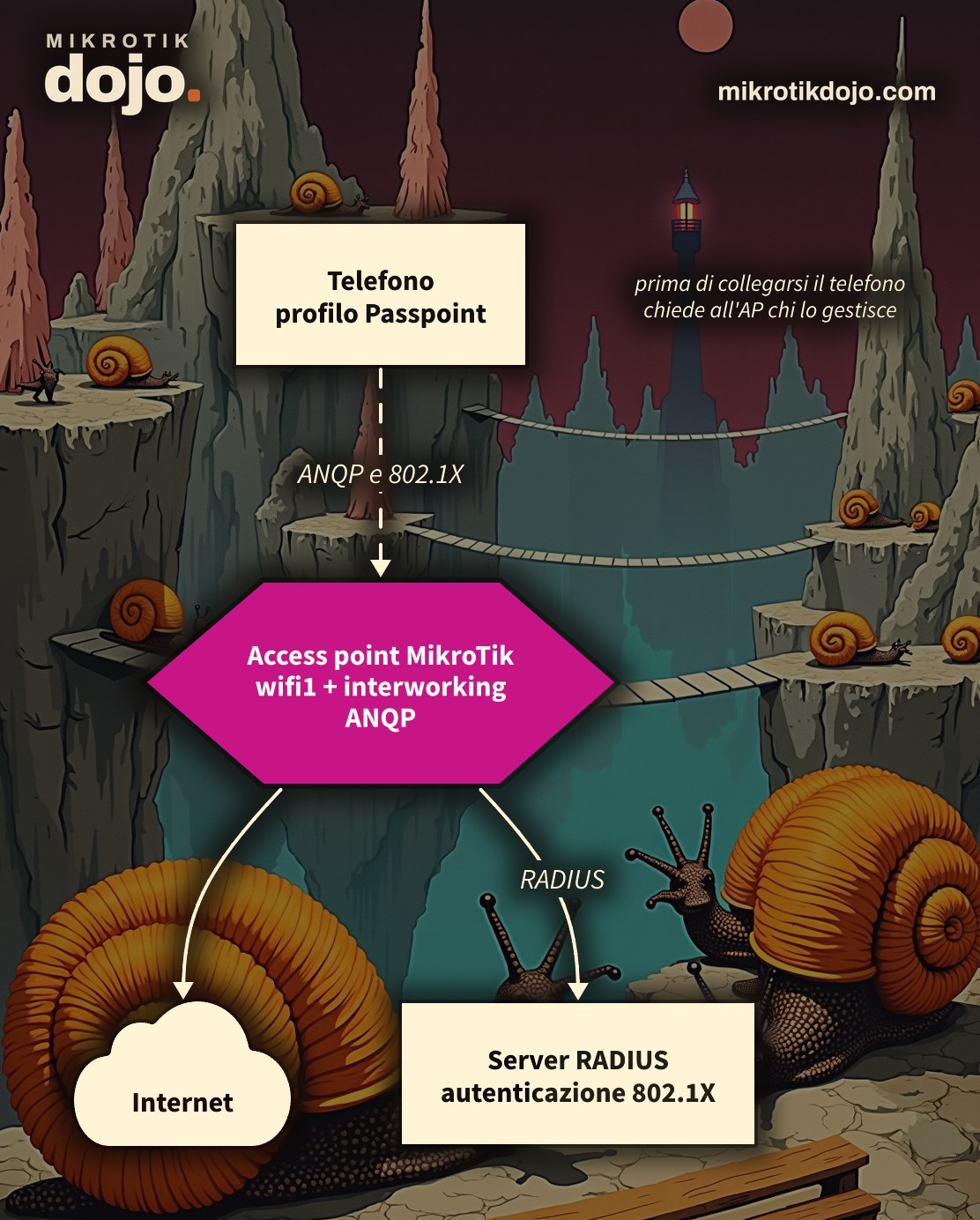
- the phone, which has a Passpoint profile installed, asks questions using the ANQP (Access Network Query Protocol) protocol: who manages the network? Which domains and realms do you accept? Are you part of any roaming consortium? Is there internet, and how busy is the line?
- if the answers match its profile, the phone connects and authenticates with WPA2 or WPA3-Enterprise (802.1X): the credentials go to a RADIUS server, which says yes or no;
- if no network matches, the phone stays silent: it never connects to a network it does not know.
Credentials can be of three types: the phone’s SIM (EAP-SIM, EAP-AKA), a certificate (EAP-TLS), or a username and password (EAP-TTLS). The profile can come from the mobile operator, an app, or a website, or from a federation such as eduroam (universities and research institutions) or OpenRoaming.
What are the advantages over a captive portal?
- No login page. A captive portal relies on HTTP redirects, and today almost everything is HTTPS: apps hang, the phone says “connected, no internet,” and the user gives up. With Passpoint, there is no page at all.
- Encrypted traffic over the air. A hotspot with a captive portal is an open network: everything that is not HTTPS travels in clear text between the phone and the antenna. With Passpoint, each user has their own encryption key, just like in an enterprise environment.
- No fake networks. The phone trusts the network only if the authentication server proves its identity with a valid certificate. Someone who turns on an access point with the same name in the parking lot gets nothing.
- Automatic roaming. The same profile works in all locations of a chain, in all buildings of a municipality, or, with a federation, worldwide: the student with eduroam joins the Wi-Fi of a university in another city without asking anyone for anything.
- One identity per connection. RADIUS knows who connected, when, and with which address, and the logs do not depend on the MAC address, which modern phones change at will.
- Less work at the counter. No password to print on the sign and change every month, no customer asking “what is the Wi-Fi password?”.
What about the disadvantages?
There are some, and it is right to state them upfront:
- you need an authentication infrastructure: a RADIUS server and valid certificates, not just the access point;
- phones must have the profile: either you distribute it (with an app or a registration page) or you join a federation that already distributes it;
- for a passing guest without a profile, Passpoint does nothing: for them, you still need a regular network, perhaps with a captive portal alongside.
In short: for the bar around the corner, the captive portal remains the simplest choice. For a chain, a municipality, a campus, a hospital, or a network that wants to accept eduroam or OpenRoaming users, Passpoint is the right path.
What had I found in 2017?
Browsing the terminal of a RouterBOARD with RouterOS 6.33, one extra Tab had revealed an undocumented submenu, interworking-profiles, with entries like hotspot20, ASRA, and 3GPP. It was a sign that MikroTik was working on it. Today that work has become an official feature, also in the wifi package.
Step 1: can my access point do it?
You need the wifi package, the one for 802.11ax radios and some 802.11ac. Check that the menu is present:
/interface wifi print
/interface wifi interworking print
On devices with the legacy wireless package, the same function is in /interface wireless interworking-profiles, with very similar parameters.
Step 2: how do I create the interworking profile?
The profile contains what the access point announces to phones. A starting example for a restaurant:
/interface wifi interworking add name=passpoint-bar internet=yes network-type=public-chargeable \
    venue=assembly-restaurant hotspot20=yes domain-names=example.com \
realms="example.com:eap-tls"internet=yes: the network provides internet access;network-type: the type of network being advertised, for examplepublic-free(free public),public-chargeable(paid public),private;venue: the type of location, in thegruppo-tipoformat of the 802.11u standard. A restaurant, for example, belongs to the assembly group, along with theaters and stadiums:assembly-restaurant;hotspot20=yes: enables Hotspot 2.0;domain-namesandrealms: the domains and realms of the accepted credentials, using the EAP method (hereeap-tls). These are exactly the responses the phone receives via ANQP and compares against its profile;- to join a federation, you add the
roaming-ois, the identifiers of the roaming consortium that the federation communicates to you.
⚠️ Warning: older notes may contain values such as chargeable-public or business-restaurant. In RouterOS 7.24.5, they return syntax error: the correct values are public-chargeable and assembly-restaurant. You can see the complete list by pressing the Tab key after network-type= and venue=.
Check the profile:
/interface wifi interworking print detailStep 3: how do I assign it to the radio?
The radio configuration uses WPA2/WPA3-Enterprise authentication towards a RADIUS server (in the example 10.6.0.60, replace with your server’s address):
/interface wifi configuration add name=cfg-passpoint ssid="Passpoint" mode=ap country=Italy \
    interworking=passpoint-bar security.authentication-types=wpa2-eap,wpa3-eap security.eap-accounting=yes
/radius add service=wireless address=10.6.0.60 secret="segreto-radius"
/interface wifi set [find default-name=wifi1] configuration=cfg-passpoint disabled=no
country is not a minor detail: it determines which channels and power levels the radio can use. Then check that the radio has started:
/interface wifi monitor wifi1 onceIt must show state: running with the selected channel. All parameters, with a complete example, are in the MikroTik manual: Interworking for WiFi6.
Step 4: what is needed besides the MikroTik?
The most demanding part is not the access point:
- a RADIUS server that authenticates credentials (for example FreeRADIUS);
- Passpoint profiles installed on phones, or an agreement with an organization that already distributes them, such as eduroam for universities and research institutions, or OpenRoaming;
- certificates valid for EAP authentication.
If you need a network for users who do not have the profile, you can keep a classic hotspot alongside Passpoint: there is an howto on how to create a WiFi hotspot with MikroTik.
Step 5: what do I check before putting it into production?
An access point communicating with a RADIUS server holds a shared secret: the router must be protected like the server. Follow the Basic Hardening of a MikroTik router and use a long RADIUS secret, different for each access point.
Tested in the lab on a routerboard with Wi-Fi 802.11ax running RouterOS 7.24.5 (stable) and the wifi package: interworking profile, WPA2/WPA3-Enterprise configuration, and radio started with the assigned profile. Full authentication with a RADIUS server and a phone with a Passpoint profile has not been tested.
Frequently asked questions
What is the difference between Hotspot 2.0 and Passpoint?
They are the same thing viewed from two sides: Passpoint is the Wi-Fi Alliance certification program, Hotspot 2.0 is the name of the technology, based on the IEEE 802.11u standard.
Does MikroTik support Hotspot 2.0?
Yes: in RouterOS 7, with the wifi package, the /interface wifi interworking menu allows you to configure Hotspot 2.0 and 802.11u parameters to assign to the radio configuration.
What values does venue accept?
Values in the gruppo-tipo format of the 802.11u standard, for example assembly-restaurant, business-bank or mercantile-shopping-mall. The full list can be viewed using the Tab key in the terminal.
Is a captive portal required with Passpoint?
No. With Passpoint, the phone authenticates automatically using WPA2 or WPA3-Enterprise with the credentials from its profile, without a login page.
What is required to make Passpoint work?
In addition to compatible access points, you need a RADIUS server, certificates for EAP authentication, and profiles installed on user devices, or membership in a federation such as eduroam or OpenRoaming.
This howto updates a 2017 article from my old blog wirelessguru.it, which is now offline, to RouterOS 7.