
What problem does IP Cloud solve?
Many lines, especially home and small office connections, have a public IP address that changes: it is one today, and another one after the next modem reboot. To reach the router from outside, for a VPN or for support, you would need to know the new address every time.
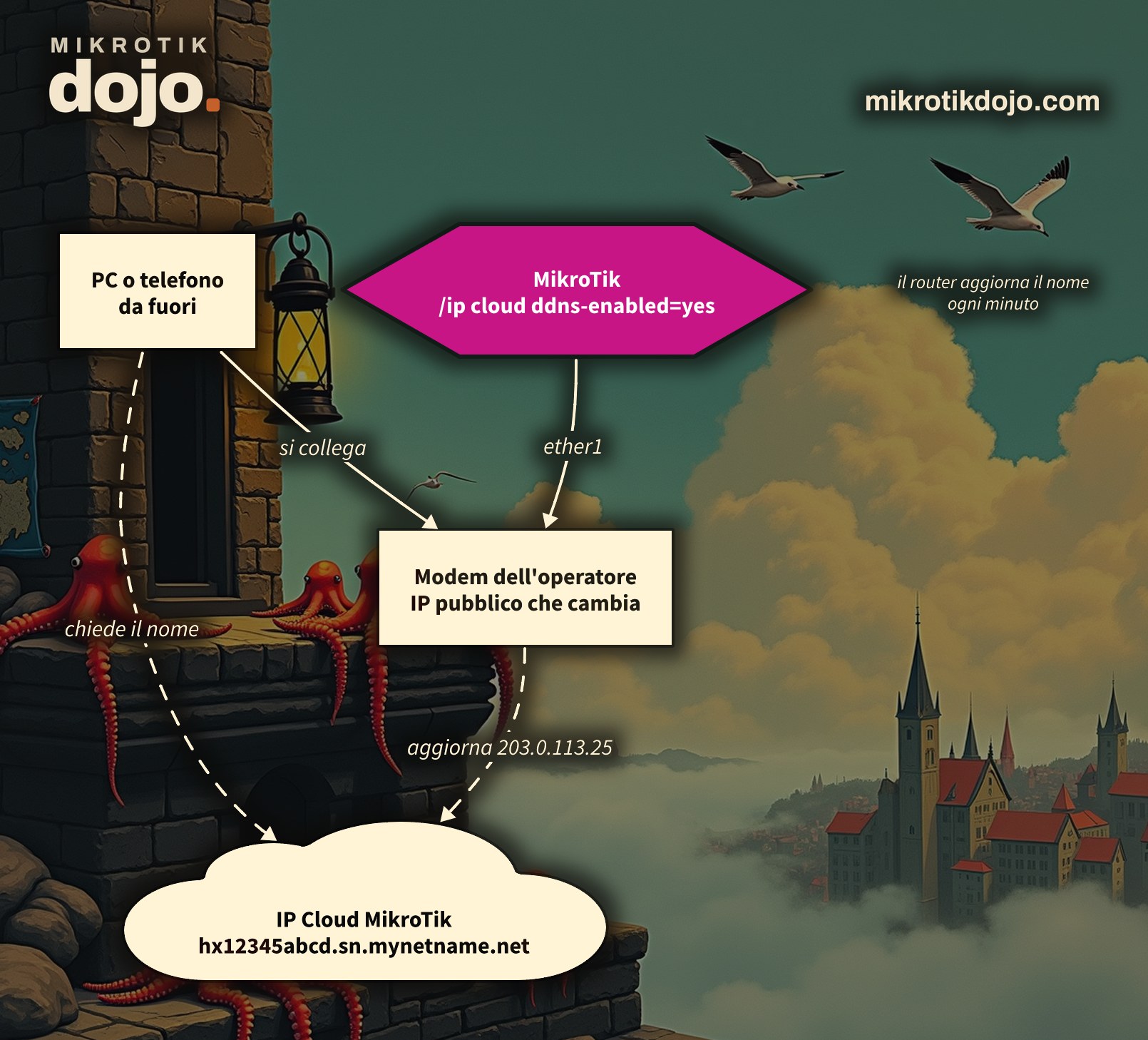
IP Cloud is MikroTik’s free dynamic DNS: it gives the router a fixed name, of the form numero-di-serie.sn.mynetname.net, and keeps it always pointing to the current public IP address. You remember the name, the router handles the rest. No account to create, no external services.
Step 1: how do I enable it?
One line:
/ip cloud set ddns-enabled=yesAfter a few seconds, the router has registered. Check the result:
/ip cloud printOn the routerboard in my lab, this is what came out (I changed the public IP and the serial number):
          ddns-enabled: yes
       public-address: 203.0.113.25
             dns-name: hx12345abcd.sn.mynetname.net
               status: updated
              warning: Router is behind a NAT. Remote connection might not work.
The name is the router’s serial number, in lowercase, followed by .sn.mynetname.net. It is fixed: it does not change with the IP address and cannot be chosen.
Step 2: how do I verify that the name works?
From any PC, inside or outside the network:
nslookup hx12345abcd.sn.mynetname.net
dig +short hx12345abcd.sn.mynetname.net
It must respond with the public-address from Step 1. The name has a TTL of 60 seconds: when the IP address changes, the name follows within a minute or two. If you want to force an immediate update:
/ip cloud force-updateStep 3: what does “Router is behind a NAT” mean?
It means the router does not have the public IP address on one of its interfaces: there is a modem or another router doing NAT in front of it. This is the case in my lab, and in countless installations with the ISP’s modem in front of the MikroTik.
The name still works: the router updates it every minute with the address seen by the MikroTik server, which is the modem’s address. But a connection coming from the internet stops at the modem, unless you have port-forwarded the port you need to the MikroTik on the modem (for example, the UDP port for the WireGuard VPN). Without that forwarding, the name points to the right place, but the port is closed.
Step 4: does the name expose the router to the internet?
No, and this is important. The name is only used to find the router: it does not open any port and does not change the firewall. If the router is protected, it remains protected.
⚠️ Warning: the name is the serial number. The serial number is printed on the label, on the box, and appears in installation photos: anyone who knows it also knows your public IP address. It is not a secret and should not be one. Security is provided by the firewall, so before using IP Cloud on a production router, follow the Basic Hardening of a MikroTik Router.
Step 5: and now what do I do with it?
The fixed name is the missing ingredient to reach the router from outside the right way:
- as a WireGuard VPN endpoint: the phone or laptop connects to the name, not the address, and the VPN keeps working even when the address changes. This is exactly what we do in the how-to on WireGuard VPN from a phone;
- as the address for port knocking to WinBox, if you chose that route: there is a dedicated how-to on port knocking on MikroTik.
There is also Back To Home, MikroTik’s ready-made VPN that you enable from the phone app and works behind NAT, going through a MikroTik server. It is convenient for a home router; for a professional installation, I prefer my own VPN, under my control.
Step 6: how do I turn it off?
/ip cloud set ddns-enabled=autoauto is the factory default: the name stays active only if you use Back To Home; otherwise, the router asks the MikroTik server to delete it, and within a few minutes it stops responding. All options are in the MikroTik manual: Cloud.
How it works internally, in the Dojo Knowledge base: IP Cloud inside: where it gets the address from, NAT and CGNAT, Back To Home.
Tested in the lab on a routerboard with RouterOS 7.24.5 (stable), behind the home modem’s NAT: activation, name registration, resolution from the PC, force-update.
Frequently asked questions
Is MikroTik’s IP Cloud free?
Yes: it is included in RouterOS, no account is required, and it has no costs. The router receives a name like numero-di-serie.sn.mynetname.net.
Can I choose the DNS name?
No, the name is always the router’s serial number in lowercase followed by .sn.mynetname.net. If you need your own name, you can create a CNAME record in your domain that points to that name.
Does it work if the MikroTik is behind the ISP’s modem?
The name does: it points to the modem’s public address and updates every minute. However, to actually reach the MikroTik from outside, you must forward the port you need on the modem.
Does enabling IP Cloud expose the router to the internet?
No. The name is only used to find the router; it does not open ports and does not change the firewall. Protection remains that of the input firewall.